

Key takeaways
SMTP relay is what lets your app, website, device, or platform send email through a trusted mail server instead of trying to deliver it directly. You probably need an SMTP relay if you send transactional emails, marketing emails, site notifications, system alerts, or anything where deliverability matters. The safest setup uses an authenticated relay, port 587 or 465, and properly configured SPF, DKIM, and DMARC records.
This guide is the one I wish existed when I started supporting SMTP customers in 2017. It explains what SMTP relay actually is, how it works step by step, when you genuinely need one, how to set it up without breaking your DNS, how to pick a provider without getting burned, and what tends to go wrong on day three. No fluff, no jargon walls, no “the secret to email success” energy. Just the thing somebody can actually use.
What SMTP relay actually is
SMTP stands for Simple Mail Transfer Protocol. It’s the rulebook computers use to send email between servers. The protocol’s been around since 1982, which means it predates HTTPS, predates the modern web, and predates almost everything you’re reading this on. It still works.
A relay is what happens when one mail server hands a message to another mail server for delivery. When your application sends an email, your application doesn’t deliver that email itself. It connects to an SMTP server, hands off the message, and that server (or a chain of servers) carries it the rest of the way to the recipient’s mailbox.
An SMTP relay service is a third party that does the relaying for you. SMTP2GO is one. SendGrid, Mailgun, AWS SES, Postmark, and Resend are others. The reason these companies exist is that doing relay yourself, at scale, with good deliverability, is harder than it looks. (Our walkthrough on understanding the SMTP protocol covers the commands and response codes if you want the protocol-level detail.)
That’s it. Three sentences, three definitions. Everything else on this page is layering on top.
SMTP relay vs SMTP, SMTP server, SMTP service, smart host, open relay
These terms get tossed around as if they all mean the same thing. They don’t. Here’s the cleanest way to keep them straight:
| Term | What it actually means |
|---|---|
| SMTP | The protocol. The set of rules servers use to send and accept email. |
| SMTP server | A specific machine (or cluster) that speaks SMTP. Every domain that sends email has one somewhere. |
| SMTP relay | The act of one mail server passing a message to another mail server on the way to delivery. |
| SMTP relay service | A managed third-party provider (SMTP2GO, SendGrid, Mailgun, AWS SES, etc.) that handles relay for you, plus authentication, deliverability monitoring, analytics, and support. |
| Smart host | A specific kind of relay server, usually one that requires authentication. Often used to route all outbound mail through a single trusted gateway. We’ve got a full explainer on smart hosts if you want to go deeper. |
| Open relay | A relay server that accepts mail from anyone, no authentication required. Common in the 1990s, a known spam liability now. If you find one in your stack, fix it. |
The single most common confusion is “SMTP” vs “SMTP relay.” SMTP is the language. Relay is one of the things you do in that language. Saying “we send mail by SMTP relay” is a bit like saying “we communicate by spoken English.” Technically true, doesn’t quite mean what people think it means.
How SMTP relay works, step by step
The post-office analogy is overused but it works. You don’t drive a letter to the recipient. You drop it at the post office, the post office sorts it, hands it to a regional center, which hands it to the post office nearest the recipient, which delivers it. Email runs the same play. The whole journey takes seconds.
Here’s what actually happens when an app you’ve pointed at an SMTP relay service sends an email:
- Submission. Your application opens a TCP connection to your relay’s SMTP host (for SMTP2GO that’s
mail.smtp2go.com) on port 587, 465, or 2525, depending on what your network allows. It authenticates using a username and password or an API key. The relay confirms you’re allowed to send through it. - Acceptance. The relay accepts the message. It checks the envelope sender, the From header, your sending limits, and whether your domain is authorized. If everything looks fine it queues the message for delivery. If not, you get an error response immediately. This is the part where misconfigured DNS records (an SPF record that doesn’t include the relay, a DKIM key that’s not published yet) get caught.
- Recipient lookup. The relay queries DNS for the recipient domain’s MX (mail exchange) record. That record tells the relay which server, or which list of servers in priority order, accepts mail for the recipient domain.
- Delivery handoff. The relay opens an SMTP connection to the recipient’s mail server and transfers the message. The receiving server runs its own checks: SPF alignment, DKIM signature verification, DMARC policy lookup, content filtering, IP reputation, sometimes ARC validation if the message has been forwarded. Then it accepts the message to the inbox, routes it to spam, defers it for later, or bounces it back.
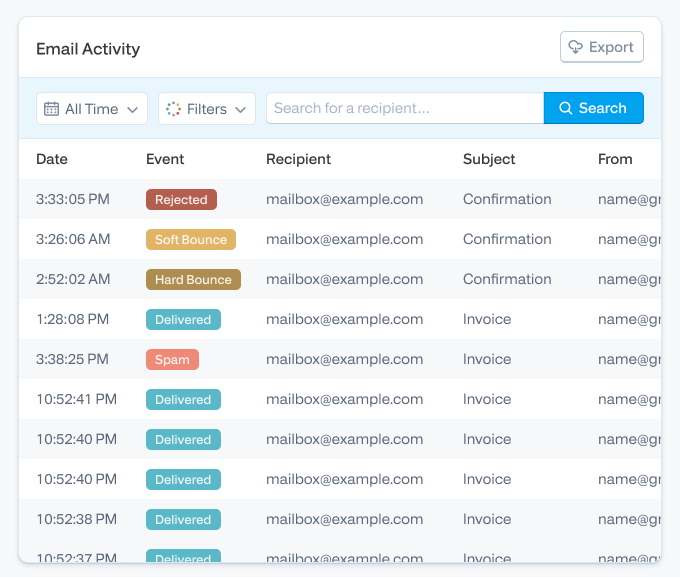
- Feedback. A reputable relay tells you what happened. Hard bounce, soft bounce, deferral, block, spam complaint, delivered, opened. This loop is the operational reason most teams stop running their own mail server. When you self-host, all you get is “the message left.” When you relay, you find out where it landed.
This whole sequence usually finishes inside two seconds. When it doesn’t, the problem is almost always either reputation, authentication, or rate limiting, and which one decides where you start looking.
When you actually need a relay (and when you don’t)
Most “do I need a relay?” content treats the answer as a foregone conclusion. It isn’t. Here’s the actual decision matrix.
| Your situation | Need a relay? | Why |
|---|---|---|
| Password resets, order confirmations, account verifications from an app or SaaS | Yes | Transactional email has to arrive fast, every time. Mailbox SMTP isn’t built for this. |
| Marketing or newsletter sends past a few hundred recipients | Yes | Volume, throttling, list hygiene, and reputation all kick in past that line. |
| WordPress, Drupal, or another CMS sending notifications | Yes | Hosting providers block port 25 by default, and shared hosting IPs are usually blacklisted somewhere. |
| Office printer, scanner, or MFP sending scan-to-email | Usually | Many of these devices can only authenticate over SMTP, not OAuth. They need a relay that takes basic auth. |
| Server monitoring alerts, log digests, cron-driven notifications | Yes for production | A missed alert at 3 a.m. is worse than no alert at 3 a.m. |
| CRM or helpdesk system sending on your domain | Yes | Reputation alignment with the rest of your sending matters. |
| ISP, cloud provider, or hosting provider has started blocking port 25 | Yes | A relay routes you around the block on 587, 465, or 2525. |
| One-to-one human email from a single mailbox | No | Your mailbox SMTP is fine. Don’t overbuild. |
| A handful of internal-only notifications going to one team on the same domain | Probably not | Internal Exchange or M365 will handle it without involving outside infrastructure. |
| You’re already running Postfix or Exchange and deliverability is fine | Maybe | If reputation, logs, and bounce visibility are all sufficient, you might not need to change. Audit before moving. |
Two cases worth pulling out:
Devices and legacy systems. Office equipment and older line-of-business apps often can’t speak modern auth. Microsoft deprecated basic auth for Exchange Online SMTP AUTH in 2023 (with extensions through 2025 for some tenants), which broke a lot of MFCs and old CRMs overnight. (Our writeup on the basic auth deprecation covers what changed and what to do about it.) If you’ve got a Kyocera, Ricoh, Lexmark, or Canon device that scan-to-emails through Office 365, you’ve probably already felt this. A relay that accepts username/password authentication over TLS 1.2+ on port 587 (or 465 for older devices that need implicit TLS) solves the problem cleanly. StoredTech has been using SMTP2GO since 2011 for exactly this reason, phone systems and copiers that need a place to deliver from.
Scaling SaaS. If you’re past the prototype stage and sending real transactional volume, a relay is non-optional. Group IMD grew from sending 10,000 emails a month to over a million emails a month over six years on SMTP2GO. That kind of scaling requires reputation management, dedicated or carefully-pooled IPs, real bounce handling, and a control plane you don’t have to operate. Build it yourself and you’ll spend six months in deliverability remediation. Use a relay and you’ll spend six minutes a week looking at the dashboard.
Ports and security, in plain English
SMTP uses TCP ports, and the port you pick affects how the connection is encrypted (and whether your network even lets it through). Here’s the short version:
| Port | What it’s for | Should you use it? |
|---|---|---|
| 25 | The original SMTP port. Used for server-to-server relay between mail servers. | Almost never, for outbound from an app. Most ISPs and cloud providers block it. |
| 465 | Implicit TLS, the connection is encrypted from the moment it opens. | Yes, particularly for legacy clients and devices. Widely re-supported. |
| 587 | Submission port. Designed for authenticated client-to-server sending with STARTTLS. | Yes. This is the most common modern default. |
| 2525 | Unofficial fallback. | Use when 587 is blocked on your network (some hosts and corporate firewalls). SMTP2GO supports it. |
Our infographic on SMTP ports lays this out visually if you prefer that format.
A few things worth knowing that the port table doesn’t capture:
AWS EC2 outbound port 25 is locked by default. If you spin up a fresh EC2 instance and try to send through port 25, the connection will silently fail. AWS does this to prevent abuse. The fix is either to request the limit removal (which takes a couple of days) or to use a relay on 587, 465, or 2525. Most teams go the relay route because the trade-off is obvious.
TLS 1.0 and 1.1 are dead, but some printers haven’t gotten the memo. Many ISPs and inbox providers deprecated TLS 1.0/1.1 over the last few years, and SMTP2GO retired them too. That broke older MFCs and IoT devices that only spoke TLS 1.0. If you’ve got a device that suddenly can’t send and it’s older than about 2018, this is your first suspect. (More on the TLS 1.0/1.1 retirement here.) The usual fix is firmware update; if that’s not possible, the device has to be replaced or routed through an internal gateway that does the TLS handshake on its behalf.
Authentication has to be set up properly, even on internal traffic. Open relays (servers that accept mail from anyone without authentication) were the standard configuration in the 1990s. They are now treated as a deliverability and security liability. Modern receivers will reject mail from servers configured that way. Authenticated relay is the modern default and there’s no good reason to want anything else.
If you’re catching up on the authentication layer, the dedicated breakdowns of SPF, DKIM, and DMARC each go deeper than this page should. The short version: SPF declares which servers are allowed to send for your domain, DKIM signs each message so the recipient can verify it wasn’t tampered with, DMARC tells the recipient what to do when SPF or DKIM fails. Get all three right and your inbox placement improves visibly inside 48 hours. Get one wrong and you’ll see soft fails compounding across receivers until you fix it.
SMTP relay vs email API vs running your own mail server
These three options exist on a spectrum from “easy and well-understood” to “powerful but you’re on your own.” Pick the one that matches what you’re actually trying to do.
| Option | Best for | What you give up |
|---|---|---|
| SMTP relay | Apps, devices, CRMs, WordPress, printers, anything that already speaks SMTP | Some flexibility. SMTP is simpler than an API, which means fewer hooks for advanced behavior. |
| Email API | Custom application code, transactional pipelines, event-driven sending | Drop-in compatibility with legacy systems. Requires actual integration work. |
| Self-hosted mail server | Teams with deep mail infrastructure expertise and a real reason to operate one | Time. Reputation has to be built and defended. Most teams shouldn’t go here. |
| Mailbox SMTP (Gmail, M365) | Low-volume one-to-one sending from a human’s mailbox | Volume, reliability, automation safety, real analytics. |
A few honest observations:
If you’re a developer building a transactional pipeline from scratch, an email API gives you better hooks for templates, personalization, batched sending, and event subscriptions. SMTP2GO supports both, which means you don’t have to pick one forever. Most teams end up using SMTP for legacy and devices, API for new application code. That’s the common shape and there’s no need to fight it.
If you’re thinking about self-hosting Postfix or Exim for production transactional sending, ask yourself whether you have someone on the team who has built and warmed a sending IP before. If the answer is no, don’t go this route. Reputation isn’t something you bolt on at the end. ThinkPorch came to us after AWS SES support took too long to resolve a delivery issue. That’s a recurring pattern. The “easy” platforms make assumptions you don’t realize you’re making until something breaks.
How to set up SMTP relay with a managed provider
Setup is the same shape regardless of provider. The specifics vary (especially around domain verification and the format of the DNS records), but the steps don’t.
- Sign up and verify your sending domain. Don’t skip this. Sending from an unverified domain works for testing and breaks everything in production. The provider gives you a CNAME or TXT record. You add it to your DNS. They confirm. Done.
- Publish SPF, DKIM, and DMARC records. SPF goes in a TXT record on your sending domain and includes the provider’s sending range. DKIM goes in a CNAME (or sometimes a TXT) on a selector subdomain. DMARC goes in a TXT record on
_dmarc.yourdomain.com. DNS propagation is usually a few minutes; occasionally an hour. If you’re moving from another provider, leave their SPF include in place for the first week so in-flight messages don’t suddenly start failing. - Get your SMTP credentials. SMTP host, port (start with 587), username, password or API key. SMTP2GO lets you create multiple users per account so you can give each app or device its own credentials and revoke them independently if one gets compromised.
- Configure your sending application or device. This is the part that varies by app. WordPress uses the official SMTP2GO plugin. WooCommerce hooks through the same plugin. PHP apps usually go through PHPMailer. Laravel has its own setup guide. Python apps usually use the standard
smtplibmodule (Python script setup). Postfix and Exchange have their own guides too (Postfix, Exchange 2019). The full setup library covers most of what you’ll need. - Send a test email and read the log entry. Send one. Don’t send a thousand. Then look at the delivery log. Was it accepted? Did the recipient server accept it? Did DKIM align? If anything failed, fix it before you scale up. This is the single biggest mistake I see new senders make: they configure, send a campaign immediately, and find out three days later that their SPF was misconfigured.
- Monitor your bounces and complaints from day one. A clean list and good complaint hygiene matter more than the relay you choose. Suppression handling and bounce categorization is what keeps your reputation alive. Most providers, SMTP2GO included, will suppress hard-bounced addresses automatically. Resist the urge to clear suppressions just because you want to “give them another chance.” A hard bounce means the address doesn’t exist or the receiving server has rejected you. Sending again doesn’t help.
The whole setup process, end to end, usually takes 20 to 40 minutes for a new sender on a single domain. Existing senders migrating from another provider should plan for an overlap week where both providers are live and you’re shifting traffic gradually.
How to choose an SMTP relay provider
Most provider-selection content reads like a feature checklist, which isn’t actually that useful because every modern provider checks most of the boxes. Here’s the version that matters.
Deliverability is the only thing that actually matters. Everything else is table stakes. A provider with mediocre deliverability and the world’s best UI is worse than a provider with great deliverability and a clunky dashboard. When you’re evaluating, the question to ask is: what’s your inbox placement rate, broken out by major receiver (Gmail, Microsoft, Yahoo), measured over the last quarter? If they can’t answer with specific numbers, that’s the answer.
Look at the IP reputation strategy. Shared IPs are fine for most senders. They work because the provider manages the pool, warms IPs together, and keeps the bad actors out. Dedicated IPs are useful when you have enough volume to maintain a reputation of your own, typically 100,000+ emails per day sustained. Below that threshold, a dedicated IP usually performs worse than shared, because the dedicated IP doesn’t have enough sending to maintain warmth. If a provider pushes you onto dedicated IPs at 10K/day, they’re not optimizing for your deliverability.
Bounce, block, and complaint visibility, with searchable logs. When something goes wrong, you need to be able to find the specific message. Not “your average bounce rate is 2%.” The specific message, with the specific receiver response code, with the timestamp, with the IP it was sent from. If the provider’s dashboard makes you grep through CSV exports to find this, that’s a tell.
Authenticated relay only, with multi-user support. Avoid any provider that lets you send without authentication. Multi-user support (per-app credentials you can revoke independently) is the difference between “one compromised WordPress plugin took down our whole sending domain” and “one compromised WordPress plugin had its key revoked in two minutes.”
Support that has answered an actual postmaster ticket. This one’s hard to evaluate from outside. The proxy I’d use: read the provider’s most recent customer reviews on G2 or Trustpilot and look specifically for support stories. Generic “great service” reviews are worthless. Reviews that say “I had a deliverability issue at 11pm and they were back to me in 15 minutes with the actual cause” are gold. ThinkPorch migrated to us specifically because their previous provider (AWS SES) couldn’t get to their ticket quickly enough.
Pricing that matches your trajectory, not just your current volume. Most senders ramp. A pricing plan that’s cheap at 10K/month but punishing at 500K/month will hurt later. Look at what you’ll be paying when you’re at the volume you’re projecting to in 12 to 18 months. SMTP2GO publishes transparent pricing so you can model this in advance.
Red flags to walk away from:
A provider that requires you to commit to an annual contract before they let you test. Marketing copy that uses “guaranteed deliverability” without explaining what’s guaranteed (nobody can guarantee inbox placement; the receiver decides). No documented incident response process. A pricing model that gets opaque past a certain volume threshold. Support that responds to tickets through a generic shared inbox. Anything that markets itself as “easy” without saying anything about reputation, authentication, or bounce handling.
The test-before-you-commit move: every reputable provider has a free tier or a meaningful free trial. Spin up an account. Configure SPF, DKIM, and DMARC. Send 50 test messages to a mix of Gmail, Outlook, Yahoo, and one or two B2B receivers in your industry. Pull the delivery logs. Look at the bounce categorization. Spend 30 minutes in the dashboard. You’ll know within an hour whether the provider is a fit.
Common SMTP relay problems and what’s actually causing them
When SMTP relay goes wrong, it usually goes wrong for one of about ten reasons. Here’s the diagnostic table.
| Problem | Likely cause | Fix |
|---|---|---|
535 Authentication failed |
Wrong username or password. API key revoked. Account suspended. | Verify credentials. Regenerate the API key if necessary. Check your account status. |
| Connection timeout on port 587 | Port 587 blocked by the network (corporate firewall, hosting provider, sometimes home ISP). | Try 465 with implicit TLS. If that fails too, fall back to 2525. (SMTP timeouts guide.) |
550 Relay access denied |
Sender address not authorized for this relay. Usually a domain verification or SPF issue. | Verify the sending domain. Check that the From address actually matches a verified sender. (Full 550 error breakdown.) |
| Messages delivered but landing in spam | Authentication misalignment, content triggers, IP or domain reputation, or sender pattern issues. | Check SPF/DKIM/DMARC alignment first. Then content. Then reputation. (How to escape an email blocklist.) |
| High bounce rate (above 5%) | Bad list quality. Stale data. Catch-all addresses that have since been disabled. | Suppress hard bounces. Re-verify the list if it’s been sitting more than 6 months. Stop importing purchased lists, full stop. |
| Messages deferred, never quite delivered | Recipient server rate limiting, or temporary block on the sending IP. | Read the deferral reason in the log. If it’s “try again later,” it usually clears. If it’s “blocked,” check the receiver’s postmaster page. |
| Scanner or printer suddenly can’t send | TLS version deprecation. Microsoft basic auth deprecation. DNS record drift. | Confirm the device supports TLS 1.2+. Confirm it can still use basic auth (some platforms have moved on). (Scan-to-email fixes.) |
| WordPress emails stopped working | The site host is now blocking port 25, or the WordPress SMTP plugin lost its credentials. | Switch the plugin to port 587 over the relay. Re-enter the credentials. |
| Suddenly hitting sending limits | Account tier limits. Per-user limits. Burst sending pattern. | Check your plan’s daily/monthly cap. Consider upgrading. (Know your sending limits.) |
| One specific recipient never gets mail | Their server has you blocklisted, or their spam filter is configured aggressively for your IP range. | Check the receiver’s response code. Contact their postmaster if necessary. Don’t keep retrying without diagnosing. |
Two diagnostic habits worth building. First, when something fails, read the log entry. The receiver almost always tells you why, in plain language, in the SMTP response code. “Recipient address rejected: user unknown” means the mailbox doesn’t exist. “Spam policy violation” means content. “IP reputation” means reputation. The error code is the answer most of the time. Second, if you can’t replicate the problem yourself, get the exact error message from the affected user before you start debugging. Half of “my emails aren’t sending” tickets turn out to be “my emails are sending and landing in spam,” which is a completely different problem.
If you’re stuck, our troubleshooting guide for emails that won’t send walks through the diagnostic tree in more detail.
Why teams pick SMTP2GO (and when they shouldn’t)
I work here, so take the framing with the appropriate amount of salt. But I’ve also spent the last several years on the support desk, which means I’ve seen the cases where we’re a fit and the cases where we’re not. Both are worth saying out loud.
Where SMTP2GO is genuinely strong.
Mixed-use sending. A lot of senders aren’t pure transactional or pure marketing or pure device traffic. They’re some of all three. SMTP2GO handles all three on the same account without forcing you into separate platforms. GlaxoSmithKline uses it for manufacturing-floor environmental notifications, which has to land instantly to about 20 production operatives so the next shift can dispense the right components. That’s not what a marketing platform is built for, and it’s not what a developer-first API is built for. It’s mixed transactional with reliability as the only KPI.
Legacy device and printer support. We get this one a lot. If you’ve got a fleet of MFCs, scanners, or older industrial equipment that needs to send authenticated mail and can’t speak OAuth, we’ll handle it. StoredTech has been using SMTP2GO since 2011 for exactly this case.
Real human support. The pattern that keeps showing up in customer stories is: somebody had a deliverability problem at an inconvenient hour, they wrote in, they got a real engineer back in minutes with the actual cause, not a copy-pasted FAQ link. ThinkPorch moved to us after slow AWS SES support on a delivery issue. That’s the single most common migration reason we see.
Compliance posture. ISO 27001 and ISO 9001 certified, GDPR compliant, M3AAWG member. Useful for B2B sales conversations where Procurement asks the questions.
Where SMTP2GO might not be the best fit.
If you’re a developer building a custom transactional pipeline with rich event-driven needs, our API is solid, but if your stack is built around webhooks-for-everything and you want the most opinionated developer experience, Postmark or Resend may suit you better. Worth evaluating side by side.
If you’re a high-volume marketing-only sender with a deeply experienced in-house deliverability team and you’re willing to do reputation management yourself, AWS SES at scale is cheaper. Just understand what you’re signing up for in operational burden.
If you’re a hosting provider needing outbound filtering across thousands of customer accounts on shared IPs, MailChannels is purpose-built for that use case in a way we’re not.
For everyone else (the SaaS team scaling transactional, the operations lead with a fleet of MFCs, the developer who wants the relay to “just work” so they can ship the feature), we’re the answer we’re built to be.
Pricing is published transparently, the free account has no time limit and no card required, and you can run real test sends inside an hour.
No. SMTP is the protocol. Relay is one of the things you do with the protocol (passing a message from one server to another). “We use SMTP relay” means “we send mail by handing it off to a server that delivers it for us.” No. An SMTP server is a specific machine. Relay is what an SMTP server does when it forwards a message to another server. A relay service is a managed product built around the capability. Functionally yes. “Email relay” is the informal term, “SMTP relay” is the protocol-specific one. They get used interchangeably. A relay that requires a username and password (or an API key) before it will accept a message. This is the modern default. Anything else is an open relay, which you should not use and should not run. An SMTP server that accepts mail from anyone, no authentication required. They were common in the 1990s. Spammers found them, used them, and modern receivers now treat any mail from a known open relay as suspect. If you find one in your infrastructure, close it. Technically yes, for very low volume. In practice no, for anything past a few hundred messages a day. Both providers cap sending volume, throttle automated patterns, and aren’t built for transactional or marketing use. Mailbox SMTP exists to send mail from a human, not from a fleet. Start with 587 with STARTTLS. Use 465 if your client wants implicit TLS or you’re working with a legacy device. Fall back to 2525 only if 587 is blocked on your network. Avoid 25 for outbound from an application; most networks block it. SMTP relay if you’re sending from something that already speaks SMTP (apps, frameworks, CMS plugins, devices). An email API if you’re building custom application code with rich event-driven needs. SMTP2GO offers both, so you can mix. Probably not. Shared IPs work well for most senders below about 100,000 emails per day sustained. A dedicated IP needs enough volume to stay warm; below that line it usually performs worse than a well-managed shared pool. Our breakdown on shared vs dedicated IPs covers when the math changes Send a single test message to a mailbox you control, then read the delivery log. Check that the recipient server accepted it, DKIM aligned, and the message landed in the inbox rather than spam. If anything’s off, fix it before you scale up. Usually one of four things: authentication (SPF, DKIM, or DMARC misaligned), reputation (IP or domain has been previously associated with poor sending), content (the message contains spammy patterns), or sender behavior (sudden volume spike, bad list hygiene). Diagnose in that order. How to escape an email blocklist covers reputation specifically. The relay didn’t accept your message because the sender wasn’t authorized. Usually a domain verification issue, an SPF mismatch, or a sending policy on the provider’s side. Check that your From address matches a verified sender on your account. Deliverability (specifically inbox placement rates by major receiver), authentication and security defaults, real-time logs and analytics, bounce categorization, transparent pricing at your projected volume, and support that has answered postmaster tickets before. The “How to choose” section above covers this in more depth. Authenticated SMTP relay over TLS 1.2 or 1.3 is secure. The credentials and the message body are encrypted in transit. Open relays are not secure, which is one reason nobody runs them anymore.Frequently asked questions
Where to go from here
A short, honest recommendation based on what brought you here:
If you came in trying to understand the term, you’ve got it now. Save the page, share it with whoever else on your team needs the explanation, and move on.
If you came in trying to figure out whether SMTP2GO is the right relay for what you’re building, the easiest next step is to start a free account and run a few test sends. No time limit, no card required. Pull the logs. See if the dashboard is what you’d want to look at on a regular basis. The answer becomes obvious inside an hour.
If you’re already using another provider and weighing a switch, our guide on switching SMTP providers walks through the overlap-week migration approach that protects in-flight messages. If you want to compare specifics, the comparison page shows where SMTP2GO sits against the major alternatives.
And if you came in trying to debug something specific, the troubleshooting guide is the right next click. The relay isn’t usually the problem. But the dashboard will tell you what is.

No thoughts shared yet. Be the first to leave a comment above!