

Transactional SMS is the text your customer gets the second something happens on their account. The shipping label is printed. The login attempt fires. The appointment is 30 minutes out. It’s automated, it’s triggered by an event, and it carries information the recipient actually wants. Marketing? That’s a separate animal with separate rules.
This guide covers what counts as transactional SMS, ten real examples with sample copy, the compliance rules in the US, EU and India, how to actually send it, and one section most providers won’t write honestly: when SMS isn’t the right channel and email is. We run both at SMTP2GO, so I’ll be straight about which jobs each one is better at.
If you’re a developer wiring up OTPs, a sysadmin setting up alerts from a printer fleet, an MSP managing client comms, or an ops lead deciding whether to add SMS to an existing email stack, you’re in the right place.
What is transactional SMS?
A transactional SMS is an automated, time-sensitive text message sent to a single recipient in response to a customer action or system event. It carries necessary information (an order confirmation, a verification code, a fraud alert, a delivery update) and contains no promotional content. It’s one-to-one, not one-to-many, and the recipient has already established a relationship with the sender by handing over their phone number for that purpose.
That last bit matters. Implied consent applies when a customer gives you their number to receive service updates. The consent picture changes the moment you start marketing to them, which is why mixing message types creates legal exposure. More on that below.
How transactional SMS actually works
The flow is short. An event fires in your application: a successful checkout, a password-reset request, a flight delay. Your app calls an SMS API or platform. The platform routes the message through a carrier gateway to the recipient’s handset. Delivery receipts come back through webhooks so you can confirm the message landed, retry on failure, and log everything for compliance.
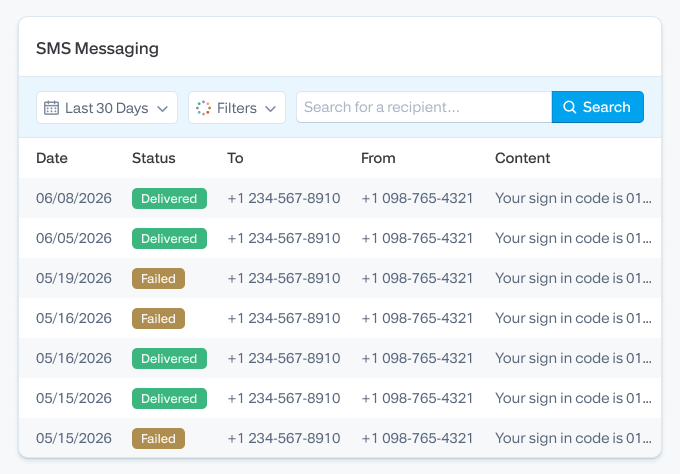
Industry typically calls this Application-to-Person (A2P) messaging, which distinguishes it from Person-to-Person (P2P) texting. A2P is what every transactional SMS provider operates on, and it’s the category that triggers carrier registration, sender vetting and the throughput rules we’ll get into below.
Read rates on transactional SMS are unusually high. The number most sources cite is around 98%, with the majority read inside three minutes. That speed is the whole reason transactional SMS exists as a channel.
Transactional SMS vs promotional SMS
The two are easy to confuse and expensive to confuse legally. Here’s the line.
| Attribute | Transactional SMS | Promotional SMS |
|---|---|---|
| Purpose | Inform, confirm, verify, alert | Sell, promote, re-engage |
| Trigger | User action or system event | Scheduled campaign |
| Consent type | Implied when number is provided for the service | Express written consent required (US) |
| Timing | Anytime, including overnight if urgent | Quiet hours apply (typically 8am–9pm local) |
| Content rule | No promotional content | Promotional content expected |
| Opt-out | STOP must be honored | STOP must be honored |
| Examples | OTP, order confirmation, fraud alert | Sale alert, coupon, product launch |
| Throughput class (US) | High (transactional 10DLC use case) | Lower (campaign 10DLC use case) |
The boundary isn’t just regulatory hygiene. Add a discount line to an order confirmation and that single message now arguably falls under promotional rules. You lose your timing latitude, your implied-consent footing, and your defense if a recipient files a TCPA complaint. The carrier filters notice too: promotional content in a transactional template is one of the fastest ways to get a sender ID flagged.
Editor’s callout - the promo-contamination trap
“Your order #1042 is on its way. Tracking: northvale.co/t/1042”
That’s transactional.
“Your order #1042 is on its way. Tracking: northvale.co/t/1042. Use SUMMER20 for 20% off your next order.”
That’s promotional, and the legal frame changes.
I see this confused weekly on the SMTP2GO support desk, usually with ecommerce teams who got tempted by the open rate. Resist. Run promo on a separate consent stream.
There’s also a third category called conversational SMS (two-way support threads, the kind enterprise teams run for customer service). Conversational sits closer to transactional on the consent spectrum but isn’t covered in detail here.
Ten common transactional SMS use cases (with sample copy)
For each example: when to send it, sample text under 160 characters, and the mistake to avoid.
1. OTP and 2FA codes
Send when: a user logs in, signs up, resets credentials, or completes a high-risk action.
Northvale: Your verification code is 408216. Expires in 10 minutes. If this wasn’t you, ignore this message.
Avoid: Long copy, marketing add-ons, or codes that expire too slowly. A 30-minute OTP is a security incident waiting to happen.
2. Password reset confirmation
Send when: a password reset is requested.
Northvale: Password reset requested. If this was you, finish here: northvale.co/r/9b21. If not, secure your account: northvale.co/help.
Avoid: Sending the new password in plain text. (Yes, this still happens.) Send a reset link or one-time code instead.
3. Order confirmation
Send when: payment is captured.
Northvale: Thanks, Jen. Order #1042 confirmed ($87.50). We’ll text when it ships. Details: northvale.co/o/1042
Avoid: Confirming before payment clears, or skipping the order number (it’s the one piece of info customers screenshot).
4. Shipping and delivery updates
Send when: the carrier scans a status change. Out for delivery and delivered are the high-value triggers.
Northvale: Order #1042 is out for delivery today. Track: northvale.co/t/1042. Reply STOP to opt out.
Avoid: Pinging on every micro-scan. Three updates per order is the practical ceiling. More than that, and STOPs spike.
5. Appointment reminders
Send when: 24 hours before, then 30–60 minutes before for high-stakes appointments (medical, financial, legal).
Northvale Clinic: Reminder, Sam. Appointment tomorrow at 10:15am with Dr Reyes. Reschedule: 0800 555 0144.
Avoid: Reminders with no clear cancel or reschedule path. That’s the single most common complaint trigger in this category.
6. Payment and billing notifications
Send when: a payment succeeds, fails, or a subscription auto-renews.
Northvale: Card ending 4321 charged $19.00 today for your Pro plan. Manage: northvale.co/billing.
Avoid: Surprise renewals. If you’re auto-renewing an annual plan, the reminder text should fire 7 days ahead, not the morning of.
7. Fraud and security alerts
Send when: a login from a new device, a large or unusual transaction, or any other risk signal.
Northvale: New sign-in from Auckland on Chrome (Mac). Wasn’t you? Lock your account: northvale.co/sec.
Avoid: Cryptic alerts with no action link. The user is panicking. Give them somewhere to go in under two taps.
8. Account activity notifications
Send when: something on the account changes that the holder didn’t initiate themselves (email updated by admin, role changed, device added).
Northvale: Your account email was updated. Wasn’t you? Reply HELP or call 0800 555 0144.
Avoid: Sending these silently with no opt-out. STOP must still work, even on security-flavored messages.
9. Service outage and status updates
Send when: a critical service goes down, and only to the subset of users actively affected.
Northvale Status: Checkout is degraded, affecting card payments. We’re on it. Updates: status.northvale.co.
Avoid: Blasting every customer on every incident. Tier your status comms by severity, then by tenant.
10. Booking confirmations and cancellations
Send when: a reservation is made, modified, or cancelled.
Northvale Stays: Booked. Sat 7 Mar, Room 214, check-in 3pm. Modify: northvale.co/b/7842.
Avoid: Stripping out reference numbers to save characters. The booking reference is the one thing the customer needs in a hurry at the front desk.
Anatomy of a great transactional SMS
Most transactional texts go wrong in the same places. Here’s the format that consistently doesn’t.
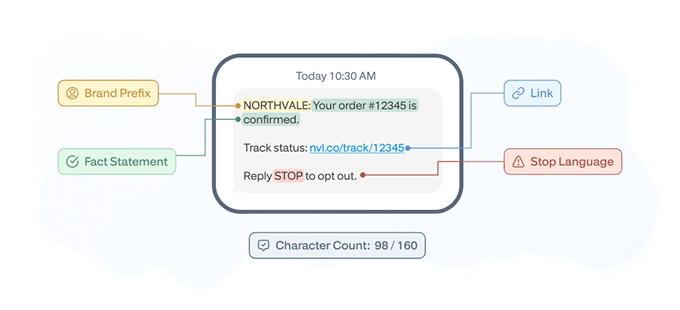
Brand prefix. First three or four characters. Northvale: tells the recipient who’s writing before they’ve read a word. Carriers and recipients both learn to trust the prefix, which helps deliverability and reduces “is this scam?” replies.
The fact, not the fluff. Lead with what happened. “Order confirmed.” “Code 408216.” “Card charged.” If the most important sentence isn’t in the first 60 characters, rewrite it.
One link, no shortener that hides the URL. Use your own branded short domain. Twilio’s t.co-style shorteners blow up open rates in some carriers (Verizon especially) and look phishy in a year when SMS phishing is the dominant attack pattern.
Character target: 160 or fewer. SMS messages over 160 chars (or 70 if there’s a single non-GSM character like an emoji) get split into multiple segments, which costs more and arrives out of order on weaker networks. Most transactional texts should fit one segment.
STOP language where required. Toll-free and 10DLC senders in the US should include opt-out instructions on the first message in a thread and at minimum monthly. Carriers will throttle senders who don’t.
Personalization variables, used sparingly. First name and order number, yes. Whole sentences pulled from a template engine, no. Keep variables narrow so a missing value doesn’t blow up the message (“Hi {first_name}” rendering as “Hi {first_name}” is the kind of mistake that makes the channel feel cheap).
Consent, opt-out, and compliance basics
Not legal advice. But the operational reality every team should understand.
United States: TCPA, CTIA, and 10DLC
The Telephone Consumer Protection Act (TCPA) is the federal floor in the US. For transactional SMS, implied consent generally applies when the customer provides their number for that service. Promotional SMS, on the other hand, requires express written consent. Mix the two in a single message and you’ve effectively converted the transactional one into promotional, which puts you in TCPA-violation territory if you didn’t collect express consent first.
The CTIA Messaging Principles and Best Practices govern carrier-level expectations: opt-out within roughly 10 seconds of receiving STOP, clear sender identification, accurate metadata, and 10DLC registration for application-to-person messaging on US long codes. Toll-free numbers have their own verification process. Skipping the registration step doesn’t stop you sending; it just means deliverability falls off a cliff once carriers spot unregistered A2P traffic.
European Union: GDPR
Phone numbers are personal data under GDPR. You need a lawful basis for processing, which for transactional messages typically falls under contract necessity (Article 6(1)(b)) or legitimate interests (Article 6(1)(f)). Document the basis, document the consent, honor erasure requests, and don’t repurpose a service number for marketing without separate consent.
If you’re in the GDPR weeds, our team has a deeper write-up.
India: DLT registration
India runs its own framework. Distributed Ledger Technology (DLT) registration is mandatory for every A2P sender. You register your business entity, your sender ID, and your message templates with one of the carrier-affiliated DLT portals (Vodafone Idea, Jio, BSNL, Tata Tele, Videocon). Unregistered traffic is blocked. Headers and templates must match what was registered, character for character, or the message fails.
It’s the gap most international providers handle awkwardly. If India is in your routing, ask your SMS provider directly: how do you handle DLT, and can I see a real, registered template?
The promo-contamination trap (again)
If you only take one compliance rule from this guide, take this one. Keep transactional templates transactional. The temptation to bolt on a discount, a referral CTA, or a “while you’re here, check out…” is the single most common way an otherwise compliant program turns into a regulatory headache.
How to send transactional SMS: step-by-step
This is the part where most guides hand-wave. Here’s the actual sequence we walk customers through on the support desk, with the specifics that trip teams up.
Step 1: Pick a provider that fits the workload
Decision criteria worth weighing in order of typical importance: delivery reliability and uptime, international coverage matching your customer base, number-type support (toll-free, 10DLC, short code, alphanumeric for non-US), template management, API quality, webhooks for delivery receipts and replies, compliance tooling for whichever regions you operate in, transparent per-segment pricing, and support quality when something breaks at 11pm on a Friday. (We have opinions on the last one. So do our customers.)
Step 2: Collect phone numbers and document consent
The collection point should make purpose obvious. “Phone number (we’ll text you order updates only)” beats a bare field every time. Log the consent event: timestamp, IP, source page, exact wording shown. Carriers and regulators will ask. Auditors will too.
Step 3: Choose the right number type
For US senders, the three live options are toll-free (text-enabled 8YY numbers, decent throughput, easier vetting), 10DLC (10-digit long codes registered for A2P use, the modern standard for transactional traffic at volume), and short codes (4–6 digit, highest throughput, longest approval cycle, most expensive). Outside the US, alphanumeric sender IDs are often the right call for one-way transactional messages. They look like NORTHVALE instead of a phone number, but they can’t receive replies, which means STOP-handling needs a different path.
Step 4: Build approved templates
Write each template tight. Get them through legal and through your SMS provider’s template approval process if your routes require pre-approval (India does; many US routes don’t, but it’s good hygiene). Version them. If you change one, log the change. The first time a regulator asks “what did you send on this date?” you’ll be glad.
Step 5: Connect via API or no-code platform
Most teams send via API call from their app server or backend job queue, with the SMS provider’s SDK handling auth and retries. Lighter shops use no-code (Zapier, Make, n8n) to fire SMS from form events or webhook triggers. Either is fine for transactional volume if your delivery monitoring is solid. Our overview of the SMTP2GO API is here if you’re scoping that path.
Step 6: Trigger from real events
The trigger source matters. Don’t fire OTPs from a marketing automation tool that batches every 60 seconds. Fire them from the auth service, synchronously, with a 5-second SLA. Don’t fire shipping updates from the WMS’ nightly export. Fire them from the carrier webhook the moment the scan lands. Latency on transactional SMS is the channel’s whole point. If it arrives slow, you’ve degraded the only thing it does better than email.
Step 7: Monitor everything
Set up delivery webhooks. Alert on delivery rate dropping below 95% for any route. Track STOPs and complaint rates per template, not just per program. When a single template starts collecting STOPs at 3x the program average, you’ve usually got a wording problem or a frequency problem, and it’s fixable in an hour if you catch it.
Transactional SMS vs transactional email: when to use each
| Use case | SMS | Best approach | |
|---|---|---|---|
| OTP / 2FA code | Strong | Workable | SMS primary, email or authenticator-app fallback |
| Order confirmation | Useful | Strong | Email primary (receipt, line items, tax), SMS as a “thanks, it’s confirmed” |
| Shipping update | Strong | Useful | SMS for the moment-of-truth (out for delivery, delivered), email for the full tracking history |
| Receipt or tax invoice | Weak | Strong | Email only. You need attachments, formatting, and a permanent record |
| Fraud or security alert | Strong | Strong | Both, in parallel, especially for high-value accounts |
| Appointment reminder | Strong | Useful | SMS for the 24-hour and 30-minute reminders; email for the original booking |
| Service outage notice | Strong | Strong | SMS for affected paying customers; email for the broader user base |
| Account statement | Weak | Strong | Email. Tables and totals don’t render in 160 characters |
| Welcome / onboarding | Workable | Strong | Email primary, SMS only if your onboarding is genuinely time-critical |
| Compliance and policy updates | Workable | Strong | Email. You need the audit trail and the ability to embed full text |
The honest summary: SMS wins on speed, attention, and reach when the device is what’s in front of the customer. Email wins on detail, attachments, formatting, and audit trail. Most real production stacks need both, with the events graph telling them which channel to fire for which trigger.
If you’re already running transactional email through us and want to add SMS, the integration path is short, and one of our customer success engineers can walk you through the eventing model. If you’re building from scratch, the same applies.
How to choose a transactional SMS provider
Honest checklist. This is what we’d use ourselves.
Deliverability and route quality. Ask for delivery-rate benchmarks by destination country, not a global average. A 99% global rate hides a lot of pain in markets like Brazil, Vietnam, or Russia.
Number-type coverage. Toll-free, 10DLC, short code, alphanumeric sender ID. If your customer base is global, you need a provider with all four and the registration support to back them up.
API and SDK quality. Read their docs before you sign. Check for retry semantics, idempotency keys, webhook signing, and rate-limit headers. The docs are a leading indicator of how the platform behaves at 3am during an incident.
Template management. First-class templates with variables and approval workflows beat raw string-stuffing every time. Especially relevant if you operate in India or any DLT-style market.
Compliance tooling. Documented consent capture, STOP handling, audit logs, region-specific opt-out flows. If a provider can’t tell you exactly how they handle a TCPA challenge, that’s the answer.
Support quality. Test it. Open a ticket before you commit. Ask a technical question. Measure how long it takes to get an answer that actually solves the problem. This is the criterion most teams underweight and later regret.
Pricing transparency. Per-segment pricing, broken down by destination, with no opaque “carrier fees” line item that triples the bill. Watch for tiered support that charges extra to talk to a human.
The single-stack option. If you’re running transactional email, transactional SMS, and the eventing layer that triggers both, having one provider for the messaging layer reduces failure modes and integration tax. That’s part of why customers like Group IMD, who scaled from 10,000 to over 1 million emails per month on SMTP2GO over six years, consolidate. (Same logic applies to GlaxoSmithKline running manufacturing-shift notifications through us, or StoredTech, who’ve been routing emails from phone systems, copiers, and printers since 2011.)
Frequently asked questions
What is transactional SMS in simple terms?
An automated text message triggered by a customer action or system event, carrying necessary information (order confirmation, OTP, alert) and no marketing content.
Is OTP considered transactional SMS?
Yes. OTPs are a subcategory of transactional SMS, alongside password resets, fraud alerts, and other authentication messages.
Do you need explicit opt-in for transactional SMS?
In most regions, implied consent applies when a customer provides their number specifically for the service. That’s different from promotional SMS, which typically requires express written consent. The line is jurisdiction-specific, so document the consent event either way.
Can I include a promotion in a transactional SMS?
No. Adding promotional content turns the message into a promotional one in the eyes of regulators and carriers, which changes the consent rules, the timing rules, and your liability picture.
How is transactional SMS different from promotional SMS?
Transactional messages are event-triggered, informational, and rely on implied consent. Promotional messages are campaign-scheduled, commercial in nature, and require express written consent in most jurisdictions. The comparison table earlier in this guide breaks it down.
What is DLT registration?
India-specific framework requiring all A2P senders to register their business entity, sender IDs, and message templates with carrier-affiliated DLT portals before sending. Unregistered traffic is blocked.
How much does transactional SMS cost?
Per-segment pricing, varying by destination country. US toll-free runs roughly $0.0075-$0.02 per segment depending on volume. International destinations vary widely.
What is a transactional SMS API?
A REST or SDK interface that lets your application send and track SMS programmatically: send messages, receive delivery webhooks, manage templates, handle opt-outs, pull logs. Every serious provider offers one.
Is transactional SMS better than email?
For different jobs. SMS wins on speed and attention; email wins on detail and audit trail. The decision matrix earlier in this guide covers it use case by use case.
What should I look for in a transactional SMS provider?
Deliverability per region, number-type coverage, API and template quality, compliance tooling, transparent pricing, and the quality of the human you reach when something breaks. The checklist above covers the long version.
Ready to send transactional SMS (and the emails that go with it)?
If you’re running transactional email already, adding SMS through the same provider keeps your eventing simple and your operational surface smaller. If you’re building from scratch, the same applies. Start a free SMTP2GO account or talk to support about routing both channels through one stack.
For the email side of the same problem, our companion guide is here: What is transactional email? For the opt-in side, our SMS opt-in guide for dedicated numbers is the next read.

No thoughts shared yet. Be the first to leave a comment above!