
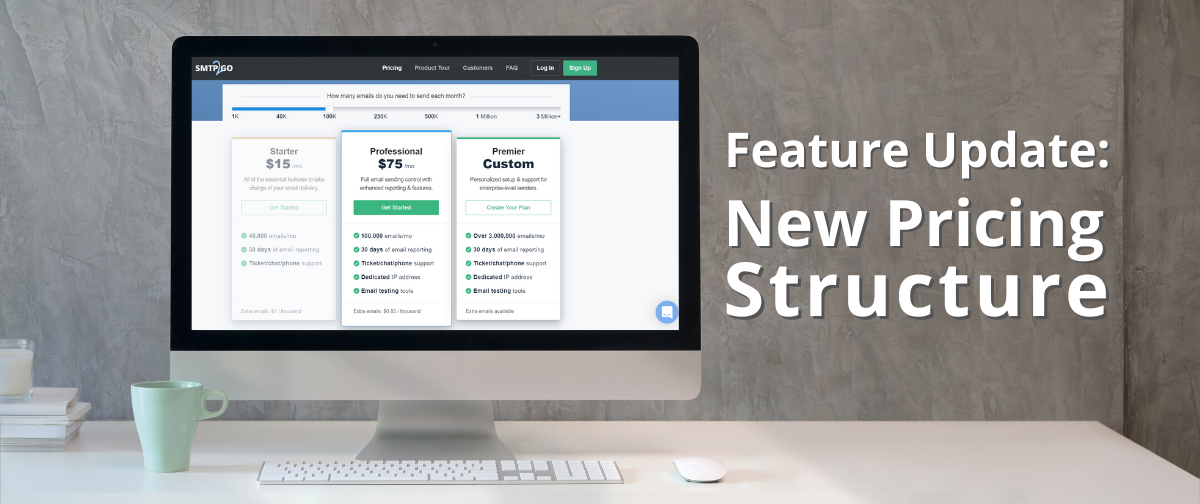
You spoke, and we listened! After considering feedback from our clients, we’ve updated our pricing structure to give you more bang for your buck.
We’ve waved goodbye to our old price plans and have rolled in some new ones. We’ve also updated our pricing page to make it easier to choose the best plan, and we’ve changed our overage system for additional emails. Let’s look at the changes in a little more detail…
Email Limits & Additional Bundles
No matter which paid plan you choose, you have the ability to send up to three times your account’s limit without needing to upgrade. You will automatically be billed for each extra 1,000 emails you send. So, if you were on our Starter Plan, which costs $30 for 50,000 emails, and you needed to send 70,000 emails, you would be billed 20,000 additional emails at a cost of $1 per 1,000 emails. Those 20,000 additional emails would cost $20, so your bill for the month would total $50.
Choosing the Best Plan for You
We’ve updated our website to make our pricing page easier to negotiate. Try our sliding scale to see which plan best suits your needs, and choose the most economical solution for your sending.
No matter which plan you choose, if you decide to pay annually rather than monthly, you’ll get the equivalent of two months free.
Try SMTP2GO Free
Our free plan allows you to send up to 1,000 emails per month at absolutely no cost. You also have access to 5 days of email reporting. We know how important a helping hand is when you’re starting off, so our support team is here to guide you through the setup process, and to answer any queries you may have via ticket. If you need our help, just click on the Support button on your SMTP2GO dashboard.
Starter Plan
If you’re sending less than 100,000 emails per month, then these plans are perfect for you. Our Starter Plans include 30 days of email reporting, subaccounts, and additional authentication options.
We even offer you support via ticket, phone and live chat. As our customer support team are based internationally, there’s always someone online to help you, no matter where you are.
Professional Plans
Our Professional Plans all include 30 days of email reporting, ticket/ phone/ chat support, a dedicated IP address, and email testing tools. We have a few different options, depending on your sending needs from 100,000 emails per month to 3 million emails per month
Premier Custom Plans
Our Premium Custom Plans are designed to offer flexibility for your business if you need to send over 3 million emails per month. They include all of the above features, and the price is personalized to your needs. If you’re interested in one of our higher volume plans, please fill out this form, and a member of our team will be in touch shortly.
No matter how many emails you send per month, we’re here to help you scale your business. Sign up today and let’s get you sending like a pro.



No thoughts shared yet. Be the first to leave a comment above!