
If you’re reading this, something probably just stopped sending.
Maybe it’s a WordPress contact form wired through a Gmail address. Maybe it’s a CRM, an invoicing app, or a scanner in the office. It worked for weeks. Then this morning it started bouncing everything with an error like 550 5.4.5 Daily user sending limit exceeded, and now you’re trying to figure out what the limit actually is and when it resets.
Here’s the whole picture in one table. If the number is all you came for, you’re done. If you want to know how each cap really works, what error string you’ll see, how long you’re locked out, and what to do about it before end of day, keep reading.
Every major provider’s sending limit
All figures verified against each provider’s official documentation as of August 2026. These change. We’ll keep this table current, the same way we do for our own limits page.
| Provider | Daily cap | Recipients per message | Other caps | When you hit it | Can you lift it? |
|---|---|---|---|---|---|
| Gmail (free @gmail.com) | 500 messages via web; far lower in practice via SMTP (our test hit the wall just past 100, see below) | 500 (web); 100 via SMTP/POP/IMAP | Rolling 24-hour window; messages AND recipients both metered | 550 5.4.5 Daily user sending limit exceeded; sending blocked up to 24 hours | No |
| Google Workspace | 2,000 messages (500 on trial; 1,500 via mail merge) | 2,000 total, 500 external; only 100 over SMTP/POP/IMAP, 500 via the Gmail API | 10,000 recipients/day; 3,000 external and 2,000 unique external/day | Same 550 5.4.5 error; up to 24-hour block | No, but Google’s separate SMTP relay service has its own higher quota |
| Microsoft 365 / Exchange Online | 10,000 recipients/day, of which max 2,000 external | 500 default (admin can raise to 1,000) | 30 messages/minute; 3 concurrent SMTP AUTH connections; tenant-wide TERRL cap | 550 5.7.233 (tenant limit); throttling at the per-minute rate |
Per-message: yes, by an admin. Daily and tenant caps: no |
| Outlook.com (consumer) | Dynamic. Roughly 300 recipients/day for established free accounts; up to 5,000 for Microsoft 365 subscribers | ~100 free; 500 subscribers | Reputation-based; new accounts get less | “You’ve reached a limit” style rejection; temporary block | No. It grows slowly with account age and behavior |
| Yahoo Mail | 500 messages | 100 | ~100/hour (undocumented but widely observed) | Temporary sending block [VERIFY: capture exact current error string from a test account] | No |
| iCloud Mail | 1,000 messages AND 1,000 total recipients | 500 | 20MB per message (5GB with Mail Drop) | “A copy has been placed in your Outbox” on iOS; “Sending limit exceeded” on iCloud.com | No |
| Zoho Mail | Plan-based, roughly 250–2,000/day [VERIFY current per-plan figures against Zoho docs] | Varies by plan | Stricter for new accounts | Rejection at the server | Higher plans only |
| AOL Mail | ~500 messages | 100 | Undocumented hourly throttling | Temporary block | No |
| Shared hosting (cPanel hosts) | Usually expressed hourly: commonly 100–800/hour depending on host and plan | Often 50–100 | See host-by-host section below | 550/554 quota errors, or silent queueing |
Sometimes, by support ticket |
Two things before the provider-by-provider detail, because they trip up almost everyone.
How the counting actually works
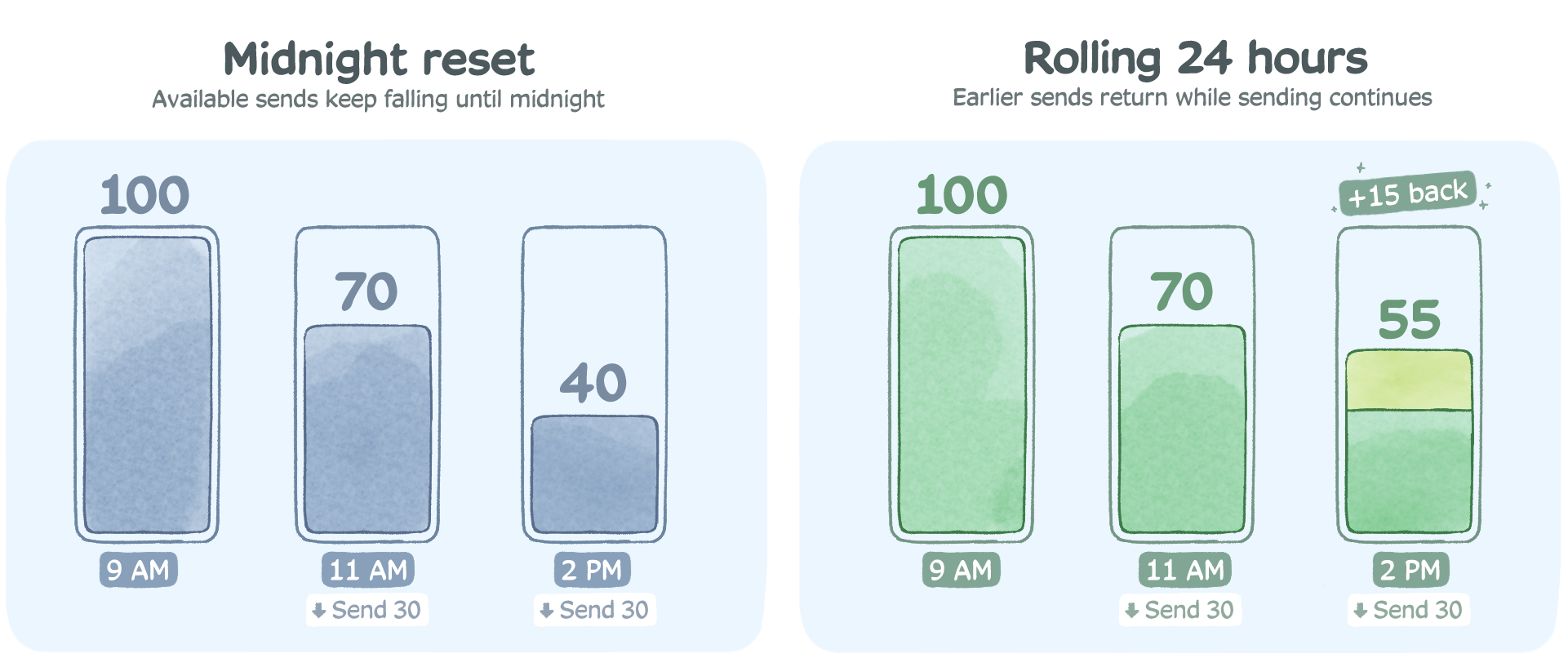
Nearly every limit runs on a rolling 24-hour window, not a calendar day. If your app burned through Gmail’s 500 by 2pm, you don’t get a fresh 500 at midnight. You get sends back gradually as the messages from 24 hours ago age out of the window. This is the single most common misunderstanding we see in support tickets about provider limits.
Providers don’t all count the same thing. Microsoft’s headline 10,000 is a recipient count, layered with a separate 30-messages-per-minute rate. Yahoo counts each recipient separately too. Google runs two meters at once, messages per day and recipients per day, and blocks you at whichever fills first: one message to 100 people is one message but 100 recipients, so recipient-heavy sending drains the recipient caps long before the message cap. iCloud does the same double-metering, with messages and total recipients as independent daily caps.
So “how many emails can I send” is usually the wrong question. The right one is “how many recipients, how fast.”
There’s also a scheduling trap hiding in the rolling window. Quota returns exactly 24 hours after it was spent, so an automated system that fires its whole daily volume at the same time every morning (a 6am digest cron, a nightly batch invoice run) ends up chasing its own tail: capacity comes back at precisely the moment the next burst wants it, and any overrun compounds into tomorrow. Spreading sends across the day keeps quota trickling back continuously. Or, honestly, stops the cap from being your scheduling problem at all, which is the relay argument in one sentence.
Gmail (free accounts): the 500 that ends most DIY setups
The free Gmail limits, per Google’s own documentation:
- 500 messages per rolling 24 hours through the web interface, and Google also meters total recipients, so a message to 30 people burns 30 recipient slots
- 100 recipients per message when sending through SMTP, POP or IMAP, which is how your WordPress plugin, script, or CRM connects
- 500 recipients per message on the web
Hit the cap and Gmail rejects further sends with 550 5.4.5 Daily user sending limit exceeded (or the in-browser banner “You have reached a limit for sending mail”). The block lasts up to 24 hours, there’s no counter showing how close you are, and there is no way to buy, request, or negotiate a higher number on a free account. None.
Worth being straight about one thing: the daily SMTP allowance is genuinely murky. Half the articles on this topic state 100 emails per day over SMTP as fact; others say SMTP draws from the same 500 pool as the web interface and only the per-message recipient cap is 100. Google’s help page doesn’t settle it. So we tested it, and our test account hit the wall just past 100 SMTP sends (full write-up below). Whatever the documentation implies, plan on ~100 as the practical SMTP ceiling.
Two more Gmail realities worth knowing if you’re relaying an application through it:
You need an app password now. Google removed “less secure app” access, so any script or device authenticating with your normal password will fail. You’ll need two-step verification enabled plus a 16-character app password. If your device predates TLS 1.2, it may not connect at all.
Your mail may say “via gmail.com” or show sent “on behalf of” your address, which looks off to recipients and hurts trust. We covered that quirk (and the fix) in this post on avoiding Gmail’s “on behalf of” message.
Honestly, Gmail SMTP is fine for what it’s designed for: a person, sending person-sized volumes. It was never meant to be application infrastructure. The 500 cap (really ~100 over SMTP) is where most people discover that.
Google Workspace: 2,000 per day, with sub-limits underneath
Paying for Workspace roughly quadruples the headline number, per Google’s Workspace limits page:
- 2,000 messages per rolling 24 hours per user (1,500 if you’re using mail merge; only 500 while your account is on a trial)
- 10,000 total recipients per day, of which at most 3,000 external and just 2,000 unique external
- Per message: 2,000 recipients total, 500 of them external. But that’s via the web. Over SMTP, POP or IMAP the per-message cap drops to 100 recipients, and via the Gmail API it’s 500
That unique-external sub-limit is the one that catches businesses. Your update to 2,500 customers is over the cap even though it’s nowhere near 10,000 total recipients. And the penalty is the same as free Gmail: up to 24 hours of blocked sending, mid-campaign, with no override. One more trap for anyone setting up a fresh account: the trial-tier 500 ceiling doesn’t lift the moment you add a card. It lifts only after the account has genuinely converted to paid, so a “new mailbox” plan built on the 2,000 figure can quietly run at a quarter of that.
Workspace admins do have one extra lever: Google’s SMTP relay service (smtp-relay.gmail.com), which carries a separate quota of up to 10,000 messages per day per user for devices and apps. It helps. But it’s fiddly to configure per-IP, and it still ties your application’s deliverability to your staff mailboxes’ domain reputation, which is exactly the coupling you want to avoid.
One date-stamped note: since February 2024, Google and Yahoo require any sender pushing 5,000+ messages a day to Gmail addresses to have SPF, DKIM, and an enforced DMARC policy, one-click unsubscribe on bulk mail, and a spam complaint rate under 0.3%. We wrote up the full requirements in Gmail and Yahoo’s inbox protection rules. If you’re approaching Workspace’s caps, you’re approaching those thresholds too.
Microsoft 365 / Exchange Online: generous on paper
Microsoft’s published numbers look roomy. The layers underneath are where sending actually breaks. From Microsoft’s Exchange Online limits documentation and their outbound sending limits troubleshooting guide:
- 10,000 recipients per mailbox per rolling 24 hours (the “recipient rate limit”)
- 2,000 of those can be external (the External Recipient Rate limit, phased in across tenants from 2025). Hit it and external sends block until the window rolls over, while internal mail keeps flowing
- 30 messages per minute per mailbox. Exceed it and Exchange doesn’t bounce your mail, it delays it, carrying the excess into the following minutes. This is why “Microsoft 365 is sending slowly” tickets are usually not a Microsoft outage
- 500 recipients per message by default, though an admin can raise individual mailboxes to 1,000
- 3 concurrent connections for SMTP AUTH submission
Then there’s the layer most articles miss entirely: the Tenant External Recipient Rate Limit (TERRL), a cap on how many external recipients your whole organization can email per day, scaled to your license count (Microsoft’s formula is 500 × licenses^0.7 + 9,500, with trial tenants held to 5,000). Blow through it and every mailbox in the company starts generating 550 5.7.233 bounces (550 5.7.232 on trial tenants). A single runaway script or a compromised mailbox can exhaust the tenant’s entire external quota and take everyone’s outbound email down with it. You can check your tenant’s number in the Exchange admin center’s Tenant Outbound External Recipients report.
And if you’re wondering whether Microsoft intends any of this headroom for application or bulk sending, their limits documentation answers it directly: “Exchange Online isn’t suited to accommodate bulk-mailing scenarios.” Their words.
And the authentication clock is ticking. As of Microsoft’s January 27, 2026 update, Basic authentication for SMTP AUTH keeps working until the end of December 2026, at which point it’s disabled by default for existing tenants (admins can temporarily re-enable it), unavailable entirely for new tenants, with final removal to be announced in the second half of 2027. When it goes, every printer, scanner, and legacy app authenticating to smtp.office365.com with a username and password gets 550 5.7.30 Basic authentication is not supported for Client Submission. We keep a full timeline and migration options in our guide to the end of Microsoft’s Basic authentication.
Fair’s fair: Microsoft does offer its own paths for higher volume, High Volume Email and Azure Communication Services. If your mail is entirely internal to your tenant, HVE is worth a look before you pay anyone anything. For external, customer-facing mail from apps and devices, both options involve more Azure plumbing than most IT teams want for the job a relay does in twenty minutes.
Outlook.com (consumer accounts): the limit Microsoft won’t publish
Free Outlook.com, Hotmail, and Live accounts have deliberately fuzzy limits. Microsoft states them as “variable, based on account history and reputation.” In practice, established free accounts land around 300 recipients per day, new accounts get far less, and Microsoft 365 Personal/Family subscribers can reach up to 5,000 recipients per day with 500 per message. There’s a catch inside that 5,000, though: only 1,000 per day can be non-relationship recipients, meaning addresses the mailbox has never emailed before. For anything automated, where nearly every recipient is new to the mailbox, 1,000 is the real number, not 5,000.
The bigger issue for anyone relaying an app through a consumer account: Microsoft removed Basic authentication from personal accounts back on September 16, 2024. If your device or script stopped sending through smtp-mail.outlook.com around then and never recovered, that’s why, and no setting brings it back.
Yahoo Mail: 500 a day, 100 per message
Yahoo documents limits on sending at 500 messages per day with a maximum of 100 recipients per message, and each recipient counts toward the daily total. There’s an unofficial hourly throttle most senders peg around 100. Yahoo requires an app password for SMTP, same as Google.
There’s not much more to say, which is sort of the point. Yahoo SMTP is for a person with a Yahoo inbox. Nobody should wire a business system to it in 2026.
iCloud Mail: two counters, and whichever fills first wins
Apple documents iCloud’s limits cleanly: 1,000 messages per day, 1,000 total recipients per day, 500 recipients per message, 20MB per message (up to 5GB via Mail Drop). What’s unusual is the failure mode. On an iPhone or Mac, over-limit messages don’t bounce with a server error; they quietly park in your Outbox with “A copy has been placed in your Outbox.” People assume the mail went. It didn’t. If you’re troubleshooting “sent but never arrived” from an Apple device, check the Outbox before you check anything else. We see this constantly, and we wrote up the broader pattern in emails stuck in the Outbox and won’t send.
Shared hosting: hourly caps and silent queues
If your website sends through your web host’s mail server (the default for most cPanel WordPress installs), your caps are set by the hosting plan, they’re usually hourly, and they’re usually low. Commonly published figures: Bluehost around 150 emails/hour, DreamHost 100 recipients/hour, SiteGround up to 800/hour with 80 recipients per message, HostGator 500/hour, GoDaddy’s email plans in the 250–500/day range.
Hosts fail differently than mailbox providers, and worse. Some bounce with a 550 quota error. Plenty just queue the overflow and dribble it out, so your “instant” order confirmations arrive four hours late and nobody tells you. And because you share the server’s IP with hundreds of strangers’ websites, your deliverability rides on their behavior. One compromised site on the box and everyone’s mail starts landing in spam. That reputation problem doesn’t show up in any limits table, but it’s the real reason host SMTP mail underperforms, cap or no cap.
I hit the caps on purpose, so you don’t have to
To document the failure modes rather than paraphrase them (and to settle the 100-versus-500 SMTP question the rest of the internet keeps contradicting itself on), I set up a fresh free Gmail account, connected it to a test WordPress site with an SMTP plugin over port 587, and pointed a form-fill script at it.
The messy details are the useful part. The account sent cleanly at a steady pace until send number 102, at which point the server started returning 550 5.4.5 Daily user sending limit exceeded on every attempt. Not 500. Just over 100, because SMTP submission has the lower ceiling, which the plugin’s documentation never mentioned. The plugin retried each failed message three times, so the WordPress error log filled with triplicate failures, and the site owner (me) got no notification at all. A visitor filling in that contact form would have seen a friendly “thanks, we’ll be in touch.” The message went nowhere.
The lockout wasn’t a tidy 24 hours either. Sends started succeeding again in a trickle as the earliest messages aged out of the rolling window, which is exactly the behavior the “resets at midnight” folk wisdom gets wrong.
Repointing the same site at a relay took 14 minutes end to end: create the account, add the CNAME records for domain verification, wait for DNS, swap the SMTP credentials in the plugin. The form backlog cleared in under a minute.
The real cost isn’t the cap, it’s what silently doesn’t send
A marketing email arriving tomorrow is annoying. A password reset that never arrives is a support ticket. An order confirmation that never arrives is a chargeback. When a provider limit trips, it doesn’t pick which of your messages matter; the invoice bounces right alongside the newsletter.
That’s why the businesses that outgrow provider SMTP are rarely “big senders” in the marketing sense. StoredTech, an MSP, has routed mail from phone systems, copiers, and client infrastructure through SMTP2GO since 2011, because a voicemail-to-email notification that arrives four hours late may as well not arrive. And Group IMD grew from 10,000 to over a million emails a month across six years on the same account, without ever re-architecting around a new ceiling. Both stories are on our customer success page.
When you’ve outgrown provider SMTP
You don’t need a relay because a blog told you to. You need one when the symptoms show up:
- You’ve hit a daily cap more than once, or you’re planning volume that will
- Your mail comes from software or hardware (forms, CRMs, ERPs, scanners, alarms) rather than a person at a keyboard
- Recipients say things land in spam, or headers show “via” some other domain
- You’re staring down Microsoft’s Basic auth cutoff with a fleet of devices that will never speak OAuth
- A delayed message costs you money or trust
A relay flips the model. Instead of borrowing capacity from a mailbox designed for humans, your systems send through infrastructure built for exactly this, with authentication (SPF, DKIM, DMARC) set up on your own domain, real bounce reporting, and limits that are business decisions rather than anti-abuse walls. If the concept is new, start with our plain-English introduction to SMTP relays. For SMTP2GO specifically, every one of our caps, and how to lift each, is documented on our own sending limits page: free accounts get 1,000 emails a month at up to 200 a day (plenty for testing or a small site), and paid plans scale to millions with a default speed of 200,000 an hour.
And to be straight with you about the other side: if you’re a person sending 20 emails a day from your own mailbox, you don’t need us or anyone else. If your Microsoft 365 mail never leaves your tenant, look at Microsoft’s High Volume Email first. Provider limits only become your problem when your sending stops being personal. For most people reading a page like this one, that day was today.
Frequently asked questions
- Do sending limits reset at midnight?
-
No. Every major provider uses a rolling 24-hour window. Quota returns gradually as older sends age out.
- How long does the Gmail lockout last?
-
Up to 24 hours from the sends that tripped it. There’s no way to shorten it, and support won’t lift it.
- Can I pay Google for a higher Gmail limit?
-
Not on a free account. Workspace raises the ceiling to 2,000 messages a day, and Google’s SMTP relay service adds a separate device/app quota, but there is no “more, please” button beyond that.
- Does one email to 100 people count as 1 or 100?
-
At Microsoft and Yahoo: 100, because they meter recipients. At Google it’s both at once: one message off your daily message count and 100 off your daily recipient counts, and you’re blocked at whichever meter fills first. Either way, BCC-blasting a list drains quota far faster than people expect.
- What does 550 5.7.233 mean on Microsoft 365?
-
Your whole organization (not just your mailbox) exceeded its daily external recipient allowance, the TERRL. Check the Tenant Outbound External Recipients report in the Exchange admin center, and find which mailbox or app burned the quota. Our guide to email delivery errors covers the other codes you’re likely to meet.
- What's the highest-limit "free" option?
-
iCloud’s 1,000/day is the biggest consumer number, but it’s explicitly for personal use, and Apple prohibits bulk sending through it. For application email, a purpose-built free tier (ours is 1,000/month) beats any mailbox provider because the messages are authenticated on your domain and you get real delivery reporting.


No thoughts shared yet. Be the first to leave a comment above!