
Short version. If you’re not Amazon, not running your own postmaster team, and your inbox placement matters to your customers, SMTP2GO is the safest default.
The 5 picks in 60 seconds
If you don’t have time for the full piece, here’s the shortlist.
| Pick | Best for | Free plan | Starts at | Tested deliverability (2026) |
|---|---|---|---|---|
| 1. SMTP2GO | Most senders, especially mixed teams, MSPs, device/legacy estates, SMBs that don’t want to run their own deliverability team | 1,000 emails/month | $15 / 10k | 95.5% avg (EmailTooltester) |
| 2. Postmark | App email where a delayed receipt or password reset is a customer-support ticket | 100 emails/month | $15 / 10k | 93.8% avg (EmailTooltester) |
| 3. Amazon SES | AWS-native dev teams sending high volume who are willing to own their own deliverability work | 3,000/mo for year 1 | $0.10 per 1k | Not independently tested (see review) |
| 4. Brevo | Teams who genuinely need transactional and marketing under one roof and accept the reputation trade-offs | 300/day | $9/mo | 79.8% avg (EmailTooltester) |
| 5. Mailgun | Dev teams who want deep API flex, EU data residency, and serious deliverability tooling | 100/day | $15 / 10k | Not in the 2026 test (see review) |
How we narrowed the field
Honest disclosure first. We’re SMTP2GO. We’re not going to pretend the ranking is unbiased, and we’re not going to invent test data we didn’t run. What we have done is read the providers’ docs, configured most of them ourselves over the years, pulled the most current independent test data we trust, and weighted picks toward what we see customers actually need.
Two third-party sources do most of the heavy lifting on numbers:
- EmailTooltester’s 2026 transactional email test. Four rounds, GlockApps seeding, the major mailbox providers (Gmail, Outlook, Yahoo, AOL, GoDaddy, Zoho). Real inbox placement, not opens. We cite their per-round numbers in each provider section.
- Knock’s API performance benchmarks (Feb 6 - May 7, 2026). Hundreds of millions of real production sends across ten providers. Median (p50) and tail (p99) API response time, plus error rates. Useful when API latency actually matters to your product, which is more often than you’d think.
A few providers in the field weren’t in either dataset (Mailgun, SES). Where that’s the case, we say so and judge them on architecture, documentation, support track record, and customer feedback from G2, Trustpilot, and Capterra. We don’t make up scores.
We also weighted by what we see day to day in the trenches: not every reader is a Resend-using Next.js dev. Many are sysadmins setting up a copier to email scanned PDFs, an MSP running 80 client accounts, or a SaaS founder who just wants password resets to land.
1. SMTP2GO - Best overall for most senders
Best for: mixed-team senders (devs + ops + marketing); MSPs running multi-tenant deployments; businesses with device-generated email (copiers, MFPs, phone systems, security cameras, ERPs); SMBs that don’t want to be their own postmaster.
Not for: AWS-native teams sending 50M+/month who treat deliverability as an in-house ops problem (use SES). Teams whose entire job is the lowest possible time-to-inbox on critical app email and have budget to match.
Free plan: 1,000 emails/month, no expiry.
Pricing: $15/month for 10,000 emails. $30 for 50k. $75 for 100k. Full pricing here.
The case for us, briefly. SMTP2GO scored 95.5% average inbox placement across EmailTooltester’s 4-round 2026 test, which is the second-highest result they recorded and ahead of every other provider on a like-for-like cost basis. Their reviewers gave us the 2026 “Best Value for Money” badge. We didn’t pay for it. They tested us on the free plan.
What we genuinely do better than the field:
The mixed-use case nobody talks about. A lot of senders aren’t pure app developers. They’re a 40-person company running WooCommerce order confirmations, a few HR notifications, scanned-PDF emails from the office Konica Minolta, and occasional newsletters from marketing. The big API-first providers don’t fit that shape well. The marketing-first providers risk poisoning your transactional reputation. SMTP2GO is built for that middle. You get a real API, a real SMTP relay, sub-accounts, dedicated IPs on demand, the device-friendly ports (25, 465, 587, 2525), and a UI a non-developer can actually use.
Legacy and device support. If you’ve ever tried to configure a 2015-era copier to email via AWS SES, you know why this matters. SMTP2GO handles TLS 1.0/1.1 quirks, port 2525 fallback when ISPs block 587, and IP allowlisting for static-source devices. StoredTech has been running phone systems and copiers through us since 2011.
Multi-tenant for MSPs and agencies. Sub-accounts, isolated reputations, per-client billing visibility. Real partner program. If you’re an MSP managing email for 30 clients and don’t want them sharing a sender reputation, this is the model you want. Group IMD scaled from 10,000 to over a million emails per month with us over six years.
Support that’s actually staffed by humans who know SMTP. NZ-based, 24/7, and answered by people who can read a bounce code without escalating. Capterra reviewers consistently flag this.
Compliance. ISO 27001 certified. GDPR compliant. M3AAWG member. EU hosting available for senders who need it.
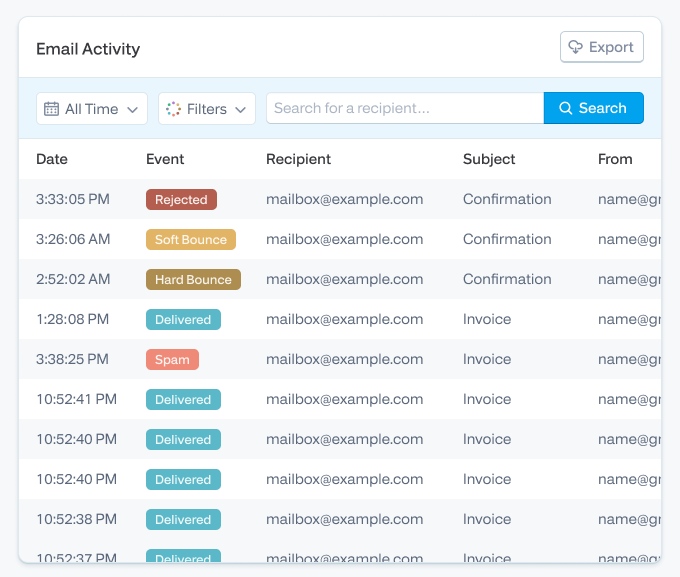
What we’d flag honestly. The Activity log search UI can feel dated compared to Postmark’s polished dashboard. We’re rebuilding it. If you live in your provider’s dashboard ten hours a week, Postmark looks prettier today. Also: if you’re a Next.js / React Email shop building a side project, Resend’s developer experience will feel more “of 2026” than ours. We’re focused on production deployments at scale, not on being the trendiest tool in the YC batch.
Bottom line. If we weren’t the publisher of this article, we’d still recommend SMTP2GO for around 80% of the readers who land on it. It’s the safest competent default. You can get from “sign up” to “first delivered email” in about ten minutes, support actually picks up, and your reputation isn’t sharing a building with a Lithuanian sportsbook’s marketing list.
Try SMTP2GO free for 1,000 emails/month. No credit card.
2. Postmark - Best for deliverability-critical app email
Best for: SaaS and consumer apps where a delayed transactional email is a support ticket. Password resets, two-factor codes, payment receipts, booking confirmations. The “if this email doesn’t land in 30 seconds, we lose the customer” use case.
Not for: anyone sending marketing email through the same account (Postmark explicitly separates the streams, but you’ll be paying transactional prices for it). Teams sending under 100/month (their free tier is genuinely tiny). EU senders with strict data residency rules (US-only data hosting).
Free plan: 100 emails/month for developers.
Pricing: $15 for 10k. $55 for 50k. $115 for 100k. Considerably pricier than the rest of this list, and they’re honest about it.
The case for Postmark. EmailTooltester’s 2026 test gave them a 93.8% average, with three of four rounds at 95-97% (round four pulled the average down with an 87% on what looked like a Microsoft-specific deliverability dip). Knock’s benchmarks show p50 API response of 23ms and p99 of 228ms, which is among the fastest on the market. Postmark also publishes their time-to-inbox data publicly, which almost no other provider does. That kind of operational transparency earns respect.
What’s genuinely great. Strict separation of transactional and bulk streams (so a marketing send can’t tank a password-reset’s deliverability). DKIM + SPF + DMARC are first-class citizens in the UI. 45-day message retention on all plans. Dashboard is the cleanest in the field. Documentation is excellent. Webhooks and inbound parsing work well.
What we’d flag. Templating is plain compared to SendGrid or Brevo (no drag-and-drop visual editor worth mentioning). Pricing scales steeply: at 100k/month you’re paying about 50% more than SMTP2GO and double Brevo. US-only data hosting is a hard “no” for some EU teams, regardless of how good the deliverability is. And they’re now owned by ActiveCampaign, which has been gentle so far but is worth knowing.
Bottom line. If your business model breaks the moment a transactional email is late, and you have the budget, Postmark is worth the premium. We’d send a developer-tooling SaaS or a fintech to Postmark before we’d send them to ourselves. Honest answer.
3. Amazon SES - Best for AWS-native teams sending at scale
Best for: dev teams already deep in AWS, sending more than 500k/month, who treat email deliverability as an in-house infrastructure problem.
Not for: anyone who wants a working dashboard out of the box; anyone who doesn’t have a developer on the team; teams sending under 50k/month (the savings don’t justify the operational overhead); MSPs managing multiple client domains.
Free tier: 3,000 emails/month for the first 12 months.
Pricing: $0.10 per 1,000 emails. Nobody on this list comes close. At 1M/month you’re paying $100 to SES vs. somewhere between $400 and $1,200 to the others.
The case for SES. Cheapest at scale, full stop. Knock benchmarks show p50 of 153ms (mid-pack) and 0.00% error rate over hundreds of millions of sends, which is fine. Tight integration with the rest of AWS: events into EventBridge, metrics into CloudWatch, identity through IAM. If you’re already SOC-compliant in AWS, you’re not paying the compliance lift twice.
What you’re trading away. Everything that makes a transactional email service feel like a service. Setup is genuinely involved. Every account ships sandboxed - 200 messages per 24 hours, allowlist-only recipients, until you write to AWS support and convince them you’re not going to spam. Analytics aren’t really a dashboard, they’re SNS topics you route through a Lambda. There’s no UI for templates worth using. Dedicated IPs are $24.95/month. And if deliverability slips, you fix it. Amazon will not.
We’ve spoken to teams who migrated to SES for the cost and migrated back off SES because deliverability dropped and they couldn’t get human support fast enough. ThinkPorch made that exact move - they came to us after AWS SES support delays during a deliverability incident. That’s a real pattern, not a one-off.
Bottom line. SES is the right answer if you have an engineer who can build the missing operational layer around it. If you don’t, the per-email price doesn’t matter, because you’ll pay for it in lost-email customer-support load.
4. Brevo - Best if you genuinely need marketing + transactional in one place
Best for: small-to-mid-sized businesses where the marketing team and the dev team are the same three people, and they want one tool, one database, one bill.
Not for: anyone sending high-value transactional email where deliverability is non-negotiable (their 2026 test result is below the field). Teams who already use a separate marketing automation tool. Companies that need strict transactional-vs-marketing IP separation.
Free plan: 300 emails/day (so ~9k/month).
Pricing: From $9/month at 5k. $25/month at 20k. $65 at 100k. Add $12/month to remove Brevo branding from emails on lower tiers (annoying but disclosed).
The case for Brevo. It’s a near-complete marketing platform with transactional bolted in. Drag-and-drop email builder, automation workflows, segmentation, SMS, CRM, Facebook ads integration. EU-headquartered (Paris) and GDPR-friendly. For a team of three people who don’t want to integrate Mailchimp + SendGrid + a CRM, Brevo is a defensible single-platform answer.
The honest concern. EmailTooltester’s 2026 test put Brevo at 79.8% average, with one round dipping to 72% on what looked like a Hotmail/Outlook issue. That’s well behind SMTP2GO (95.5%) and Postmark (93.8%) on the same test methodology. If your transactional email is critical, that gap matters more than the marketing features.
There’s a structural concern too. Mixing transactional and marketing email on the same sender reputation is risky. If your marketing list goes stale and complaint rates spike, your password resets share the punishment. Postmark and SMTP2GO both isolate the streams properly. Brevo’s approach is less rigorous.
Bottom line. Right call for small businesses where consolidation matters more than absolute deliverability ceiling. Wrong call if your transactional email needs to be bulletproof. If you go Brevo, keep a separate sender domain for transactional and watch your bounce rates closely.
5. Mailgun - Best for developer teams who want deep API flex
Best for: product teams that want a powerful, well-documented API; companies that need EU data residency; senders at 100k–1M/month who care about deliverability tooling and have an engineer to wield it.
Not for: non-technical users (the UI assumes you know what you’re doing); teams whose ideal setup time is “fifteen minutes” rather than “an afternoon”; anyone on the cheapest plan who needs decent support (it’s email-only on lower tiers).
Free plan: 100/day, ongoing, no expiry. Honest free tier.
Pricing: $15/mo for 10k (Basic). $35 for 50k (Foundation). $215+ at 250k (Scale tiers). Custom above 2.5M.
The case for Mailgun. Mailgun has been doing this since 2010. Sends for Lyft, American Express, Wikipedia. Their deliverability documentation is among the best the field has produced. Knock benchmarks show p50 of 130ms — mid-pack but consistent — and 0.00% error rate. Send Time Optimization, email validation, EU and US sending regions, dedicated IP pools on Scale tiers. For an engineering team that wants levers to pull, Mailgun has the most of them.
Honest concerns. Pricing is on the higher side at low-mid volumes (worse value than SMTP2GO at 10–50k). Support on entry plans is email-only and not always fast. UI is dense. Mailgun’s sister product Mailjet (also Sinch-owned) is the marketing-friendly version, which can make the product positioning confusing if you’re shopping the parent company. And Mailgun wasn’t included in EmailTooltester’s 2026 deliverability test, so we don’t have current independent inbox-placement data to point at — judge on architecture and reputation.
Bottom line. A serious choice for serious dev teams. If we were standing up a 500k/month transactional pipeline for a SaaS company with EU users and an engineer who likes APIs, Mailgun’s on the shortlist with SMTP2GO and Postmark. For non-developers, look elsewhere.
Also worth considering
These didn’t make the top 5, but they’re real options and skipping them would be dishonest.
Resend. Newest of the modern dev-first providers (founded 2023). Best React/Next.js developer experience on the market — they own React Email. Knock benchmarks: p50 80ms, p99 351ms, 0.06% error. Pricing reasonable ($20/mo at 50k). The right choice for a Next.js SaaS being built today by a founder who values DX over operational maturity. Less battle-tested than the rest of this list. Worth watching.
MailerSend. Sibling to MailerLite. Clean modern UI, drag-and-drop builder, good API. EmailTooltester 2026 result: 86.8% avg deliverability — solid, with one weak round. Their free plan was reduced from 3,000 to 500 emails/month in October 2025, which stings. Good fit for SaaS apps that want polish without paying Postmark prices.
Mailtrap. Started as a testing-only sandbox. Now ships a sending product too. Strong developer story (SDKs in Python, Ruby, PHP, Node, Elixir, C#, Go), ISO 27001, GDPR. EmailTooltester 2026 result: 77% avg - inconsistent (one round at 64%). Best use: keep them for staging/test sends regardless of who you use in production.
SendGrid (Twilio). Massive scale, used by everyone from Uber to Yelp. Knock benchmarks: p50 22ms (fastest on the list). EmailTooltester 2026 deliverability: 82% - middling. Free plan is 100/day for 60 days only (then nothing). Email activity history is a paid add-on, which is silly. Worth considering at enterprise scale where SLAs and procurement matter more than feature elegance.
Mailchimp Transactional (formerly Mandrill). Only makes sense if you’re already paying for Mailchimp Standard or Premium. As a standalone choice in 2026, no. As an add-on to a Mailchimp account, it works and the docs are friendly.
Two we’d skip in 2026
Elastic Email. Cheap, but EmailTooltester’s 2026 test put them at 59.5% average deliverability — the worst in the field. Their own support attributed it to shared-IP reputation on the free plan, which is fair, but providers like SMTP2GO achieve 95%+ on shared IPs. So the explanation doesn’t hold up.
SMTP.com. No free trial. Refund policy charges a 20% admin fee and refuses to refund if you’ve sent a single email.
Choose by use case
If you’d rather skip to the answer for your specific situation, here’s the short version.
SaaS or app email (password resets, receipts, alerts). SMTP2GO first, Postmark second.
Ecommerce (order confirmations, shipping updates, abandoned-cart, light marketing). SMTP2GO if you want one tool that handles all of it cleanly. Postmark + a separate marketing tool if you can afford the operational split. Brevo if your team is tiny and consolidation matters more than peak deliverability.
WordPress (WooCommerce, Easy WP SMTP, contact forms). SMTP2GO has a WordPress plugin and works out of the box.
Legacy device estate (copiers, MFPs, security cameras, phone systems, ERPs). SMTP2GO. We are honestly the strongest here. Port 2525 fallback, TLS 1.0/1.1 tolerance, IP allowlisting for static-source devices, and we’ve been doing this since 2007.
MSP / agency / multi-tenant. SMTP2GO sub-accounts give you isolated reputations per client, per-client billing visibility, and a real partner program. No other provider on this list does multi-tenant as cleanly.
EU / GDPR-sensitive. SMTP2GO (EU hosting available), Mailgun (EU region), Brevo (Paris-based), Mailjet (EU data residency).
Very high volume (5M+/month) with engineering muscle. Amazon SES on cost. Mailgun on tooling. SendGrid on enterprise SLA negotiation.
Side project or hobby app. Resend if you’re on React/Next.js. SMTP2GO’s free plan if you’re not. Don’t pay for anything until you’re shipping more than 1,000 emails a month.
What actually moves the needle on deliverability in 2026
Choosing a provider gets you a starting line. It doesn’t get you over it. A lot of senders pick a great service and still land in spam because the setup work didn’t get done. Here’s what’s actually changed in the last two years.
Google and Yahoo’s February 2024 sender requirements. If you send more than 5,000 messages per day to gmail.com (and Yahoo’s equivalent for yahoo.com), you must now publish a DMARC policy of at least p=none, sign with DKIM, publish SPF, align your From: domain with your authentication, offer one-click unsubscribe on bulk mail (RFC 8058), and keep spam complaint rates below 0.3% (target under 0.1%). This is enforced. We see senders get throttled or junked over it weekly. Google’s official post is here.
Microsoft is tightening the same screws. As of May 2025, Outlook.com applies similar requirements to bulk senders above 5,000/day. Microsoft is also deprecating basic authentication for SMTP across legacy applications on a rolling schedule — affected copiers, MFCs, and on-prem apps need to migrate to OAuth-capable relays or a provider that handles the auth abstraction for them.
Apple Mail Privacy Protection broke open rates. Has been since iOS 15 (September 2021), and it’s worse in 2026 because privacy-protected open rates now apply to most iOS Mail users. Stop using open rate as a deliverability proxy. Use delivery rate, bounce rate, complaint rate, and inbox-vs-spam seed testing instead.
Dedicated vs shared IP - and when each is wrong. Below ~100k/month, a shared IP from a reputable provider beats a dedicated IP every time, because you can’t warm one consistently enough. Above ~500k/month, a dedicated IP (warmed properly over 21–30 days) gives you control over your reputation. The 100k-500k middle is messy: it depends on your sending cadence. SMTP2GO and Postmark both explain this well. Don’t ask for a dedicated IP because it sounds professional. Ask for one when shared isn’t working.
Suppression list hygiene. Every hard bounce should go onto your provider’s suppression list automatically and stay there. Every complaint (FBL feedback) should suppress immediately. If your provider doesn’t do this by default, switch.
SMTP relay vs API: a quick honest answer
Use SMTP relay if you’re integrating with off-the-shelf software (WordPress, your CRM, your copier, MailPoet, Magento) that has an SMTP option built in. The integration is usually a 5-minute config screen.
Use the API if you’re building a custom application and want richer event data, templating, batch send optimization, and webhook hooks for engagement events. APIs typically deliver a few hundred milliseconds faster than SMTP relay, which matters for password resets and 2FA codes but not for order confirmations.
Use both if your stack is mixed. SMTP2GO, Postmark, Mailgun, and SendGrid all let you use both side by side on the same account without weirdness.
For most senders the choice is forced by the integration in front of you, not by a strategic decision. Don’t overthink it.
The “cheap provider” trap: cost per delivered email
The headline price on a provider’s pricing page is cost per sent email. The number that actually matters is cost per delivered-to-inbox email. Watch what happens when you apply EmailTooltester’s 2026 tested deliverability rates to like-for-like 10,000-email plans.
| Provider | List price (10k/mo) | Tested inbox placement | Effective cost per 1,000 delivered |
|---|---|---|---|
| SMTP2GO | $15 | 95.5% | $1.57 |
| Postmark | $15 | 93.8% | $1.60 |
| MailerSend | $7 (Hobby plan) | 86.8% | $0.81 |
| Mailtrap | $15 (10k tier) | 77.0% | $1.95 |
| Brevo | $15 (20k tier) | 79.8% | $0.94 |
| Elastic Email | $9 | 59.5% | $1.51 |
The lesson here isn’t that MailerSend is cheapest (though it is, on this calculation). It’s that Elastic Email costs almost as much per delivered email as SMTP2GO does, despite looking 40% cheaper on the sticker. Headline price is misleading.
Migrating without burning your sender reputation
A few specific things to do, in order, if you’re switching providers.
Don’t move all your traffic at once. Phase it: start with 10% of sends on the new provider, watch the bounce and complaint rates for 48 hours, then ramp 25%, 50%, 100% over a week. New IPs (shared or dedicated) need a few days of “this isn’t a botnet” before mailbox providers settle their suppression heuristics on you.
Set up DKIM and SPF on the new provider’s sending domain before you cut over. Make sure DMARC alignment is preserved (the From: domain matches the DKIM signing domain). Our DKIM deepdive walks through this.
Pull your suppression list from the old provider and import it to the new one. This is the single biggest miss we see in migrations: a brand-new provider doesn’t know that the 4,000 addresses you’ve been suppressing for six months are still bad. The first send out the door re-bounces all of them, which trashes your reputation immediately.
Keep the old provider running for 30 days after cutover in case something breaks. The marginal cost is small. The cost of being unable to roll back is enormous.
Our full guide to switching providers is here.
There isn’t one. The honest answer is “depends on the workload.” For the broadest audience (mixed teams, MSPs, device estates, SMBs), SMTP2GO. For dev-team app email where time-to-inbox is the entire job, Postmark. For AWS-native dev teams at 1M+/month, SES. Anyone telling you there’s a universal #1 is selling you something. Above 95% inbox placement on a third-party seed test is excellent. 90-95% is good. 85-90% is okay but worth looking at why. Below 85% means something’s wrong — usually authentication, list hygiene, or content, not the provider. Read our deliverability guide. Whichever your integration supports. SMTP for off-the-shelf software, API for custom builds. They’re both legitimate. APIs are usually a few hundred ms faster. Below 100k/month, almost never. Above 500k/month, usually yes. In between, depends on your sending cadence and how stable your reputation already is. Detailed answer here. Yes. Use separate sender domains (or at minimum separate subdomains and separate sending streams), so a marketing reputation hit doesn’t drag down your password resets. SMTP2GO, Postmark, and Mailgun all support this cleanly. Brevo and Mailjet mix them more aggressively, which is risky. For a side project sending under 100/day, sure. For a business, no. Web hosts cap aggressively (1&1 IONOS at 30 messages per 5 minutes, for example). Gmail SMTP relays through your personal address and isn’t built for application sending. The deliverability and operational gap compared to a real transactional provider is enormous. Our take on whether you need one. If you send 5,000+ messages per day to gmail.com or yahoo.com, you need DMARC enforcement, aligned SPF and DKIM, one-click unsubscribe on bulk, and a complaint rate under 0.3%. Every provider on this list helps you meet these. SMTP2GO and Postmark configure the auth for you on a verified sending domain. SES makes you do it yourself. Only if you’re already paying for Mailchimp Standard or Premium. As a standalone choice, no. Amazon SES at $0.10 per 1,000, by a wide margin. But cheap by send price is not cheap by total cost of ownership. If you have to hire a developer to babysit it, you’ve spent more than SMTP2GO’s entire annual fee in a week of engineer time. Use GlockApps or Mail-Tester. Send a real email through your provider to a seed list of inboxes across Gmail, Outlook, Yahoo, AOL, and a corporate Microsoft 365 tenant. Watch what lands where. Repeat over 4 rounds at different times to catch variance. This is exactly what EmailTooltester does in their independent tests.Frequently asked questions
A note on transparency. This article is published by SMTP2GO. You’ll see us in the rankings, and you’ll see exactly why. Where another provider is a better fit for your situation, we say so plainly, and we name them. The third-party deliverability data cited below comes from EmailTooltester’s 4-round GlockApps tests and Knock’s published API benchmarks. The audit work is theirs. The opinions are ours.


No thoughts shared yet. Be the first to leave a comment above!