Short answer: Yes, Gmail is still blocked in mainland China in 2026, the same as it’s been since 2014. If you need to read your inbox, you’ll want a VPN, an international eSIM, or roaming. But if your real problem is sending (an app, a website, a CRM, a printer, or just Outlook trying to push mail out), that’s a different problem with a cleaner fix: route your outbound mail through an SMTP relay (SMTP2GO) on port 443 with SSL. It often slips straight through the Great Firewall, because blocking that port would break secure web browsing for the whole country.
Most guides on this topic are written for travelers trying to open their inbox. This one’s written for the other person. The sysadmin whose WordPress site stopped sending order confirmations the day the team opened a Shanghai office. The developer whose app’s password-reset emails vanish from inside the country. Different problem. Keep reading.
Does Gmail work in China in 2026?
No, not on a normal mainland China connection. As of June 2026, Google’s services are blocked by the Great Firewall, and that’s held steady since mid-2014. It’s not just the Gmail website either. The block reaches:
- Gmail on the web (mail.google.com won’t load)
- The Gmail mobile app (Android and iOS)
- Google Workspace Gmail (your custom-domain Google account is affected too)
- IMAP, POP, and SMTP – so you can’t quietly pull your mail down into Apple Mail or Outlook and dodge the website block. The protocols are blocked at the connection level.
A few things worth knowing before you assume the worst:
Hong Kong and Macau are different. They sit outside the Firewall, so Gmail generally works there on local networks. If your traveler or office is in HK, this whole article may not apply.
eSIMs changed the game. This is the part the old version of this page couldn’t have mentioned, because consumer eSIMs barely existed in 2014. An international roaming eSIM routes your phone’s data through a network outside mainland China, so the Firewall treats you like an international roaming user and Gmail loads. For a quick inbox check on a phone, that’s now often easier than fighting with a VPN.
The block targets access, not your account. Your Gmail account is fine. Your mail is sitting there. The problem is the pipe between your device and Google’s servers, which is exactly why the sending problem and the reading problem have different solutions.
First, which problem do you actually have?
This is the question almost every other guide skips, and it’s the one that saves you hours. “Gmail is blocked in China” is really five or six different problems wearing the same coat. Here’s how they sort out.
| What you’re trying to do | Best first move | Does SMTP2GO help? |
|---|---|---|
| Open and read your Gmail inbox | VPN, international eSIM, or roaming | No, not by itself |
| Receive a few critical messages | Forwarding to an accessible inbox + a backup recovery email | Not the primary fix |
| Send from Outlook, Apple Mail, or Thunderbird | An SMTP relay on a port that isn’t blocked | Yes |
| Send from WordPress, WooCommerce, a CRM, an app, or a printer | An SMTP relay your software points at | Yes |
| Reach Chinese customers or suppliers reliably | An SMTP relay with proper authentication and reporting | Yes |
| Keep sending when your VPN drops mid-day | SMTP2GO for outbound, forwarding for inbound | Yes, as your backup path |
If your honest answer is one of the top two rows, the rest of this page will still be useful, but the real fix is connectivity (a VPN or eSIM), and we’ll point you there fairly in the next section. If you’re in the bottom four rows, you’re in the right place.
If you just need to READ Gmail in China
Quick and honest, because this isn’t where SMTP2GO fits and we’re not going to pretend otherwise.
To get your actual inbox back on a mainland connection, you have a few options, each with a real trade-off:
- A VPN restores full access to Gmail and the rest of Google, but only if it’s one of the few that reliably beats the Firewall, and you have to install it before you arrive (the download pages are often blocked once you’re inside). Set it up at home.
- An international eSIM or roaming routes your data outside China, so Gmail works on your phone without a VPN at all. Easiest path for mobile-only inbox checks. Less helpful for a desktop workflow.
- Email forwarding set up before you travel pushes important mail to an inbox you can reach inside China. A good safety net for “I just need to not miss anything critical.”
- Gmail offline mode lets you read already-downloaded mail, but it won’t fetch anything new. Emergency fallback only.
Pick based on whether you need everything (VPN), just your phone (eSIM), or just the important stuff (forwarding). That’s the whole decision. Now, the part this page is actually for.
If you need to SEND email from China: use an SMTP relay
Here’s the distinction that matters. When your app, your website, or your email client sends a message, it doesn’t need to load a webpage. It just needs to hand the message to a mail server it can reach, over a port that isn’t blocked. That’s all an SMTP relay (SMTP2GO) is: a sending server you point your software at, which takes the message and delivers it on your behalf. (New to the idea? We wrote a plain-English intro to SMTP relays.)
The trick from inside China is the port. Most mail software defaults to port 587 or 25 for sending. Those get throttled or blocked all the time on restricted networks. But port 443 is the port secure websites use. Blocking it would break HTTPS for the entire country, so it stays open. Point your sending at an SMTP relay on 443 with SSL, and your mail usually goes straight out while the Gmail website is still sitting there refusing to load.
The exact settings
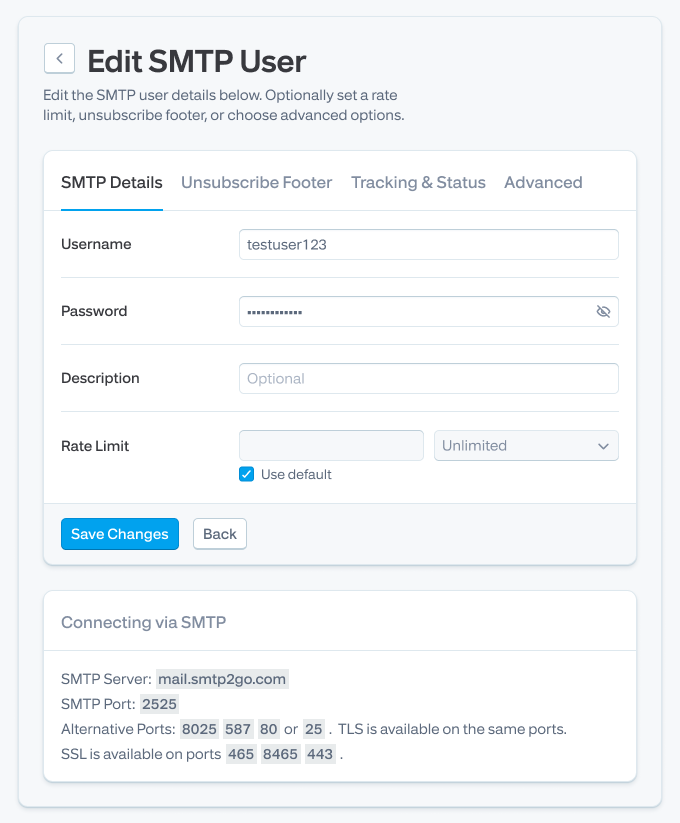
This is SMTP2GO’s documented controlled-location setup, and it’s the same configuration the support team recommends for China today:
| Setting | Value |
|---|---|
| SMTP server | mail.smtp2go.com |
| SMTP port | 443 |
| SSL | On |
| If 443 is blocked, try | 465, then 8465 (SSL on) |
| If all three fail | Use a VPN alongside SMTP2GO |
| Username / password | From Sending → SMTP Users in your dashboard |
That’s it. Five fields. No webpage to unblock, no inbox to recover. You’re not trying to defeat the Firewall, you’re just sending mail over a door it can’t afford to close.
Why port 443 works when 587 and 25 don’t
It’s the same logic the VPN crowd relies on, applied to email. Port 443 carries HTTPS, the encrypted traffic behind every secure website, bank login, and payment page in the country. A censor can throttle or block niche ports like 587 or 25 without anyone noticing. Block 443 and you’ve taken down secure browsing nationwide. So it stays open, and an SSL connection to a mail relay on 443 looks, from the outside, a lot like ordinary secure web traffic.
This is also why our customers running odd hardware lean on it. OPW Electronic Systems sends alerts and reports off proprietary equipment, and as their team put it, the flexible range of ports lets their gear “work on almost all network configurations.” Same principle: when the standard mail port is closed, you reach for one that’s open. (If ports are new territory, we made a plain-language guide to SMTP ports.)
Set it up in your app, device, or website
The settings above go anywhere that has an “outgoing mail” or “SMTP” field. Swap in mail.smtp2go.com, port 443, SSL on, and your credentials. A few specifics by use case, with the full walkthroughs linked:
- Outlook: point the outgoing server at the controlled-location settings. Outlook setup guide
- Apple Mail: same idea under the outgoing (SMTP) server settings. Apple Mail setup guide
- Thunderbird: edit the outgoing server in account settings. Thunderbird setup guide
- WordPress & WooCommerce: use an SMTP plugin so order confirmations and password resets stop silently failing. WordPress plugin guide · WooCommerce guide
- CRMs & helpdesks: Salesforce, Zoho, and the rest take standard SMTP credentials. Salesforce guide · Zoho CRM guide
- Printers, scanners & devices: scan-to-email and device alerts are a classic China headache. Ricoh · Kyocera · Xerox
- Custom apps: send over SMTP or the API. Node.js · Python · PHP
One Gmail-specific caveat worth its own line. If you’ve set up Gmail’s “send mail as” to send through a different address, that feature still routes through Google and can stamp your messages with an awkward “on behalf of” header. Sending through your own relay avoids it. We’ve written up how to dodge the “on behalf of” message if that’s your situation.
A full library of setup guides covers the apps not listed here.
“Sent” doesn’t mean “delivered” – what to watch from China
Getting the message out is half the job. The other half is knowing it arrived, and that’s where sending blind from a restricted network gets expensive. A few failure modes are sharper from China than from a normal connection:
- A throttled port can swallow a message so your app reports success while nothing left.
- Mail sent from a fresh or shared setup can quietly land in spam without a single bounce to warn you.
- A hard bounce or a spam complaint you never see is a reputation problem building in the dark.
The fix isn’t hope, it’s visibility. SMTP2GO’s Activity dashboard logs what happens to every message: delivered, bounced, opened, clicked, rejected, marked as spam. You track a send to its destination roughly the way you’d track a parcel. When something fails silently, you find out, instead of hearing about it from an angry customer three days later. SPF and DKIM are handled for your domain so your mail authenticates properly, which matters more than ever now that Gmail and Yahoo enforce authentication rules for bulk senders.
This is the part real customers keep coming back to:
- Intelligent Eye put it simplest: “Where I have sometimes been blocked from sending, such as at hotels, SMTP2GO has been able to send.” A hotel network and the Great Firewall block mail for the same kinds of reasons, and the workaround is the same.
- Stored Technology Solutions has used SMTP2GO since 2011 to keep phone systems, copiers, and printers sending “with no headaches and no downtime,” after ISP limits made device email harder and harder to deliver.
- GlaxoSmithKline runs a time-critical notification system on it, pushing manufacturing-room conditions to the next shift so production can start on schedule. Their note: it “worked accurately from Day One.”
- Group IMD, a SaaS provider, scaled on it from 10,000 emails a month to over a million over six years, because their customers expect email to “just work.”
None of those are China case studies. They’re something more useful: proof that when a network fights your outbound mail, this is the layer that keeps it moving.
Troubleshooting: still not sending from China
Work down this list. Most “it won’t send” reports are one of the first three.
Port 443 won’t connect. Try 465, then 8465, SSL on for each. If all three stall, the network is doing something unusual (a corporate firewall doing deep packet inspection, say). That’s the case where you run a VPN and SMTP2GO together.
You get a 535 authentication error. This is credentials, not the Firewall. Re-copy your username and password from Sending → SMTP Users, watch for trailing spaces, and confirm SMTP authentication is switched on in your app.
SSL/TLS errors. Make sure you’ve selected SSL (not plain/STARTTLS) for ports 443/465/8465. Legacy devices sometimes only speak an old TLS version. If a printer or older box refuses to handshake, check its firmware and TLS support.
It sends, but never arrives. Open the Activity dashboard and find the message. The event tells you the story: a hard or soft bounce points at the recipient address or server; “delivered” means it’s a placement problem, covered next. Our guide to hard vs soft bounces decodes the rest.
It lands in spam. Confirm SPF and DKIM are set for your domain, keep your content clean, and warm up gradually if you’ve just started sending volume. Start with our stay-out-of-spam playbook.
Attachments fail. SMTP2GO allows up to 50MB per email. If a device chokes below that, the limit is usually the device or the recipient server, not the relay.
Your VPN browses fine but email still won’t send. That’s the giveaway that your problem was never inbox access. The browser works because 443 is open. Point your mail at 443 too and it’ll move.
FAQs
Does Gmail work in China in 2026?
No, not on a standard mainland connection. It’s been blocked since 2014 and remains blocked as of [PUBLISH MONTH/YEAR]. Hong Kong and Macau are exceptions.
Can I use Gmail in China without a VPN?
For reading your inbox, an international eSIM or roaming often works without a VPN, since it routes your data outside China. For sending, you don’t need a VPN at all if you use an SMTP relay on port 443.
Does SMTP2GO let me access my Gmail inbox?
No. SMTP2GO handles outbound sending. It doesn’t unblock or open your Gmail inbox. Use a VPN or eSIM for that.
Can SMTP2GO send from my Gmail address?
You can send using your own domain through SMTP2GO. Sending “as” a @gmail.com address has its own quirks and an “on behalf of” header issue worth reading up on first.
Which SMTP port should I use in China?
Start with 443 (SSL on). If that’s blocked, try 465, then 8465. Avoid 587 and 25 on Chinese networks, they’re commonly restricted.
Does this work with Google Workspace?
Google Workspace Gmail is blocked in China the same as consumer Gmail. For sending from Workspace-connected apps, routing outbound mail through SMTP2GO on port 443 sidesteps the block.
Does it work with Outlook or Apple Mail?
Yes. Both have outgoing-server settings where you enter the controlled-location config. See the setup links above.
What if port 443 doesn’t work?
Try 465 and 8465 first. If none connect, the network is heavily restricted, and that’s when you pair a VPN with SMTP2GO.
Can I use SMTP2GO for WordPress or WooCommerce emails in China?
Yes, and it’s one of the most common reasons people set it up. An SMTP plugin pointed at the controlled-location settings stops order confirmations and password resets from silently failing.
What’s the best backup plan before traveling to China?
Install a working VPN at home, set up an international eSIM, forward critical mail to a reachable inbox, and configure your sending apps on port 443 so outbound email keeps working even if your VPN drops.
Start sending from China in about five minutes
If your inbox is the problem, sort out a VPN or eSIM before you fly. If your sending is the problem, this part’s quick:
- Create a free SMTP2GO account.
- Set your app or device to
mail.smtp2go.com, port 443, SSL on. - Send a test message.
- Open the Activity dashboard and confirm it shows delivered.
Four steps, and your outbound email is back, whether you’re behind the Great Firewall, a hotel network, or an ISP that throttles the usual ports. If business depends on email while you’re operating in China, don’t leave it to a VPN that might drop at the worst moment.
Start my free account → Free plan included. No credit card.
About the author

Charlie Abrahamson
Charlie is CEO and co-founder of SMTP2GO. He started the company in 2006 after a trip to Argentina left him locked out of his own email (every internet café and local ISP blocked his attempts to send). Twenty years later, SMTP2GO delivers email for businesses around the world from its Christchurch, New Zealand base. Charlie has personally configured SMTP relays, debugged deliverability incidents, and led migrations for senders ranging from small businesses to enterprises moving off AWS SES, SendGrid, Mailgun, and Postmark. SMTP2GO is ISO 27001 certified, GDPR compliant and an M3AAWG member.






My practical approach for China is to test everything before the flight: eSIM/roaming, hotel Wi-Fi expectations, and VPN login. I’d still keep mobile data as a fallback because conditions vary a lot.