SMTP2GO vs Mailgun
Which email delivery service is right for you?The same reliable transactional and bulk sending you expect, but with easier setup, clearer reporting, better support, and a free plan that stays free.
-
'“Excellent product.”'
I left Mailgun because they were just not interested in replying to our support tickets. I never had any issues with SMTP2GO.
-
'“Free account in seconds.”'
Mailgun and Sendgrid were not working as I expected them to. SMTP2GO was the simplest, fastest more humanized process I had the chance to test.
-
'“Very reliable company.”'
Services like Mailgun or Sendgrid are good but if you need a smtp server that's fast and reliable without all the "extras" this is the one.
-
'“One word: Great!”'
As a developer for a plan system for service companies, we are sending 10k e-mails each month. Delivery success is extremely high.
-
'“Saved our lives!”'
SMTP2GO was able to deliver both our email and voicemail to email 100% of the time. Never had an issue and we are sending 1000's of email per month.
Compared to Mailgun, SMTP2GO gives you more free sending, broader sending flexibility, stronger value for money, and higher ratings across major review platforms.
| SMTP2GO | Mailgun | |
|---|---|---|
| 1. Value for money | 4.7 | 4.1 |
| 2. Ease of use | 4.8 | 4.3 |
| 3. Reputation | 4.9 4.7 4.8 | 4.3 4.2 4.1 |
| 4. Support | 1:1 support free on all plans | No chat support on free plan |
Better value for money
At many sending volumes, SMTP2GO gives teams a lower-cost path than Mailgun.
Mailgun’s free plan is generous for testing and developer use.
But once you move into a regular business sending, SMTP2GO becomes very competitive. For example, at 50,000 emails per month, SMTP2GO is $30/month, while Mailgun is $35/month. Similarly, at 100,000 emails per month, SMTP2GO is $75/month, while Mailgun is $90/month.
Mailgun can be a good fit for teams that need its advanced developer-focused platform. SMTP2GO is built for businesses that want reliable email delivery, clear reporting, and human support without paying extra.
Simpler everyday sending
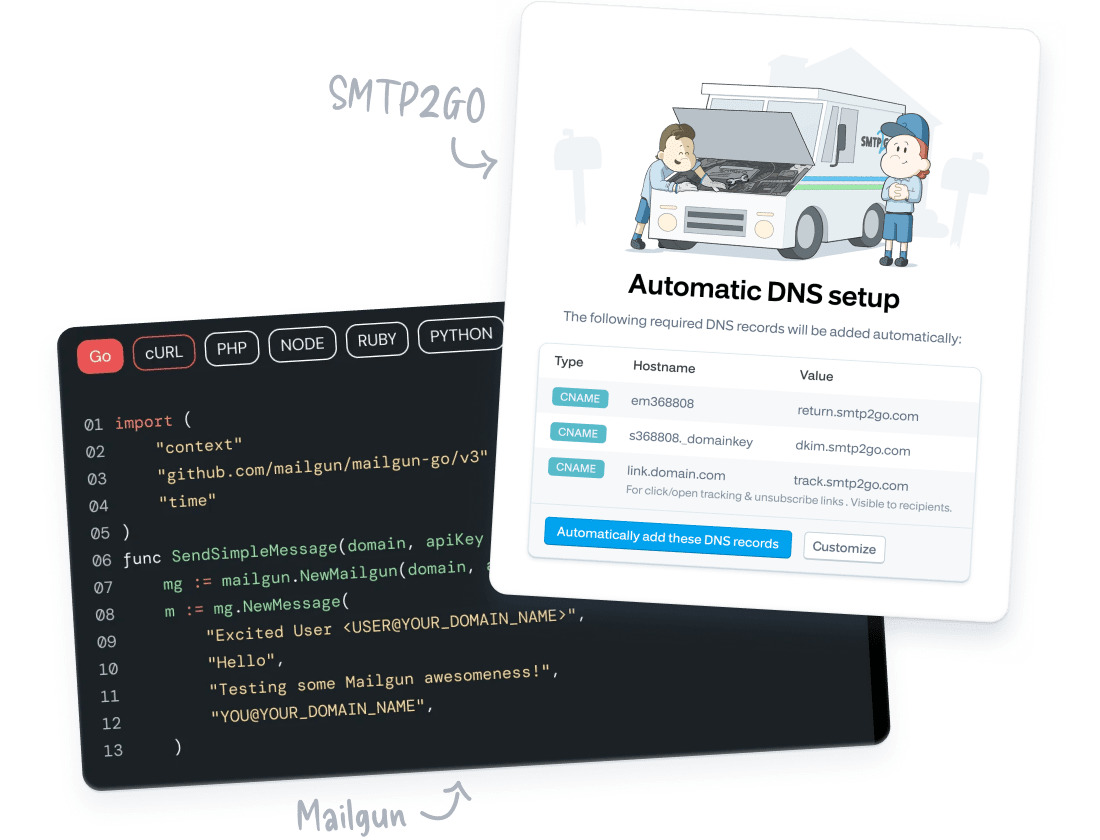
Mailgun gives developers lots of infra control.
SMTP2GO makes all types of email delivery simpler.
Mailgun can be a strong choice for technical teams that want advanced API workflows, routing, validation, suppression controls, dedicated IP options, security controls, and enterprise-style configuration.
SMTP2GO is built for teams that want dependable SMTP and API sending, clear reporting, and practical troubleshooting without navigating more controls than they actually use.
A stronger reputation
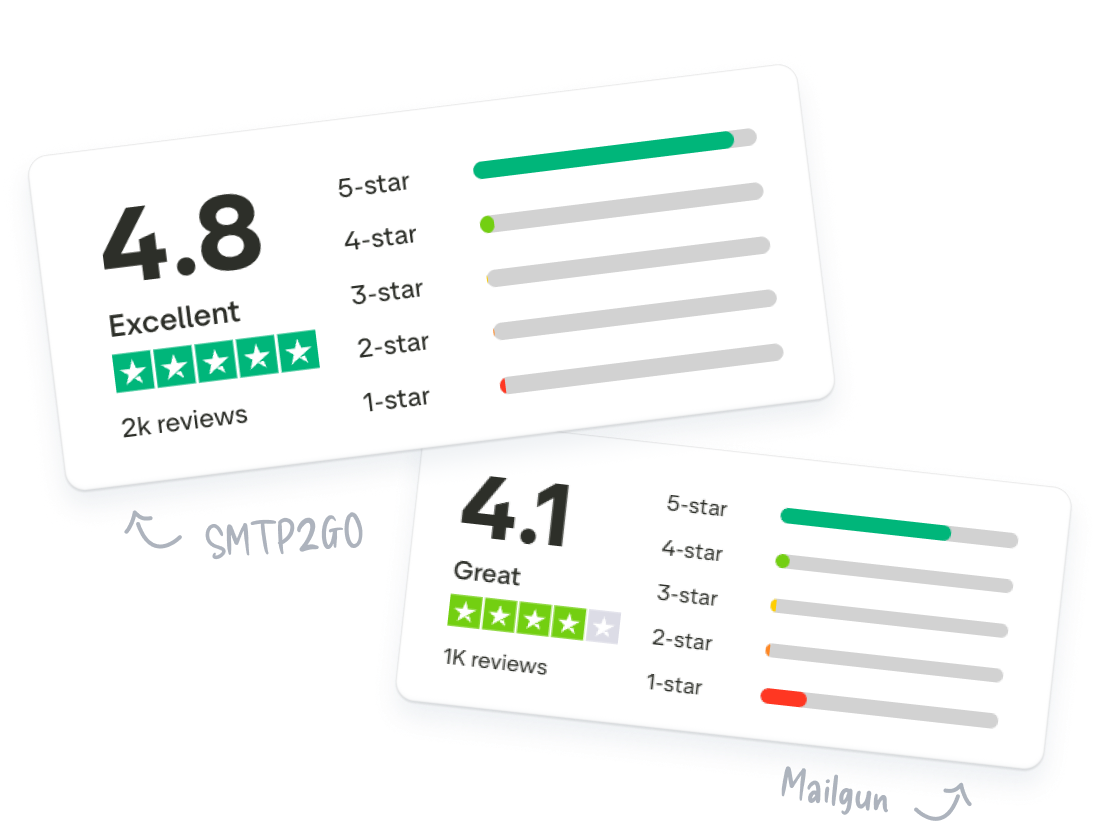
SMTP2GO ranks higher on major review platforms.
Email delivery is an essential business function, and too important to gamble on. SMTP2GO receives stronger ratings than Mailgun across review platforms, with users repeatedly highlighting reliability, support, deliverability, and ease of use.
That makes SMTP2GO a great choice for teams that value the safety of endorsements from real users using the platform day-to-day for years.
Ratings checked June 8, 2026.
More ways to get support
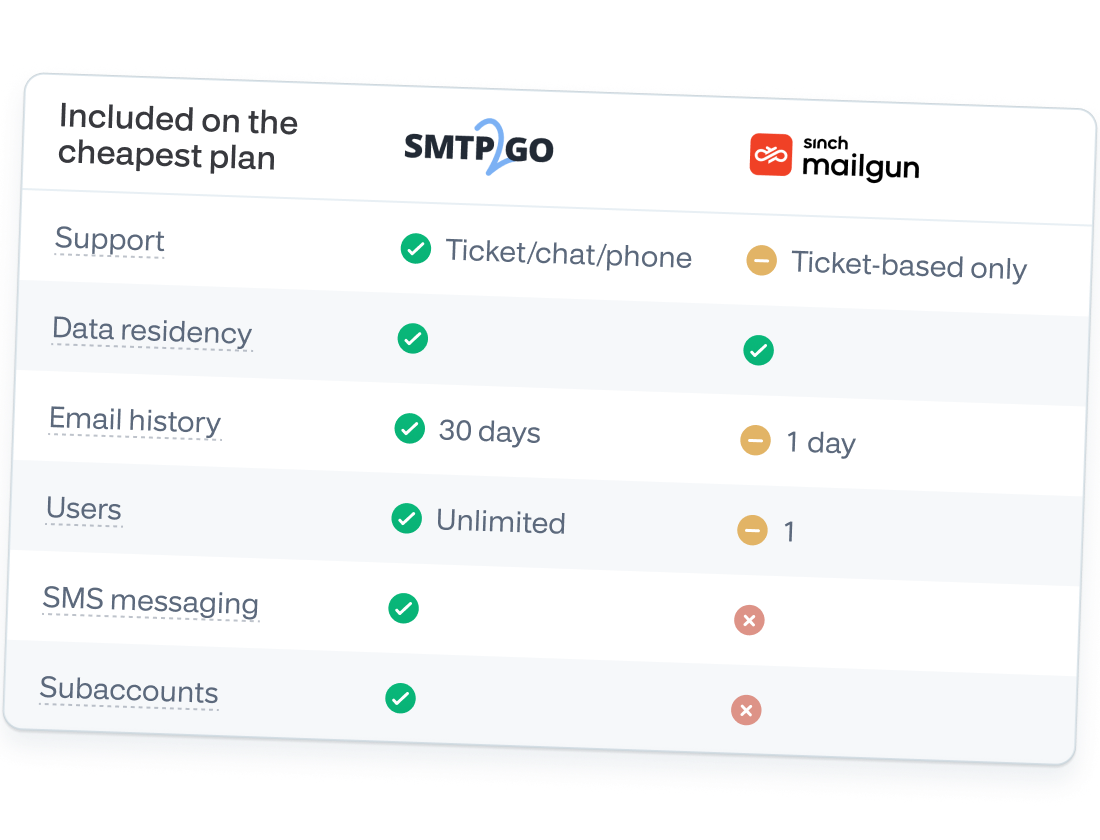
Mailgun talks to users on its highest plan.
SMTP2GO gives all paying customers phone & chat support.
Mailgun includes ticket support on most paid plans, which may be enough for technical teams that are comfortable working through email infrastructure issues asynchronously.
SMTP2GO is built around accessible human support, with ticket support, live chat, toll-free phone, setup assistance, and priority support available depending on the plan.
That makes SMTP2GO a better fit for teams that want more direct ways to get unstuck when email delivery affects customers, orders, password resets, app notifications, or internal systems.

Ready for simple, great value email delivery?
Start sending emails with a platform that's easy to set up, backed by responsive support, and trusted by businesses around the world.
Frequently asked questions
- What is the difference between a free account and a paid account?
-
Free accounts come with a monthly allowance of 1,000 emails and a limit of 200 emails per day. There is an hourly limit of 25 emails (the hourly limit is removed when you verify your sender domain). Free accounts are limited to 5 days of email reporting, and 2 weeks of phone and live chat support. Paid accounts have no hourly limit and your monthly allowance is based on the plan you choose.
- Why would we need SMTP2GO?
-
Every person, and every business, needs a reliable outgoing email service for sending emails. SMTP services offered by webhosts and ISPs are being discontinued, or greatly restricted. They don’t want to run them in the first place, and put the minimum possible amount of resources into their maintenance. When things go bad, you’ll likely be left high and dry, trying to get answers from support staff reading from scripts.
Aside from low quality webhost/ISP services, you theoretically could run your own email servers. However, bear in mind that email delivery is a complex, specialized, and constantly evolving field that really does take years of experience and hours of time every week.
- OK, how do I actually send emails?
-
Setting up SMTP2GO simply involves entering our SMTP server details into the settings of your email software (e.g. Outlook), or your code. To make it easier, we’ve provided setup instructions for most email programs and scripting languages. Click here to view our setup guide.
- Is there an API I can use to send emails with?
-
Of course! Our API enables you to integrate SMTP2GO with your email systems. Using the API, you can send emails, retrieve details of previously sent emails, and even manage various features of your account like Sender Domains, SMTP Users, sub-accounts, suppressed email addresses and domains, and retrieve statistical reports. Detailed documentation on how to use the API is available.
You’ll also have access to our Webhooks. Webhooks are an advanced feature that can notify your web services whenever an event happens in your SMTP2GO account. You can use these events to track what happens to the emails you send. Learn more about webhooks with SMTP2GO.
- Will SMTP2GO work even if port 25 is blocked?
-
Yes – SMTP2GO is open on different SMTP ports (25, 80, 587, 2525, 8025). We recommend using por 2525, which is open from most locations. Try a different port number if port 2525 is blocked at your location.
TLS is available on the same ports, and SSL is available on ports 465 and 8465.