MetaTrader is excellent software for analyzing financial markets and making trades.
It also comes with a feature enabling emails to be sent to an email address of your choice, using an SMTP server.

SMTP2GO provides an SMTP server that can be used with MetaTrader, and is used by many currently active MetaTrader users.
To setup SMTP2GO as the SMTP server in your MetaTrader software, you firstly need an SMTP2GO account, which you can get by signing up.
You then need to apply the following settings in your MetaTrader software (click the image to enlarge):
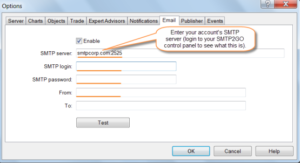
Open MetaTrader application and click Options from Tools menu.
Click Email tab.
Check Enable checkbox.
Change the SMTP Server setting to your account’s SMTP server followed by Port Number :2525. You can also try using Port Number 25, 8025 or 587. You can see what is your SMTP server by login into your SMTP2GO control panel.
To see everything is working, enter From: and To: Email addresses and click Test.
Click OK to save your settings.
Make sure to enter an email address in the ‘From’ field that you have registered with SMTP2GO, and click ‘Test’ to see if everything is working as it should!
We have also had reports that MetaTrader sometimes fails to properly change SMTP settings. If you are still unable to send, please do the following:
– close MetaTrader
– delete the email.ini file in your MT4 ‘config’ folder
– open MetaTrader and re-enter the email settings