
Xerox WorkCentres have a feature called ‘Scan to E-mail’ which can be used to send emails.
The feature works great as long as you have an SMTP server that can either authenticate using what is known as ‘POP before SMTP authentication’, or can authenticate based on the sender’s IP address or ‘From’ email address.
SMTP2GO provides an SMTP server that can authenticate based on the sender’s IP address or ‘From’ email address used, and can therefore be used with Xerox WorkCentres. To authenticate based on the sender’s IP address, add the fixed IP address of your Xerox machine to the Settings > IP Authentication page in your SMTP2GO control panel. Gmail’s SMTP server normally doesn’t work, as it requires that SSL is used.
Some example Xerox WorkCentre models that work with SMTP2GO are M118i, M24, M20, M20i, 4150 and 7132. All WorkCentre models will work with SMTP2GO.
SMTP2GO is available by clicking here.
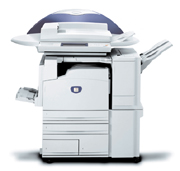
Please note: some Xerox WorkCentres may still have a problem sending – if this is the case, use the IP address of 43.228.184.6 or 103.47.204.4 as the SMTP server.
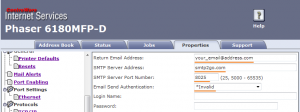
An example configuration screen, showing SMTP2GO setup on a Xerox Phaser 6180 MFP is below. Note that all POP server settings (not shown in the image below, but further down the settings page) should be blank – otherwise the machine may try to perform ‘POP before SMTP authentication’, which won’t work. The Xerox Phaser works with ports 8025 and 25.



No thoughts shared yet. Be the first to leave a comment above!