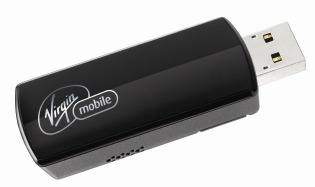
SMTP2GO for Virgin Mobile Broadband2Go.

We have recently been contacted by a Virgin Mobile Broadband user who has advised us that they do not provide an SMTP server for use by their customers for sending emails.

virgin-mobile-usa2

This user has fixed their problem by switching to using SMTP2GO as their SMTP server while connected to the internet through their Virgin Mobile Broadband2Go service.

As SMTP2GO is a worldwide SMTP service, it works from any location in the world where coverage is available. Setup is once-off, generally takes less than 2 minutes, and involves changing your SMTP server, and changing your SMTP port setting to 2525.

More information can be found at the SMTP2GO homepage.
virgin-mobile-broadband2go2

Charlie Abrahamson

Leave a comment

No thoughts shared yet. Be the first to leave a comment above!

Related posts

More Features & Updates articles
  • Scan to Email: How to Set It Up and How to Fix It When It Breaks

    Scan to Email: How to Set It Up and How to Fix It When It Breaks

    Scan to email is five settings. Get them right and a fifteen-year-old copier will send PDFs reliably for another fifteen years. Get one wrong, or let your email provider change the rules underneath you, and you get a two-line error on a touchscreen and a line of people holding paper.

  • Gmail Blocked in China? How to Keep Sending Email That Actually Arrives

    Gmail Blocked in China? How to Keep Sending Email That Actually Arrives

    Most guides on this topic are written for travellers trying to open their inbox. This one’s written for the sysadmin whose WordPress site stopped sending order confirmations the day the team opened a Shanghai office. The developer whose app’s password-reset emails vanish from inside the country.

Not tried SMTP2GO yet?

Get acquainted with our application while you apply. There's no extra cost to track all of your emails. Forget headaches with email delivery:

Create your SMTP2GO account
App Dashboard

Log In