
You’re scaling from a few thousand emails a day to fifty or a hundred thousand. Maybe more. You have a list, you have a sender domain, and you’d like the mail to actually reach inboxes. Here’s the version your future self wants you to have read before launching.
Start at 500 to 1,000 emails on day one. Send only to people who’ve opened or clicked something of yours in the last 30 days. Watch your spam complaint rate like it personally owes you money. Roughly double the volume each week. Don’t advance if anything looks wrong. Plan for five to six weeks.
That’s the headline. Below is the part that determines whether the headline actually works.
| Week | Volume | Hourly cap | Audience | Advance if | Hold/rollback if |
|---|---|---|---|---|---|
| 1 | 500–1,000 | 100–200/hr | 30-day openers/clickers | Spam rate <0.1%, bounces <2%, opens >25% | Any single Gmail/Yahoo deferral pattern, hard bounces >2% |
| 2 | 2,000–5,000 | ~500/hr | 30-day engaged + recent opt-ins | Same thresholds hold; Postmaster reputation rising | Complaints >0.1%, reputation flat or declining |
| 3 | 10,000–15,000 | 1,000–2,000/hr | Expand to 60-day engaged | Bounces stable, no blocklist hits, IPR >85% on seeds | Yahoo 421s, Gmail temporary failures, opens collapsing |
| 4 | 20,000–30,000 | 3,000–5,000/hr | Broader active list | All metrics within tolerance for 7+ days | Any provider-specific throttling that doesn’t resolve in 48h |
| 5+ | 50,000–100,000 | 5,000–10,000/hr | Full active list | Stable for 14 days, ready for steady-state | Anything above this line |
That’s the skeleton. The rest of this guide is the meat: prerequisites, scenarios, segmentation, monitoring rules, troubleshooting, and the provider-specific quirks that determine which week you actually graduate from.
If you only want the bare schedule, the support team also publishes it as a quick reference.
Who actually needs a high-volume warmup
Warmup isn’t universal. A SaaS sending 500 password reset emails a day from a shared IP on a reputable relay doesn’t need a five-week plan. The mailbox providers already know that IP. They’ve decided what it is.
You do need this guide if any of the following describe you:
- You’re scaling a list past 20,000 recipients and your typical daily send is climbing toward 50k+
- You just provisioned a new dedicated IP and intend to push real volume through it
- You’re standing up a new sending domain or subdomain (yes, even from an established parent domain — mailbox providers treat new subdomains as new senders)
- You’re migrating off another provider (AWS SES, SendGrid, Mailgun, Postmark, Mailjet) and your new IP/domain combination is effectively cold
- You stopped sending for 30+ days and need to restart at volume
- You’re recovering from a reputation incident like a blocklist hit or a spam complaint spike
- You’re separating marketing and transactional streams onto different IPs or subdomains and need to warm one of them
If none of those fit, you probably want the shorter article on whether you actually need a warmed-up IP instead. Save yourself five weeks.
What warmup is and why mailbox providers care
In one sentence: warmup is the controlled demonstration to mailbox providers that the volume coming from your IP and domain is real mail from real people who wanted it.
Gmail, Yahoo, Microsoft, and Apple don’t trust new senders. They’ve watched too many spammers spin up fresh IPs, blast a million messages overnight, get burned, and move on. So when they see a new IP suddenly emitting 50,000 emails an hour, they don’t deliver. They defer, they throttle, they spam-folder, and (since November 2025 on Gmail and May 2025 on Microsoft) they outright reject.
What they’re actually grading: complaint rate, engagement, infrastructure authentication, and content quality. The fastest way to think about it is borrowed from Adobe’s framing of those four pillars. Warmup is the demonstration period where you prove the first three are clean before you scale into the fourth.
Two practical implications most people miss:
- Reputation attaches to both IP and domain. Mailbox providers track both. A new IP on an established domain warms faster than a new IP on a new domain. A new subdomain (even on a 10-year-old parent domain) still gets the unknown-sender treatment.
- Inactivity decays reputation. If you stop sending from an IP for 30 days, you’re effectively starting over. This is the part most senders learn the hard way after returning from a quarterly campaign pause.
Before you ramp a single message: the prerequisite checklist
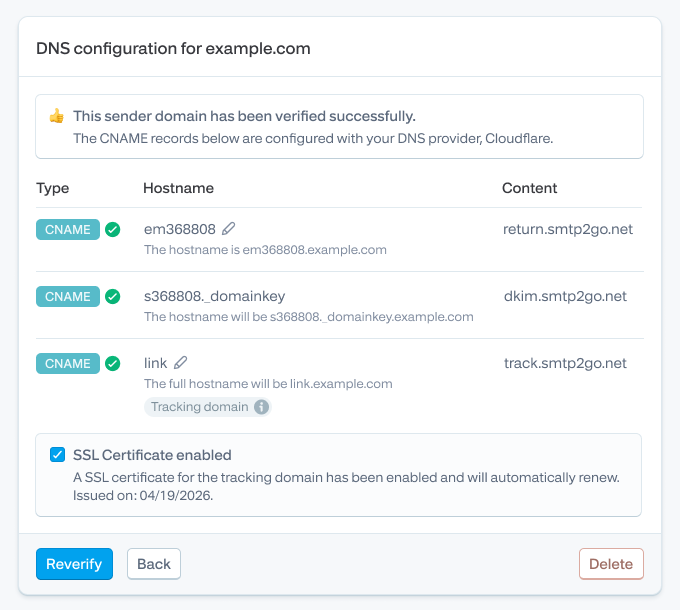
Honestly, this is the part most people skip. They shouldn’t. No volume ramp will compensate for an SPF record that doesn’t include your sending IP, or a DMARC policy that quarantines your own mail.
Authentication that has to pass
- SPF record published, with all sending IPs (including SMTP2GO’s relay range) authorized. If you’re not sure, run
dig TXT yourdomain.comand confirm thev=spf1record includesinclude:spf.smtp2go.com -allor your equivalent. The SPF deep dive covers the syntax landmines. - DKIM signing enabled for your sending domain. SMTP2GO publishes the public key; you publish the CNAME or TXT record. Then you test it. A DKIM record that publishes but doesn’t align with your From: domain will fail DMARC anyway.
- DMARC record at minimum
p=nonewith a workingrua=reporting address. Since February 2024, Gmail and Yahoo have required a DMARC policy for any sender pushing more than 5,000 messages per day to consumer accounts. As of November 2025, Gmail rejects non-compliant traffic outright. If you don’t have DMARC reports flowing somewhere you’ll actually read them, you don’t really have DMARC. - PTR / reverse DNS record for any dedicated IP, pointing back to a subdomain on your sending domain. Mailbox providers do reverse lookups and judge you on what they find.
- TLS for the outbound connection. Gmail requires TLS for transmission. STARTTLS on port 587 or implicit TLS on 465. If a legacy device still requires plain SMTP on port 25, that’s a problem to solve before warmup, not during.
Infrastructure that has to be in place
- A working suppression list. Hard bounces need to never get a retry. Most relays handle this automatically, but if you’re routing through your own MTA, check it before you ramp.
- A working bounce-processing loop. Soft bounces should retry per RFC; hard bounces should suppress immediately. Without this, your bounce rate will climb during warmup and you’ll roll back for the wrong reason.
- One-click unsubscribe (
List-UnsubscribeandList-Unsubscribe-Postheaders per RFC 8058) on every marketing message. Transactional messages are exempt, but Gmail and Yahoo require this for marketing mail, full stop. - Google Postmaster Tools configured for your sending domain. This is your scoreboard. Without it, you’re warming up blindfolded.
- Yahoo Complaint Feedback Loop (CFL) registered, if you have meaningful Yahoo traffic.
- Seed-list or inbox placement monitoring so you can see where mail is actually landing before your customers tell you.
Operational readiness
- Your engaged-recipient segment is defined and exported before week one starts. You don’t want to be querying your CRM at 9am on Monday trying to figure out who counts.
- Your warmup content is drafted in advance for at least weeks one and two. Stable templates, modest images, no aggressive promotional language, no surprise URL shorteners.
- Someone is assigned to watch the dashboards daily for the duration. Not weekly. Daily.
- A rollback plan exists. If week three blows up, what’s the answer? Pause? Reduce to week two volume? Switch back to the engaged segment only? Decide before you need it.
Skip any of the above and the schedule below is just numbers on a page.
Pick your scenario before you pick your schedule
This is the section the existing SMTP2GO page (and almost every other warmup guide on the internet) skips. The five-week schedule assumes a generic “new sender.” Your situation is probably more specific.
New domain or subdomain
Slowest warmup. The mailbox providers know nothing about you. Stick to the full five-week schedule. Don’t try to compress.
New dedicated IP on an existing, well-reputed domain
Faster. Most senders complete warmup in 30 days, some in 1–2 weeks if engagement is strong, others stretching up to 60 days. Your domain reputation carries some weight; your IP still needs to earn its own. Plan for three to four weeks if your domain is genuinely well-reputed (check Postmaster Tools).
ESP migration (e.g. SES, SendGrid, Mailgun → SMTP2GO)
This is its own beast. You’re not just warming an IP, you’re rebuilding the mailbox providers’ association between your sending domain and a new infrastructure footprint. Two practical paths:
- Parallel send. Route 5% of traffic to the new IP in week one, 10% in week two, 25% in week three. Keep the old infrastructure running. Decommission the old IP only after Postmaster Tools shows the new one at “High” reputation. This is the safe path.
- Hard cutover. Run the full five-week ramp on the new IP, then switch over. Faster, but you lose the ability to compare deliverability across the two paths in real time.
For more context: ThinkPorch’s IT lead Dennis, moved off AWS SES after struggling with support response times on a deliverability issue. They warmed the new SMTP2GO IP over four weeks using the parallel-send approach.
Restart after a 30+ day pause
Mailbox providers treat extended inactivity as reputation decay. If you haven’t sent through an IP in more than 30 days, warm it up again. You don’t need the full five weeks, but you do need the first three. Start at week two of the schedule above, ramp normally.
Recovery from a reputation hit
If you’re rebuilding after a blocklist incident, complaint spike, or content-related filtering event, throw out the schedule. Audit what caused it (usually opt-in source, content, or list hygiene). Fix it. Then start at week one and move slower than normal. The mailbox providers have a memory of you now, and it isn’t positive. The goal isn’t speed, it’s consistent re-demonstration that you’re not the sender they remember.
Marketing vs transactional
Don’t mix them on the same IP if you can avoid it. If you send all email from the same IP and the same “from” address, customers who unsubscribe from promotional emails (or report them as spam) may end up not receiving future receipts or password resets they want and need. Spam complaints on marketing mail will degrade transactional delivery, full stop.
Practical setup: marketing on a dedicated IP and marketing.yourdomain.com subdomain. Transactional on a separate dedicated IP and mail.yourdomain.com or txn.yourdomain.com. Warm them separately, with transactional warming faster (engagement is naturally higher).
The 5-week ramp to 100k/day: full decision table
The table at the top of this page is the executive version. Here’s the version you actually operate from.
| Week | Volume | Hourly cap | Recipient segment | Advance to next week if | Hold or rollback if | |
|---|---|---|---|---|---|---|
| 1 | 500–1,000 | 100–200/hr | Internal users + 30-day openers/clickers only | Bounces <2%, complaints <0.1%, opens >25%, Postmaster Tools shows reputation forming, no blocklist hits | Any hard bounce rate >2%, any Gmail 4.7.x deferrals, any Yahoo 421 patterns | |
| 2 | 2,000–5,000 | ~500/hr over 8–12 hours | 30-day engaged + recent opt-ins (last 14 days) | Bounces stable, complaints <0.1%, Postmaster reputation rising toward Medium | Complaints >0.1%, reputation flat or declining, deferral patterns from any single provider | |
| 3 | 10,000–15,000 | 1,000–2,000/hr | Add 60-day engaged subscribers | Bounces stable, IPR on seed accounts >85%, no provider throttling for 7 consecutive days | Yahoo 421 temporary failures, Gmail 4.x.x deferrals, opens collapsing on any single provider, blocklist hit | |
| 4 | 20,000–30,000 | 3,000–5,000/hr | Broader active list (exclude only 90-day-plus inactive) | All metrics within tolerance for 7+ days; reputation at High on Postmaster Tools | Complaint spike (>0.15%), bounce climb above 2%, sudden unsubscribe wave | |
| 5+ | 50,000–100,000 | 5,000–10,000/hr | Full active list; 90-day inactive remains suppressed pending re-engagement | Stable for 14+ days; ready for steady-state operation | Anything that wasn’t a problem at lower volumes suddenly becoming one |
A few notes on the table that matter more than the numbers themselves:
- Hourly cap matters as much as daily volume. Sending 50,000 emails between 9am and 10am looks more suspicious than sending the same 50,000 over 12 hours. The mailbox providers watch the rate, not just the total.
- “Advance if” is per-provider, not aggregate. If Gmail looks healthy but Yahoo is throwing 421s, don’t advance. Hold on the segment Yahoo is rejecting and keep moving on the rest.
- “Hold or rollback” is not the same as “stop.” Hold the current week’s volume for another seven days. If metrics recover, advance. If they don’t, drop one tier and investigate.
- Compress at your own risk. Twilio mentions some senders complete warmup in 1-2 weeks. They have the engagement profile to support it. Most of us don’t.
Audience segmentation: engagement age matters more than list size
“Most engaged recipients” is the phrase every warmup guide uses. It doesn’t mean anything until you define a window.
Here’s a working definition. Adjust the windows based on your typical send cadence. (If you only send once a quarter, your “30-day engaged” segment is going to be small. You may need to widen accordingly.)
- Phase 1 (weeks 1–2): Recipients who opened or clicked in the last 30 days. Plus your internal users. Plus people who opted in within the last 14 days. These are the safest signals you can send.
- Phase 2 (weeks 3–4): Add recipients engaged in the last 60 days. You’re broadening, but everyone you’re mailing still has a recent positive interaction.
- Phase 3 (week 5+): Add recipients engaged in the last 90 days. This is approximately your active list.
- Still excluded, even after warmup: Anyone who hasn’t engaged in 90+ days. Run them through a re-engagement campaign on a separate, lower-volume cadence. Don’t bring them into warmup.
Categorically exclude from warmup:
- Purchased lists. (Honestly, exclude these from anything.)
- Role addresses (
info@,admin@,noreply@). Low engagement, high complaint risk. - Old imports you’ve never validated.
- Prior hard bounces.
- Prior complainers.
- Unverified addresses (run them through an email verification service first).
One detail most senders miss: Apple Mail Privacy Protection makes “open rate” a much weaker signal for Apple users than it used to be. Treat clicks as your primary engagement signal where possible, especially during warmup. Sending to invalid or inactive addresses can degrade reputation, limit deliverability, and result in throttling or filtering, regardless of whether you can see the opens.
The daily metrics that decide whether you advance
Watch these every day. Not weekly. Daily. The mailbox providers evaluate sender reputation on short-term patterns, and a metric that goes wrong on Tuesday will compound by Friday if you don’t catch it.
| Metric | Healthy range | Warning sign | What to do |
|---|---|---|---|
| Hard bounce rate | <2% | 2–4% | Pause expansion. Audit list source. Re-check verification. |
| Soft bounce / deferral rate | <5% | 5–10% on any single provider | Check provider’s postmaster page. Confirm authentication. Hold volume. |
| Spam complaint rate | <0.1% | 0.1–0.3% | Audit recent send: opt-in source, content tone, subject line. Tighten segment. |
| Spam complaint rate | n/a | >0.3% | Stop. Gmail and Yahoo treat >0.3% as the line beyond which bulk senders become ineligible for mitigation. Investigate before sending another message. |
| Delivery rate | >95% | <95% on any single provider | Provider-specific issue. Read the postmaster page. Check for blocks. |
| Open rate (where measurable) | >25% | <20% | Engagement segment may be wrong. Or you’re hitting spam. Check seed accounts. |
| Click rate | >2% (varies by industry) | Collapse vs your baseline | Same as open rate collapse. |
| Unsubscribe rate | <0.5% | >0.5% | Content or audience mismatch. Adjust before next send. |
| Postmaster Tools domain reputation | Medium → High during weeks 1–3, High thereafter | Drop from High to Medium, or any “Bad” rating | Hold volume. Investigate. Don’t advance until reputation recovers for 7+ days. |
| IP reputation | High | Drop, or any blocklist appearance | Check Spamhaus, Sender Score, etc. Hold and investigate. |
Two numbers to internalize because they’re the ones the mailbox providers actually publish:
Bulk senders should keep spam rate below 0.1%, and avoid ever reaching 0.3% or higher. Spam rates and other data points are calculated and updated daily in Postmaster Tools. The 0.3% number is the eligibility cliff. The 0.1% number is the operating target.
Mailbox provider notes for 2026
Each major provider warms differently. As of May 2026, here’s what matters.
Gmail
- Bulk sender rules in full enforcement. Since February 2024, Gmail has required SPF + DKIM + DMARC for senders pushing more than 5,000 messages per day to consumer accounts. As of November 2025, non-compliant traffic faces temporary and permanent rejections. Don’t even start warmup without all three in place.
- Postmaster Tools is non-optional. It’s the only signal you’ll get of how Gmail is grading you in real time.
- Gmail rate-limiting during warmup typically shows as
421 4.7.0deferrals. Don’t panic-rebroadcast. Hold the volume, wait 24 hours, check Postmaster reputation, then decide. - Gmail Promotions tab is a deliverability outcome, not a warmup goal in itself. Some senders fight it; most should accept it for marketing mail.
Yahoo / AOL
- Same baseline as Gmail. SPF, DKIM, DMARC with alignment, one-click unsubscribe for marketing, spam rate threshold.
- Yahoo’s complaint feedback loop (CFL) is worth signing up for separately. It’s how you learn about complaints on Yahoo specifically.
- Yahoo throttling shows up as
421temporary failures. Treat like Gmail: hold, wait, investigate. - Yahoo is historically less forgiving of inconsistent sending patterns than Gmail is. If your weekday/weekend volume varies wildly, Yahoo will notice first.
Microsoft (Outlook, Hotmail, Live)
- Since May 5, 2025, Microsoft rejects mail from high-volume senders that lack proper authentication. The error is 550 5.7.515: “Access denied, sending domain does not meet the required authentication level.”
- Microsoft was slower to publish public sender requirements than Gmail/Yahoo, but the enforcement is now strict. Authentication is mandatory.
- Microsoft uses an internal scoring system called SmartScreen. There’s no Postmaster Tools equivalent, so you’re flying with less visibility. Smart Network Data Services (SNDS) is the closest thing.
- Microsoft is known for slow-burn reputation issues. A small problem in week three can compound into widespread filtering by week six if you don’t address it.
Apple Mail (iCloud)
- Apple is the least transparent of the major providers. No public sender hub, no postmaster dashboard, fewer published rules.
- Authentication still matters (SPF, DKIM, DMARC).
- Apple’s Mail Privacy Protection (MPP), launched 2021, masks open rates by pre-loading tracking pixels. Treat opens from Apple users as nearly worthless. Use clicks and unsubscribes as your signal.
- iCloud filtering is binary in a way Gmail’s isn’t. You’re either in the inbox or you’re not. If you’re not, it’s usually authentication or reputation, in that order.
When warmup goes sideways: the troubleshooting matrix
Every warmup runs into something. Here’s the playbook for the most common failure modes.
| Symptom | Likely cause | Immediate action | When to resume scaling |
|---|---|---|---|
| Gmail 4.7.x deferrals on a percentage of traffic | Rate limiting; reputation forming | Hold current volume. Confirm Postmaster reputation isn’t dropping. Check spam complaint rate. | After 48–72 hours of stable metrics and no further deferral pattern. |
| Yahoo 421 temporary failures | Throttling or low reputation at Yahoo specifically | Reduce volume to Yahoo recipients by 50% for 72 hours. Confirm DMARC alignment. Check CFL for complaint patterns. | When Yahoo deferrals drop below 1% of sends to Yahoo addresses. |
| Microsoft 550 5.7.515 rejections | Authentication failure | Stop sending to Microsoft. Verify SPF, DKIM, DMARC alignment. Test with a small batch. | Only when authentication test sends are passing cleanly. |
| Hard bounce rate above 2% | List quality | Pause expansion. Run remaining list through email verification. Suppress all confirmed-invalid addresses. | When bounce rate drops below 1% on a 1,000-message test batch. |
| Spam complaint rate climbing toward 0.3% | Opt-in source, content tone, or frequency | Stop. Audit recent campaigns. Identify the source segment. Suppress and review opt-in process. | Only after complaint rate stays below 0.1% for 7 consecutive days. |
| Open rate collapse on one provider | Inbox placement issue at that provider | Pull seed account data. Check if mail is landing in spam at the affected provider. Check authentication alignment for that provider specifically. | When seed accounts show consistent inbox placement again. |
| Blocklist hit (Spamhaus, Barracuda, etc.) | Reputation, content, or compromised account | Pause all sending. Audit immediately. Submit delisting request after the root cause is fixed. | After delisting confirmed and 7 days of clean sending at low volume. |
| One provider failing while others are fine | Provider-specific reputation issue | Hold or reduce volume to the failing provider only. Continue normal pace elsewhere. | When the failing provider’s metrics align with the rest. |
| Sudden unsubscribe wave | Content mismatch or list source issue | Pause. Review the message that triggered it. Decide whether to continue with the segment. | After identifying and fixing the cause. |
A note on rollback discipline: it’s almost always better to drop one tier and stabilize than to “push through” a problem. Reputation rebuilds in days. Recovery from a serious filtering event takes weeks.
After warmup: the part nobody writes about
You hit 100k/day. The metrics are stable. Now what?
The mistake most senders make is treating warmup as a project with an end date. It isn’t. It’s a re-baselining exercise that establishes the new normal. Here’s what changes (and doesn’t) after week six.
- Keep volume consistent. Adobe recommends keeping daily volume increases below 30% week-over-week even after warmup completes. That’s a reasonable rule. Don’t double your volume Monday morning because you just signed a new client.
- Avoid spike campaigns immediately. A 5x send on a Friday because Q4 just started is the kind of thing that will undo three weeks of warmup. If you must, split it across 48 hours.
- Keep your engaged segment prioritized. Continue to send to high-engagement recipients first. Mailbox providers watch the per-batch engagement of the first portion of each send.
- Re-confirm long-inactive users separately. Don’t bring 180-day inactives back into the main flow. Run them through a re-engagement campaign on lower volume.
- Monitor weekly. The daily monitoring discipline relaxes a bit, but weekly is the minimum. Postmaster Tools, complaint rates, bounce trends.
- Re-warm after pauses. Stopping for 30+ days resets reputation. If you have a seasonal pause coming, plan for a 1–2 week re-warmup before scaling back up.
- Re-check authentication every quarter. SPF includes change. DKIM keys get rotated. DMARC policies get tightened. None of those are set-and-forget.
The senders who keep deliverability strong long-term are the ones who treat warmup discipline as ongoing, not as a phase.
How SMTP2GO handles high-volume warmup
SMTP2GO’s bias is toward being straightforward about this: we don’t do automated, opaque warmup throttling, because for most of our customers, the right answer involves a conversation. Some are sending 50k/day of pure transactional from a single SaaS app. Some are MSPs aggregating mail from a dozen client environments. Some are old hardware (copiers, MFCs, alarm systems) sending notifications. The right warmup plan depends on which one you are.
What you do get:
- Authentication setup support. SPF, DKIM, DMARC, and PTR records, with real human help if any of them refuse to verify. The DKIM deep dive and what is DMARC explainers cover the theory; support covers the actual configuration when something doesn’t work.
- 24/7 support across all time zones. Headquartered in New Zealand, with coverage across the US, Europe, and Asia-Pacific time zones. If you hit a 421 at 3am on a Tuesday, someone’s reachable.
- Dedicated IPs available for senders past roughly 50k/month, with explicit guidance on when shared IP is actually fine. More on the shared vs dedicated IP decision here.
- Manual warmup review for high-volume migrations. If you’re moving from another provider and pushing 250k+/day, talk to the deliverability team before you start. They’ve done it enough times to know what your specific provider’s quirks will look like in transition.
- The concise schedule, when you want it. The SMTP2GO support article is the operational quick-reference if you don’t need the full strategy.
Two reference points worth knowing about. Group IMD, a healthcare communications firm, scaled their SMTP2GO sending from roughly 10,000 to over 1 million emails per month over many months. StoredTech, an MSP, has been routing device-generated email (phone systems, copiers, security cameras) through SMTP2GO since 2011 – the kind of mixed-volume, mixed-device sending pattern that’s hard to warm anywhere else. The deliverability team has seen most of the failure modes before.
If you’re planning to scale past 50k/day, the genuinely useful first step is a conversation about your specific scenario before you start ramping. Contact our deliverability team and we’ll plan it together.
FAQs
How long does high-volume email warmup take?
Four to six weeks for most senders going to 100k/day on a new dedicated IP. As fast as two weeks for senders with strong existing domain reputation and high engagement. Up to eight weeks for senders rebuilding after a reputation issue or migrating with cold infrastructure.
What daily volume counts as “high volume” for warmup purposes?
The mailbox-provider definition is anything above 5,000/day to consumer accounts (Gmail, Yahoo, Hotmail). The practical definition for warmup planning is anything that requires you to think about pacing, which is typically 20,000+/day on a list of 20,000+ recipients.
Do I need to warm up a shared IP?
Generally no. Low-volume senders on shared IPs don’t require individual warmup because the IP is already warm from other senders’ traffic. The exception is if you’re new to the relay and pushing significant volume immediately; even on shared IP, your domain still needs to demonstrate it’s legitimate.
Do I need to warm up a dedicated IP?
Yes. A new dedicated IP has no reputation. Even on an established sending domain, the IP itself starts cold.
Should I warm a new domain and a new IP separately?
You can’t really do them separately when both are new at the same time. You can warm them together using the schedule above. Just expect it to take longer than warming a new IP on an established domain.
Can I skip warmup if my domain already has a good reputation?
You can compress, not skip. Even with strong domain reputation, a new IP needs at least 2–3 weeks to demonstrate consistent sending.
What bounce rate is too high during warmup?
2% is the line. Above that, hold expansion and audit list quality. Above 4%, stop and run the remaining list through email verification.
What spam complaint rate is too high?
0.1% is the target, 0.3% is the threshold beyond which Gmail and Yahoo treat you as a high-complaint sender ineligible for mitigation. Operate as if 0.1% is the cliff.
Should I send to inactive subscribers during warmup?
No. Anyone past 90 days of no opens or clicks stays suppressed during warmup. Run them through a separate re-engagement campaign after warmup completes, on lower volume.
What should I do if Gmail throttles me but Yahoo doesn’t?
Hold or reduce Gmail-specific volume. Continue normal pace on Yahoo and other providers. Investigate authentication alignment for Gmail specifically. Check Postmaster Tools for the actual signal.
What happens if I stop sending for 30 days?
Your IP reputation decays. An IP unused for more than 30 days needs to be warmed up again. Plan a 1–2 week re-warmup before scaling back up.
Should marketing and transactional email use separate IPs?
Yes if you can. Spam complaints on marketing degrade transactional delivery, and customers who unsubscribe from marketing shouldn’t lose their password reset emails. Two IPs, two subdomains, separate warmup for each.
What about Apple Mail’s Privacy Protection — does it affect warmup?
It affects measurement, not warmup itself. Open rates from Apple users are inflated and unreliable. Use clicks and complaints as your primary signal during warmup if your list is heavily Apple.
Can I use a warmup service to automate this?
For high-volume sending from real customer lists, the warmup-service category (peer-to-peer inbox interaction networks) is the wrong tool. Those services are designed for cold outreach from individual inboxes. For 50k+/day from your own list, the right approach is the controlled ramp described above, monitored by a human.
Have a high-volume warmup question this guide didn’t cover? The SMTP2GO support team has helped scale customers from 10,000 to a million plus per month. Get in touch.
About the author

Simon Slade
Simon is a co-founder of SMTP2GO, launched in 2006 out of Christchurch, New Zealand. The idea was simple: a reliable way to send email from anywhere, even when local networks were blocking the usual ports. Twenty years on, SMTP2GO delivers for 40,000+ businesses across 130+ countries. SMTP2GO is ISO 27001 certified, GDPR compliant, an M3AAWG member, and a five-time Deloitte Technology Fast 500 company.