Below is a simple guide on how to configure Odoo to send outgoing emails through your SMTP2GO account. Additional details can be found in Odoo’s official documentation.
Note: Sending will need to be from your own domain, not an Odoo subdomain.
Step 1
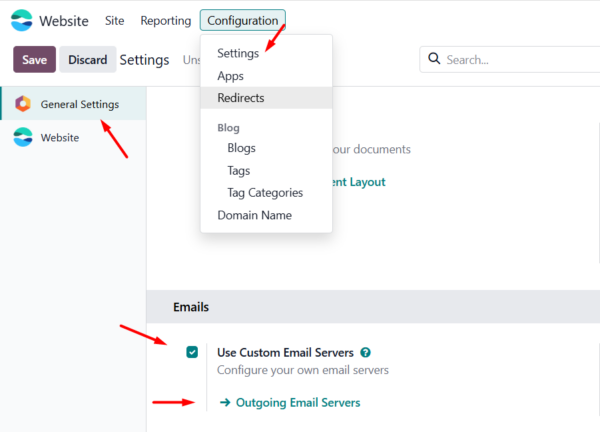
Navigate to “Configuration” > “Settings” > “General Settings” > and to the “Emails” section.
Tick the checkbox for “Use Custom Email Servers”, and click “Save” when prompted.
Then, in the “Emails” section, click the “Outgoing Email Servers” link.
Step 2
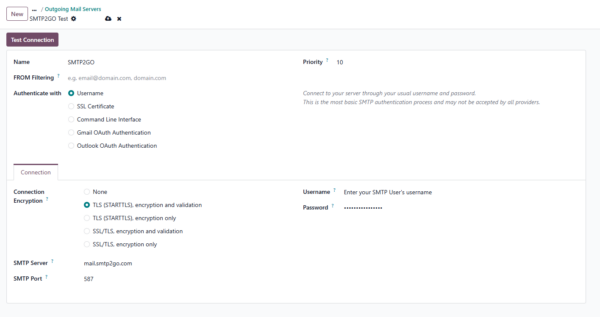
On the “Outgoing Mail Servers” page, click “New” and add your SMTP2GO server details:
Name: Give it a name of your choice, e.g SMTP2GO.
From Filtering: Enter the domain(s) or email address(es) that can use this outgoing server.
Note: These will need to be verified senders in your SMTP2GO account (“Sending” > “Verified Senders” section).
Authenticate with: Select “Username”.
Connection Encryption: Select your desired encryption type.
SMTP Server: mail.smtp2go.com - you can alternatively use a location-specific server name.
SMTP Port: Depending on your encryption type selected, you can use one of the following ports:
TLS or no encryption > available on ports 25, 2525, 8025, 587 and 80.
SSL > available on ports 465, 8465 and 443.
Username: A username from your SMTP2GO account’s “Sending > SMTP Users” section.
Password: The password for your username.
Once the server details are set, click the “Test Connection” button at the top. If everything is correct, you’ll see a “Connection Test Successful” message.
And that is it! Integrating SMTP2GO and Odoo should be an easy, quick and, hopefully, painless process.
You can access reports directly in your SMTP2GO dashboard which will help you understand delivery successes and failures, tracking information and many more useful metrics. We’ve written some great articles outlining the features of your SMTP2GO account and we recommend taking the time to see everything we have to offer.
Should you need extra help from our award-winning support team, we are almost always available to assist. You can find support contact details in your SMTP2GO dashboard and information about retrieving your support PIN here.