

Key takeaways
DMARC (Domain-based Message Authentication, Reporting, and Conformance) is a DNS TXT record you publish once, after which receiving servers handle the rest. It builds on SPF and DKIM — if neither of those passes and aligns, DMARC fails. The three policies (p=none, p=quarantine, p=reject) range from monitor-only to blocking everything that fails authentication.
DMARC is a small text record you publish in your domain’s DNS that tells receiving mail servers what to do if a message claiming to be from your domain fails SPF or DKIM checks.
It does three things: it authenticates your outbound mail, it tells receivers how to handle failures (ignore, junk, or reject), and it sends you reports so you can see who’s sending in your name. Done well, it stops most direct domain spoofing and is now required for any business sending more than 5,000 messages a day to Gmail, Yahoo, or Outlook.
This guide is the long version, written by people who configure SMTP relays for a living and have watched plenty of DMARC rollouts go right (and a few go sideways). If you’re new to email authentication, start at the top. If you already know SPF and DKIM, skip to the alignment section.
What DMARC actually does (and what it doesn’t)
DMARC is a policy layer that sits on top of two older authentication checks, SPF and DKIM. Those two answer questions about a message. DMARC answers a different question: what happens when the answers come back wrong?
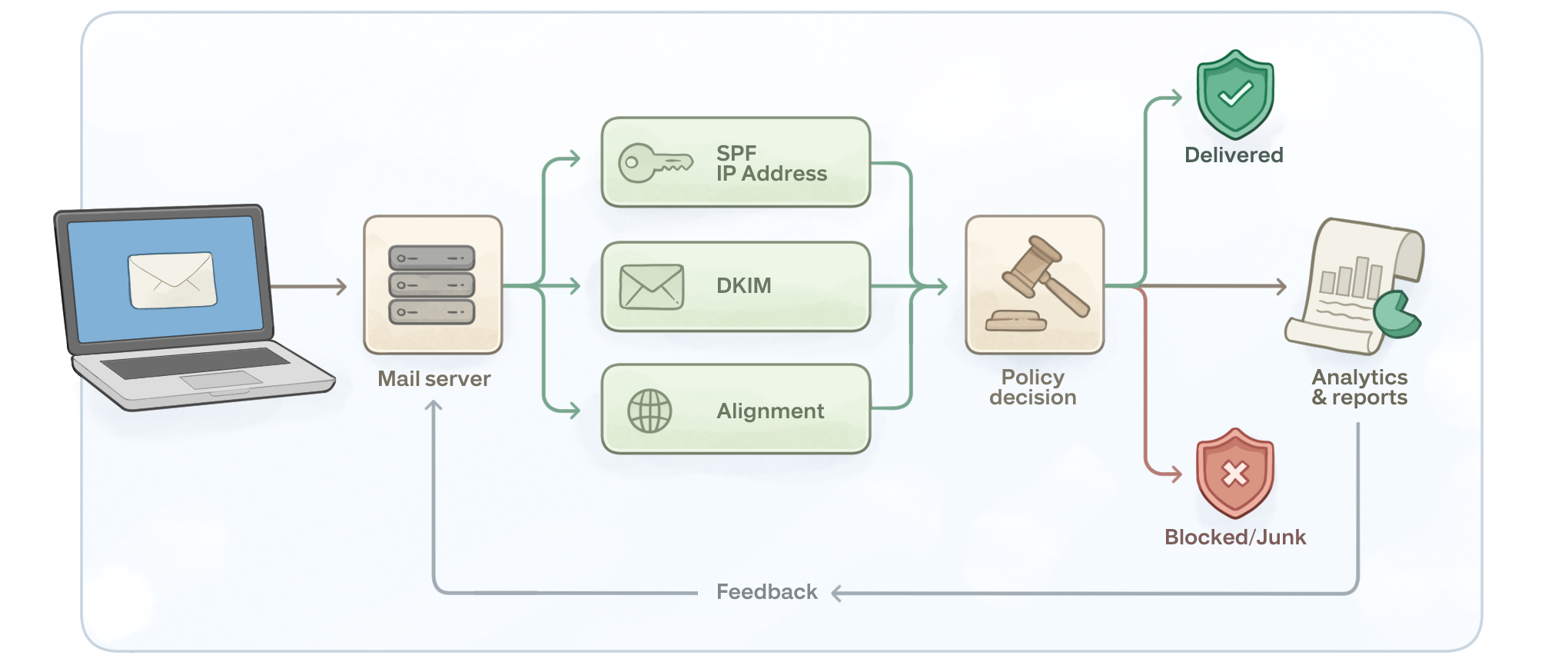
Here’s the useful framing for anyone running an actual sending domain. You publish a DMARC record. From that moment on, any receiving mail server that gets a message claiming to be from your domain looks up your DMARC record and decides what to do based on whether the message passed SPF or DKIM and whether the result aligned with your visible From address. If the message is legitimate and your auth is set up correctly, it gets delivered. If a spammer is forging your domain, the receiver follows your policy and quarantines or rejects the message.
So DMARC’s actual job: protect your domain’s reputation, give you visibility into who’s using it, and (once you’re at enforcement) shut the door on direct spoofing.
What it doesn’t do, and we’ll come back to this: it doesn’t stop look-alike domains (paypa1.com instead of paypal.com), it doesn’t stop display-name spoofing (the From shows “PayPal Support” but the actual address is randomuser@gmail.com), and it doesn’t stop attackers who break into a legitimate sender’s account and send from a domain that is properly authenticated. DMARC is one layer.
How DMARC works with SPF and DKIM
Five steps, in order, every time a message gets sent from your domain to a DMARC-aware receiver:
- You publish three DNS records: SPF (which IPs and services are allowed to send for your domain), DKIM (a public key the receiver can use to verify the cryptographic signature your sending platform attaches to each message), and DMARC (the policy that ties them together).
- You send a message. Could be a password reset, an invoice, a Microsoft Teams notification from a copier, a marketing campaign through a CRM. Anything.
- The receiver checks SPF. Did the IP that delivered this message appear in the sending domain’s SPF record? Pass or fail.
- The receiver checks DKIM. Was the message signed with a private key whose matching public key sits in the sending domain’s DNS, and does that signature still validate? Pass or fail.
- The receiver checks DMARC alignment and applies your policy. This is the part most people miss. SPF passing isn’t enough. DKIM passing isn’t enough. The domain that passed one of them has to match the domain in the visible From address. If neither aligns, DMARC fails, and the receiver follows your
p=instruction.
If alignment passes for either SPF or DKIM, DMARC passes. You only need one of the two to align.
SPF vs DKIM vs DMARC: a side-by-side
If you only learn one comparison about email authentication, learn this one. People conflate the three constantly.
| Protocol | What it checks | DNS record type | What can go wrong |
|---|---|---|---|
| SPF | Is the sending IP in the list of allowed senders for the From domain? | TXT (one record per domain) | Breaks on forwarding. Subject to the 10 DNS lookup limit. Doesn’t survive a message being re-sent through another server. |
| DKIM | Is the cryptographic signature on the message valid, and was the message unchanged in transit? | TXT (one record per selector) | Signature breaks if the message body is modified (some forwarders rewrite content). Selector mismatches if the wrong sending platform signs. |
| DMARC | Did SPF or DKIM pass and align with the visible From domain, and what should we do about it? | TXT (one record at _dmarc.yourdomain.com) |
Fails if you have multiple DMARC records, if your record syntax is bad, or if you missed a legitimate sender during rollout. |
SPF and DKIM each answer a narrower question. DMARC layers a policy and reporting system on top. Here’s the part nobody on a glossary page tells you: DMARC alone does nothing. You can publish the best DMARC record on earth, and if you don’t also have SPF and DKIM configured for every legitimate sender, your good mail will start failing alongside the spoofed mail.
What a DMARC record actually looks like
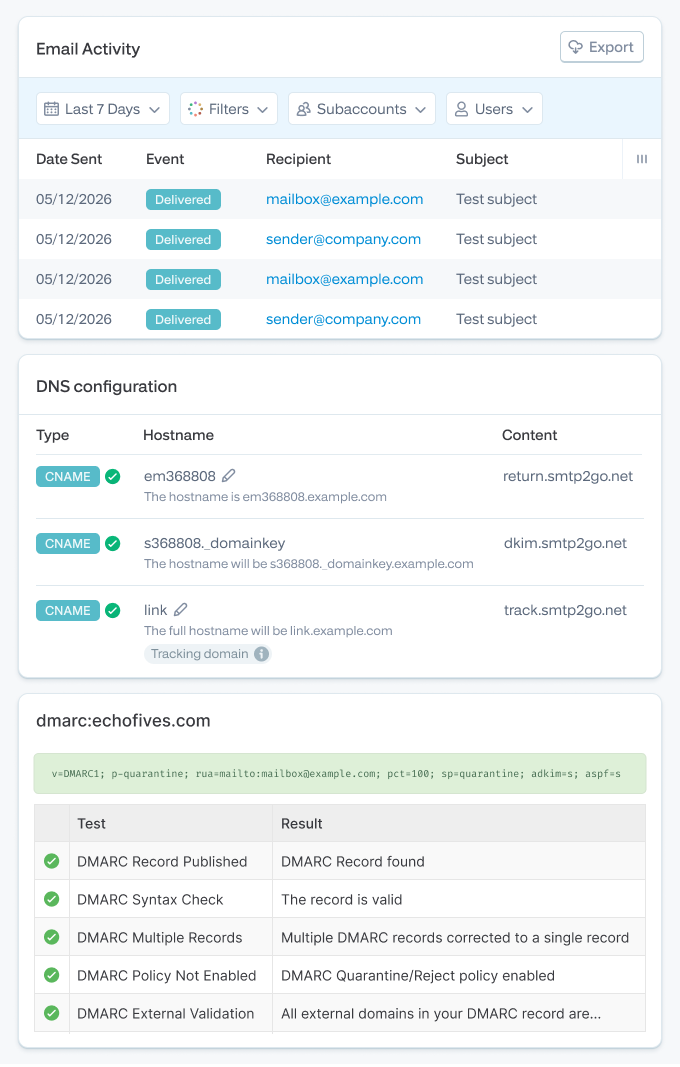
It’s a DNS TXT record. You publish it at the subdomain _dmarc.yourdomain.com. That’s all.
Here’s a sensible starter record for a domain that’s never had DMARC before:
_dmarc.example.com TXT "v=DMARC1; p=none; rua=mailto:dmarc-reports@example.com; pct=100"
This says: I’m running DMARC version 1, my policy is “do nothing yet” (p=none), send aggregate reports to that mailbox, and apply this policy to 100% of mail. Crucially: it doesn’t block anything. It just turns the reporting on. You should leave a record like this in place for at least a few weeks, often longer, before tightening anything.
Once you’ve confirmed every legitimate sender is aligned, you tighten the policy. Here’s what a mature record might look like for a brand that wants real spoofing protection:
_dmarc.example.com TXT "v=DMARC1; p=reject; sp=reject; pct=100; adkim=s; aspf=s; rua=mailto:dmarc-reports@example.com; ruf=mailto:dmarc-forensics@example.com"
This says: reject anything that fails (including subdomain mail, via sp=reject), require strict alignment on both DKIM and SPF, and send me both aggregate and failure reports.
DMARC tag breakdown
| Tag | Required? | Example | What it controls |
|---|---|---|---|
v |
Yes | v=DMARC1 |
Protocol version. Always DMARC1. |
p |
Yes | p=quarantine |
Policy for the main domain: none, quarantine, or reject. |
sp |
No | sp=reject |
Policy for subdomains. Defaults to whatever p is set to if you skip it. |
pct |
No | pct=25 |
Percentage of failing mail the policy applies to. Useful for gradual ramps. Defaults to 100. |
rua |
No (but use it) | rua=mailto:reports\@example.com |
Where aggregate XML reports get sent. Without this, you’re flying blind. |
ruf |
No | ruf=mailto:forensics\@example.com |
Where failure reports get sent. Privacy considerations apply, and many receivers don’t generate these anymore. |
adkim |
No | adkim=s |
DKIM alignment mode: s (strict) or r (relaxed, the default). |
aspf |
No | aspf=s |
SPF alignment mode: s (strict) or r (relaxed, the default). |
fo |
No | fo=1 |
Failure reporting options. 1 means report on any auth failure. |
The three policies: none, quarantine, reject
This is the part of DMARC where people get hurt. Mostly by moving too fast.
| Policy | What receivers do | When to use it | The risk |
|---|---|---|---|
p=none |
Nothing. Mail is delivered as normal. You just get reports. | First rollout. Always start here. | None for delivery. But it offers zero protection, so don’t park here forever. |
p=quarantine |
Failing mail lands in spam/junk. | After 2–4 weeks at p=none and you’ve fixed every alignment issue you saw. |
Legitimate mail you missed gets junked. Customers complain. |
p=reject |
Failing mail is dropped at the receiver. The recipient never sees it. Not even in spam. | After a clean stretch at p=quarantine. This is the goal state. |
Misconfigured legitimate mail vanishes silently. Hard to debug after the fact. |
There’s also the pct tag, which lets you apply the policy to a subset. A common ramp pattern: p=quarantine; pct=10 for a week, then pct=50, then pct=100. Same again for p=reject. It feels overcautious. It’s not. The first time you move to p=reject without testing every sender, you’ll find the one you forgot.
From the support side: the failure mode we see most often isn’t spoofing. It’s a customer flipping straight to
p=rejecton a Monday morning, then realizing on Wednesday that their HR portal sends payroll notifications through a third-party system that nobody added to SPF or DKIM. Those notifications are now silently dropped at Gmail and the team finds out the next pay cycle.
DMARC alignment, the part that trips everyone up
Both SPF and DKIM can pass on a message, and DMARC can still fail. That’s the bit that makes people pull their hair out, so let’s slow down.
When a receiver evaluates DMARC, it doesn’t just ask “did SPF pass?” or “did DKIM pass?” It asks: “did one of them pass on a domain that matches the domain in the From header?”
That match is called alignment.
SPF alignment
SPF authenticates the envelope sender, the address in the Return-Path header. That domain doesn’t have to be the same as what your recipient sees in the From field. Plenty of mail goes out where these differ. Sub-account bounce handling, custom return paths from ESPs, shared infrastructure: there are good reasons.
For SPF to align, the envelope sender’s domain has to match the visible From domain. In relaxed mode (the default), it just has to share the same organizational domain (bounces.example.com aligns with example.com). In strict mode, it has to be an exact match.
DKIM alignment
DKIM signs the message with a key tied to a specific domain (the d= value in the DKIM-Signature header). For DKIM to align, that signing domain has to match the visible From domain.
Why this matters with an SMTP relay
Here’s the practical version. Imagine you send mail from you@yourcompany.com through a third-party relay. The relay handles the envelope-level transmission, so the Return-Path might be something like bounce.relay-provider.com. SPF passes for that domain, but it’s not your domain, so SPF alignment with yourcompany.com fails. If the relay also signs the message with its own DKIM key (d=relay-provider.com), DKIM passes for the relay, but DKIM alignment with yourcompany.com fails. Both authentication checks pass. DMARC still fails. Mail goes to spam (under p=quarantine) or gets rejected (under p=reject).
The fix in this scenario is twofold. Configure a custom return path on the relay so the envelope sender uses your domain (bounce.yourcompany.com). And have the relay sign DKIM with your domain’s key (d=yourcompany.com). Now both checks align.
From the support side: when David Rousseau at Les Musées de la Civilisation de Québec moved his CRM mail through SMTP2GO, getting DKIM and SPF correctly aligned to his sending domain was the difference between mail landing in inboxes and mail landing in junk. The setup itself is small. The before-and-after is large.
DMARC reports: what you actually get
Reporting is the R in DMARC.
Aggregate reports (rua)
Once a day, every DMARC-aware receiver that sees mail claiming to be from your domain sends you an XML file. It lists every IP that sent mail in your name, how many messages, whether each one passed SPF, whether each one passed DKIM, and whether alignment held. That’s how you discover the legitimate senders you forgot about (the Zendesk macro that emails customers, the marketing automation tool, the printer in the warehouse) and the spoofers trying to forge your domain.
Here’s a fragment of what one looks like:
<record>
  <row>
    <source_ip>50.31.156.116</source_ip>
    <count>247</count>
    <policy_evaluated>
      <disposition>none</disposition>
      <dkim>pass</dkim>
      <spf>fail</spf>
    </policy_evaluated>
   </row>
   <identifiers>
     <header_from>example.com</header_from>
   </identifiers>
   <auth_results>
     <dkim>
       <domain>example.com</domain>
       <result>pass</result>
     </dkim>
     <spf>
       <domain>relay-provider.net</domain>
       <result>pass</result>
     </spf>
   </auth_results>
</record>
Reading this raw is painful. Multiply that record by hundreds of senders across dozens of daily reports and you’re looking at a lot of XML. Most teams hand the parsing off. Free options will get you started (DMARC Analyzer, dmarcian, EasyDMARC’s report viewer).
SMTP2GO doesn’t make a DMARC report parser. We handle the sending side. For the report-reading side, pick a tool that suits your scale and don’t try to read the XML by hand.
Failure reports (ruf)
Per-message reports on individual failures, with more detail (including parts of the message). Useful for debugging specific failures. Less widely supported than aggregate reports, and there are privacy considerations because the reports can contain message content. Most setups configure rua and leave ruf off.
What to do with the data
Read the aggregate reports for the first two to four weeks. Build a list of every IP and every sending domain that shows up. For each one, ask: is this us? If yes, get it aligned (add to SPF, configure DKIM signing). If no, it’s a spoofer or an old service you forgot to decommission. Once your “is this us” list is fully aligned, move to p=quarantine. Watch reports another few weeks. Once you’re confident, move to p=reject.
DMARC for Gmail, Yahoo, and Microsoft: the 2024–2026 rules
This section is the reason “do we actually need DMARC?” stopped being a debate. Three of the largest mailbox providers in the world have made it mandatory for bulk senders.
Gmail and Yahoo (February 2024, enforcement ramped from November 2025)
If you send 5,000 or more messages a day to personal Gmail accounts (@gmail.com, @googlemail.com) or Yahoo-hosted addresses, you must:
- Authenticate with SPF and DKIM.
- Publish a DMARC record (at least p=none).
- Pass alignment for either SPF or DKIM with the visible From domain.
- Keep spam complaint rates below 0.30% (Gmail’s hard threshold), ideally below 0.10%.
- Implement one-click unsubscribe (RFC 8058 List-Unsubscribe headers) on marketing mail.
- Process unsubscribe requests within 48 hours.
From 2025, Gmail began actively enforcing this. Non-compliant traffic now sees temporary rate-limiting or outright rejection. (See Google’s official sender guidelines and our earlier piece on Gmail and Yahoo’s 2024 inbox protection rules for the full breakdown.)
Microsoft Outlook (May 5, 2025)
Microsoft brought its consumer mailboxes (Outlook.com, Hotmail.com, Live.com) in line. Same 5,000-messages-per-day threshold. Same SPF + DKIM + DMARC requirement with at least p=none and alignment on at least one of SPF or DKIM. Same direction of travel: stricter, sooner.
Microsoft chose to reject rather than junk. Non-compliant mail comes back with this bounce code:
550; 5.7.515 Access denied, sending domain [SendingDomain] does not meet the required authentication level.
If you see that in your bounces, your DMARC, SPF, or DKIM isn’t where it needs to be. (Microsoft’s original Outlook bulk-sender post has the formal spec.)
What p=none actually buys you
Here’s the part the strict-letter-of-the-law version of this advice misses. p=none satisfies the minimum requirement. It does not protect your domain. If a spoofer forges mail from yourcompany.com and you’re at p=none, the receiver still delivers it. The only thing p=none does is let you watch what’s happening. That’s valuable for setup. It’s a poor place to live.
Mailbox providers know this. Senders who park at p=none indefinitely are increasingly treated as a yellow flag. Google’s official guidance still accepts it. The unofficial reality, from the deliverability community, is that domains stuck on p=none for years signal weak operational discipline. Plan to move past it.
How to set up DMARC, step by step
If you’re starting from zero, this is the playbook. It assumes you already have a domain and you’ve identified the platforms that send mail in your name (marketing tool, helpdesk, CRM, transactional relay like SMTP2GO, anything else).
- List every sender. Marketing platform, CRM, helpdesk, billing system, internal mail server, copiers, alerting systems. Write them all down. Most rollouts hit trouble because step one wasn’t thorough.
- Get SPF in place. One SPF record per domain. Include every legitimate sender. Watch the 10 DNS lookup limit; it’s the most common SPF failure mode. (We have a full SPF guide if you need the long version.)
- Get DKIM in place. For each sending platform, generate a DKIM key pair and publish the public key in DNS under the platform’s selector. SMTP2GO walks you through this in the sender domain setup; most platforms have similar flows.
- Publish your DMARC record at
p=none. Use the starter record from earlier in this guide. Make sureruapoints to a mailbox you’ll actually check. - Wait. Read reports. Two to four weeks minimum. Identify every IP and domain that shows up. Sort them into “us” and “not us.” Get every “us” aligned.
- Move to
p=quarantine. Start withpct=10if you want to be cautious. Watch reports. Watch your support inbox. Ramp pct to 100 over a few weeks. - Move to
p=reject. Same ramp pattern. When you’re confident, this is where you want to be. - Don’t stop monitoring. New senders get added (marketing tool migrations, new SaaS integrations). DNS records get edited. Things break. The reports are how you find out before your customers do.
DMARC and SMTP2GO: what the relay handles, what your DNS still has to do
Honest answer to the question SMTP2GO customers actually ask: “does SMTP2GO handle DMARC for me?”
Mostly no, and that’s not a flaw, it’s how DMARC is designed. DMARC lives in your DNS, on your domain. No SMTP relay can publish that record for you (your DNS, your call). What SMTP2GO does handle is the part that breaks DMARC alignment when you put a relay in the path:
- Custom Return-Path on your sending domain. Without this, SPF passes for the relay’s domain, not yours, and SPF alignment fails.
- DKIM signing with your domain’s key. Without this, DKIM passes for the relay, not for you, and DKIM alignment fails.
- Sub-account separation for mixed streams. If you’re running transactional and marketing through the same provider, sub-accounts let you keep reputation and DKIM signing distinct. That matters for
p=quarantineramp-ups.
What you still own:
- Publishing your SPF record (with SMTP2GO’s include directive).
- Publishing the DKIM public key in your DNS.
- Publishing the DMARC record at
_dmarc.yourdomain.com. - Aligning every other sender outside SMTP2GO (your marketing tool, your CRM, your helpdesk, etc).
What SMTP2GO doesn’t do, and we’d rather say it out loud: we don’t parse your DMARC reports. The XML files come to whatever mailbox you specified in rua. For parsing those, use a dedicated tool (Postmark’s DMARC Digests, dmarcian, EasyDMARC, or one of several others). Pick one and stick with it.
From the trenches: Will Beattie’s team at Group IMD grew from 10,000 emails a month to over a million a month through SMTP2GO over six years. That kind of scaling works because the SMTP relay layer is one part of the stack and DMARC reporting is another. When ThinkPorch migrated from AWS SES (a switch made faster by SES support delays, per Dennis Mathew), the alignment work happened on day one. The DMARC posture survived the move because DMARC lives in DNS, not in the relay.
Common DMARC mistakes (and what they look like in the wild)
The same handful of mistakes account for most of the failed rollouts.
- Jumping straight to
p=reject. The dramatic version. You publish a strong policy on Monday because the security audit said so, and on Wednesday legitimate mail starts vanishing. Always ramp throughp=noneandp=quarantinefirst. - Forgetting a third-party sender. The HR portal, the appointment-reminder tool, the asset-management system that emails low-stock alerts. None of them are top-of-mind. All of them send in your name. Aggregate reports catch this; you just have to actually read them.
- Publishing two DMARC records. Some DNS UIs let you create a second TXT record at
_dmarc.yourdomain.comwithout warning. DMARC spec says: any domain with more than one record is treated as having no record. Check before publishing. - Syntax errors. A missing semicolon, an extra quote,
p=Rejectinstead ofp=reject. Validate with a record checker before you go live. - No
ruaaddress. A DMARC record without reporting is half a system. You can’t tighten what you can’t see. - SPF blowing past the 10 DNS lookup limit. Common when you add too many
include:directives. SPF returnspermerrorand DMARC fails. SPF flattening or careful pruning fixes it. - DKIM key not rotated or missing on a new sending platform. When you migrate from one ESP to another, DKIM signing changes. If you don’t publish the new public key in DNS, DKIM fails for everything coming from the new platform.
- Subdomain mail you forgot about. If you send marketing from
mail.example.combut your DMARC record atexample.comdoesn’t have an explicitsp=policy, the parent’sp=value applies. Sometimes that’s right, sometimes it’s not. - Assuming DMARC stops phishing. It stops domain spoofing. It doesn’t stop a phisher registering
yourc0mpany.comand sending from there. Different layer of defense.
What DMARC doesn’t stop
DMARC is a useful protection. It’s not a complete one. The cases it doesn’t cover:
- Look-alike domains.
paypa1.com(with a1instead of anl),support-paypal-billing.com,yourbank.security.com. DMARC only protects domains you own. You can’t publish a policy for somebody else’s domain. - Display-name spoofing. An email shows up with “Microsoft Support” in the visible From, but the actual address is
randomname@gmail.com. DMARC checks the domain in the From address, which isgmail.com. Gmail passes DMARC trivially. The display name is unprotected. - Compromised legitimate accounts. If an attacker breaks into a real user’s mailbox at a real company and sends out from there, DMARC will happily pass that mail. The auth is genuine. The intent isn’t.
- Inbound phishing protection. DMARC tells receivers what to do with mail claiming to be from your domain. It doesn’t protect your inbox from mail claiming to be from somebody else’s domain. Inbound protection is a separate stack (secure email gateways, anti-phishing tools, user training).
This is why deliverability folks talk about “defense in depth.” DMARC, BIMI, anti-phishing training, gateway filtering, MFA on email accounts: they stack.
Where BIMI fits in
BIMI (Brand Indicators for Message Identification) lets your logo show up next to your messages in supported mailbox clients (Gmail, Apple Mail, and a few others). It’s the visible payoff of doing email auth well. The catch: BIMI requires DMARC at p=quarantine or p=reject to work. You can’t shortcut your way there. Get DMARC fully enforced, then publish BIMI. The logo in the inbox is the reward.
Domain-based Message Authentication, Reporting, and Conformance. It’s an open spec (RFC 7489) that’s free to implement. Yes. SPF and DKIM authenticate parts of a message. DMARC ties them to your visible From address (the alignment piece) and adds the policy and reporting layer. Without DMARC, receiving servers decide on their own what to do with auth failures. With DMARC, you decide. Shorthand for the SPF + DKIM + DMARC requirements Google introduced in February 2024 for senders sending 5,000+ messages a day to Gmail accounts. Enforcement started ramping in November 2025. If you send bulk mail to Gmail, you need a published DMARC record (at minimum p=none) and alignment on at least one of SPF or DKIM. See our 2024 Gmail and Yahoo inbox protection rules post for the full requirement set. For meeting Gmail, Yahoo, and Microsoft’s minimum requirement: yes. For protecting your domain from spoofing: no. DNS propagation is the fast part (often under an hour, occasionally up to 48 hours). The real timeline is the rollout discipline: 2–4 weeks at Only if you misconfigure it or move to enforcement too fast. The whole point of starting at SMTP2GO handles the parts of authentication that the relay controls (DKIM signing on your domain, custom Return-Path for SPF alignment, sub-account separation if you need it). Publishing the DMARC record itself happens in your DNS, not in any SMTP relay. We don’t parse DMARC reports; use a dedicated tool for that part.Frequently asked questions
p=none is monitoring only. Spoofers can still send in your name and receivers will deliver it. Treat p=none as a starting line, not a destination.p=none to identify senders, another 2–4 weeks at p=quarantine with a gradual pct ramp, then p=reject. Two to three months is a realistic end-to-end for most organizations.p=none is that it can’t break anything. Things only break when you publish p=quarantine or p=reject before all your legitimate senders are aligned.
##
If you’re configuring DMARC for the first time, the order of operations is straightforward: get SPF clean, get DKIM signing on your domain, then publish DMARC at p=none and read reports until the picture is clear. If you’re running mail through SMTP2GO, our sender domain setup walks you through SPF and DKIM in a few minutes; the DMARC record is yours to publish.
Need help untangling alignment when you’re seeing failures in your reports? Our support team has been doing this for over a decade. Get in touch or try SMTP2GO free if you’re not yet sending through us.

No thoughts shared yet. Be the first to leave a comment above!