<?xml version="1.0" encoding="utf-8"?><feed xmlns="http://www.w3.org/2005/Atom" ><generator uri="https://jekyllrb.com/" version="4.0.1">Jekyll</generator><link href="https://www.smtp2go.com/feed.xml" rel="self" type="application/atom+xml" /><link href="https://www.smtp2go.com/" rel="alternate" type="text/html" /><updated>2026-10-06T15:59:46+00:00</updated><id>https://www.smtp2go.com/feed.xml</id><title type="html">SMTP2GO</title><subtitle></subtitle><entry><title type="html">Email Sending Limits by Provider: Gmail, Microsoft 365, Yahoo, and the Rest</title><link href="https://www.smtp2go.com/blog/email-sending-limits-by-provider-gmail-microsoft-365-yahoo-and-the-rest/" rel="alternate" type="text/html" title="Email Sending Limits by Provider: Gmail, Microsoft 365, Yahoo, and the Rest" /><published>2026-09-01T00:00:00+00:00</published><updated>2026-09-01T00:00:00+00:00</updated><id>https://www.smtp2go.com/blog/email-sending-limits-by-provider-gmail-microsoft-365-yahoo-and-the-rest</id><content type="html" xml:base="https://www.smtp2go.com/blog/email-sending-limits-by-provider-gmail-microsoft-365-yahoo-and-the-rest/"><![CDATA[<p>If you’re reading this, something probably just stopped sending.</p>

<p>Maybe it’s a WordPress contact form wired through a Gmail address. Maybe it’s a CRM, an invoicing app, or a scanner in the office. It worked for weeks. Then this morning it started bouncing everything with an error like <code class="highlighter-rouge">550 5.4.5 Daily user sending limit</code> exceeded, and now you’re trying to figure out what the limit actually is and when it resets.</p>

<p>Here’s the whole picture in one table. If the number is all you came for, you’re done. If you want to know how each cap really works, what error string you’ll see, how long you’re locked out, and what to do about it before end of day, keep reading.</p>

<h2 id="every-major-providers-sending-limit">Every major provider’s sending limit</h2>

<p>All figures verified against each provider’s official documentation as of August 2026. These change. We’ll keep this table current, the same way we do for <a href="https://www.smtp2go.com/blog/know-your-sending-limits/">our own limits page</a>.</p>

<table>
  <thead>
    <tr>
      <th>Provider</th>
      <th>Daily cap</th>
      <th>Recipients per message</th>
      <th>Other caps</th>
      <th>When you hit it</th>
      <th>Can you lift it?</th>
    </tr>
  </thead>
  <tbody>
    <tr>
      <td>Gmail (free @gmail.com)</td>
      <td>500 messages via web; far lower in practice via SMTP (our test hit the wall just past 100, see below)</td>
      <td>500 (web); 100 via SMTP/POP/IMAP</td>
      <td>Rolling 24-hour window; messages AND recipients both metered</td>
      <td>550 5.4.5 Daily user sending limit exceeded; sending blocked up to 24 hours</td>
      <td>No</td>
    </tr>
    <tr>
      <td>Google Workspace</td>
      <td>2,000 messages (500 on trial; 1,500 via mail merge)</td>
      <td>2,000 total, 500 external; only 100 over SMTP/POP/IMAP, 500 via the Gmail API</td>
      <td>10,000 recipients/day; 3,000 external and 2,000 unique external/day</td>
      <td>Same 550 5.4.5 error; up to 24-hour block</td>
      <td>No, but Google’s separate SMTP relay service has its own higher quota</td>
    </tr>
    <tr>
      <td>Microsoft 365 / Exchange Online</td>
      <td>10,000 recipients/day, of which max 2,000 external</td>
      <td>500 default (admin can raise to 1,000)</td>
      <td>30 messages/minute; 3 concurrent SMTP AUTH connections; tenant-wide TERRL cap</td>
      <td><code class="highlighter-rouge">550 5.7.233</code> (tenant limit); throttling at the per-minute rate</td>
      <td>Per-message: yes, by an admin. Daily and tenant caps: no</td>
    </tr>
    <tr>
      <td>Outlook.com (consumer)</td>
      <td>Dynamic. Roughly 300 recipients/day for established free accounts; up to 5,000 for Microsoft 365 subscribers</td>
      <td>~100 free; 500 subscribers</td>
      <td>Reputation-based; new accounts get less</td>
      <td>“You’ve reached a limit” style rejection; temporary block</td>
      <td>No. It grows slowly with account age and behavior</td>
    </tr>
    <tr>
      <td>Yahoo Mail</td>
      <td>500 messages</td>
      <td>100</td>
      <td>~100/hour (undocumented but widely observed)</td>
      <td>Temporary sending block [VERIFY: capture exact current error string from a test account]</td>
      <td>No</td>
    </tr>
    <tr>
      <td>iCloud Mail</td>
      <td>1,000 messages AND 1,000 total recipients</td>
      <td>500</td>
      <td>20MB per message (5GB with Mail Drop)</td>
      <td>“A copy has been placed in your Outbox” on iOS; “Sending limit exceeded” on iCloud.com</td>
      <td>No</td>
    </tr>
    <tr>
      <td>Zoho Mail</td>
      <td>Plan-based, roughly 250–2,000/day [VERIFY current per-plan figures against Zoho docs]</td>
      <td>Varies by plan</td>
      <td>Stricter for new accounts</td>
      <td>Rejection at the server</td>
      <td>Higher plans only</td>
    </tr>
    <tr>
      <td>AOL Mail</td>
      <td>~500 messages</td>
      <td>100</td>
      <td>Undocumented hourly throttling</td>
      <td>Temporary block</td>
      <td>No</td>
    </tr>
    <tr>
      <td>Shared hosting (cPanel hosts)</td>
      <td>Usually expressed hourly: commonly 100–800/hour depending on host and plan</td>
      <td>Often 50–100</td>
      <td>See host-by-host section below</td>
      <td><code class="highlighter-rouge">550</code>/<code class="highlighter-rouge">554</code> quota errors, or silent queueing</td>
      <td>Sometimes, by support ticket</td>
    </tr>
  </tbody>
</table>

<p>Two things before the provider-by-provider detail, because they trip up almost everyone.</p>

<h2 id="how-the-counting-actually-works">How the counting actually works</h2>

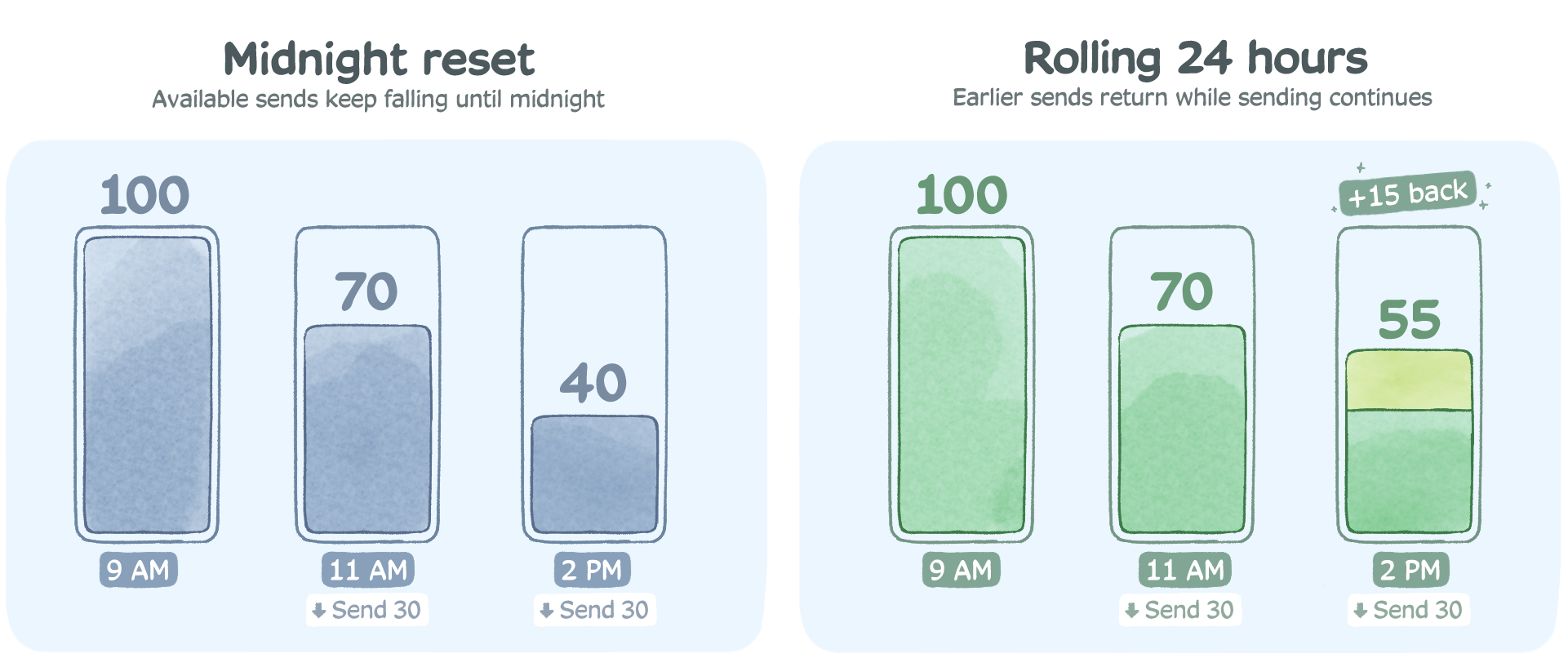
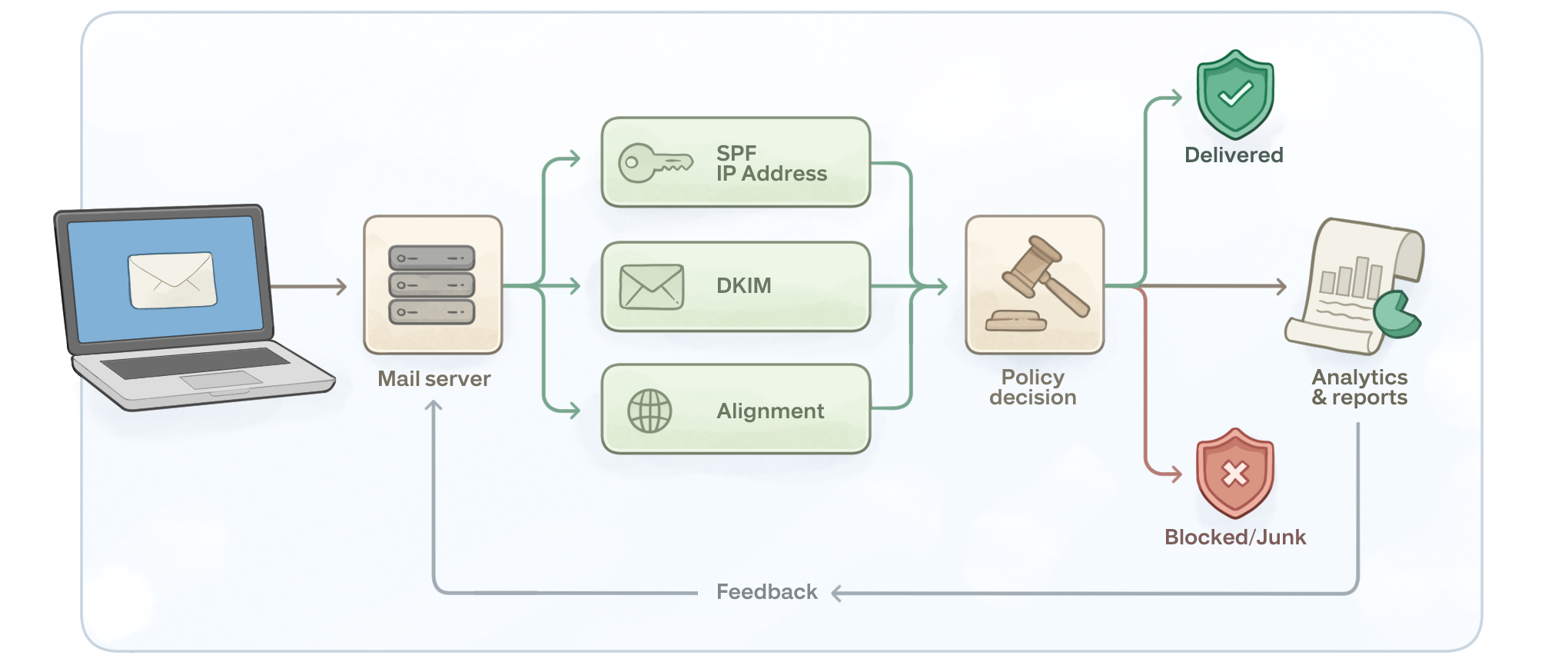
<p><strong>Nearly every limit runs on a rolling 24-hour window, not a calendar day.</strong> If your app burned through Gmail’s 500 by 2pm, you don’t get a fresh 500 at midnight. You get sends back gradually as the messages from 24 hours ago age out of the window. This is the single most common misunderstanding we see in support tickets about provider limits.</p>

<p><strong>Providers don’t all count the same thing.</strong> Microsoft’s headline 10,000 is a recipient count, layered with a separate 30-messages-per-minute rate. Yahoo counts each recipient separately too. Google runs two meters at once, messages per day and recipients per day, and blocks you at whichever fills first: one message to 100 people is one message but 100 recipients, so recipient-heavy sending drains the recipient caps long before the message cap. iCloud does the same double-metering, with messages and total recipients as independent daily caps.</p>

<p>So “how many emails can I send” is usually the wrong question. The right one is “how many recipients, how fast.”</p>

<p>There’s also a scheduling trap hiding in the rolling window. Quota returns exactly 24 hours after it was spent, so an automated system that fires its whole daily volume at the same time every morning (a 6am digest cron, a nightly batch invoice run) ends up chasing its own tail: capacity comes back at precisely the moment the next burst wants it, and any overrun compounds into tomorrow. Spreading sends across the day keeps quota trickling back continuously. Or, honestly, stops the cap from being your scheduling problem at all, which is the relay argument in one sentence.</p>

<p><img src="/assets/uploads/blog/2026-08-24-email-sending-limits-by-provider-01.png" alt="" /></p>

<h2 id="gmail-free-accounts-the-500-that-ends-most-diy-setups">Gmail (free accounts): the 500 that ends most DIY setups</h2>

<p>The free Gmail limits, per <a href="https://support.google.com/mail/answer/22839">Google’s own documentation</a>:</p>

<ul>
  <li><strong>500 messages per rolling 24 hours</strong> through the web interface, and Google also meters total recipients, so a message to 30 people burns 30 recipient slots</li>
  <li><strong>100 recipients per message</strong> when sending through SMTP, POP or IMAP, which is how your WordPress plugin, script, or CRM connects</li>
  <li><strong>500 recipients per message</strong> on the web</li>
</ul>

<p>Hit the cap and Gmail rejects further sends with <code class="highlighter-rouge">550 5.4.5 Daily user sending limit exceeded</code> (or the in-browser banner “You have reached a limit for sending mail”). The block lasts up to 24 hours, there’s no counter showing how close you are, and there is no way to buy, request, or negotiate a higher number on a free account. None.</p>

<p>Worth being straight about one thing: the daily SMTP allowance is genuinely murky. Half the articles on this topic state 100 emails per day over SMTP as fact; others say SMTP draws from the same 500 pool as the web interface and only the per-message recipient cap is 100. Google’s help page doesn’t settle it. So we tested it, and our test account hit the wall just past 100 SMTP sends (full write-up below). Whatever the documentation implies, plan on ~100 as the practical SMTP ceiling.</p>

<p>Two more Gmail realities worth knowing if you’re relaying an application through it:</p>

<p><strong>You need an app password now.</strong> Google removed “less secure app” access, so any script or device authenticating with your normal password will fail. You’ll need two-step verification enabled plus a 16-character app password. If your device predates TLS 1.2, it may not connect at all.</p>

<p><strong>Your mail may say “via gmail.com” or show sent “on behalf of” your address</strong>, which looks off to recipients and hurts trust. We covered that quirk (and the fix) in <a href="https://www.smtp2go.com/blog/avoid-gmails-behalf-message-use-different-smtp-server/">this post on avoiding Gmail’s “on behalf of” message</a>.</p>

<p>Honestly, Gmail SMTP is fine for what it’s designed for: a person, sending person-sized volumes. It was never meant to be application infrastructure. The 500 cap (really ~100 over SMTP) is where most people discover that.</p>

<h2 id="google-workspace-2000-per-day-with-sub-limits-underneath">Google Workspace: 2,000 per day, with sub-limits underneath</h2>

<p>Paying for Workspace roughly quadruples the headline number, per <a href="https://support.google.com/a/answer/166852">Google’s Workspace limits page</a>:</p>

<ul>
  <li><strong>2,000 messages per rolling 24 hours</strong> per user (1,500 if you’re using mail merge; only 500 while your account is on a trial)</li>
  <li><strong>10,000 total recipients per day</strong>, of which at most <strong>3,000 external</strong> and just <strong>2,000 unique external</strong></li>
  <li><strong>Per message: 2,000 recipients total, 500 of them external.</strong> But that’s via the web. Over SMTP, POP or IMAP the per-message cap drops to <strong>100 recipients</strong>, and via the Gmail API it’s 500</li>
</ul>

<p>That unique-external sub-limit is the one that catches businesses. Your update to 2,500 customers is over the cap even though it’s nowhere near 10,000 total recipients. And the penalty is the same as free Gmail: up to 24 hours of blocked sending, mid-campaign, with no override. One more trap for anyone setting up a fresh account: the trial-tier 500 ceiling doesn’t lift the moment you add a card. It lifts only after the account has genuinely converted to paid, so a “new mailbox” plan built on the 2,000 figure can quietly run at a quarter of that.</p>

<p>Workspace admins do have one extra lever: Google’s SMTP relay service (<code class="highlighter-rouge">smtp-relay.gmail.com</code>), which carries a separate quota of up to 10,000 messages per day per user for devices and apps. It helps. But it’s fiddly to configure per-IP, and it still ties your application’s deliverability to your staff mailboxes’ domain reputation, which is exactly the coupling you want to avoid.</p>

<p>One date-stamped note: since February 2024, Google and Yahoo require any sender pushing 5,000+ messages a day to Gmail addresses to have SPF, DKIM, and an enforced DMARC policy, one-click unsubscribe on bulk mail, and a spam complaint rate under 0.3%. We wrote up the full requirements in <a href="https://www.smtp2go.com/blog/gmail-and-yahoos-2024-inbox-protection-rules/">Gmail and Yahoo’s inbox protection rules</a>. If you’re approaching Workspace’s caps, you’re approaching those thresholds too.</p>

<h2 id="microsoft-365--exchange-online-generous-on-paper">Microsoft 365 / Exchange Online: generous on paper</h2>

<p>Microsoft’s published numbers look roomy. The layers underneath are where sending actually breaks. From <a href="https://learn.microsoft.com/en-us/office365/servicedescriptions/exchange-online-service-description/exchange-online-limits">Microsoft’s Exchange Online limits documentation</a> and their <a href="https://learn.microsoft.com/en-us/defender-office-365/outbound-spam-sending-limits-troubleshoot">outbound sending limits troubleshooting guide</a>:</p>

<ul>
  <li><strong>10,000 recipients per mailbox per rolling 24 hours</strong> (the “recipient rate limit”)</li>
  <li><strong>2,000 of those can be external</strong> (the External Recipient Rate limit, phased in across tenants from 2025). Hit it and external sends block until the window rolls over, while internal mail keeps flowing</li>
  <li><strong>30 messages per minute</strong> per mailbox. Exceed it and Exchange doesn’t bounce your mail, it delays it, carrying the excess into the following minutes. This is why “Microsoft 365 is sending slowly” tickets are usually not a Microsoft outage</li>
  <li><strong>500 recipients per message</strong> by default, though an admin can raise individual mailboxes to 1,000</li>
  <li><strong>3 concurrent connections</strong> for SMTP AUTH submission</li>
</ul>

<p>Then there’s the layer most articles miss entirely: the <strong>Tenant External Recipient Rate Limit</strong> (<strong>TERRL</strong>), a cap on how many external recipients your whole organization can email per day, scaled to your license count (Microsoft’s formula is 500 × licenses^0.7 + 9,500, with trial tenants held to 5,000). Blow through it and every mailbox in the company starts generating <code class="highlighter-rouge">550 5.7.233</code> bounces (<code class="highlighter-rouge">550 5.7.232</code> on trial tenants). A single runaway script or a compromised mailbox can exhaust the tenant’s entire external quota and take everyone’s outbound email down with it. You can check your tenant’s number in the Exchange admin center’s Tenant Outbound External Recipients report.</p>

<p>And if you’re wondering whether Microsoft intends any of this headroom for application or bulk sending, their limits documentation answers it directly: “Exchange Online isn’t suited to accommodate bulk-mailing scenarios.” Their words.</p>

<p><img src="/assets/uploads/blog/2026-08-24-email-sending-limits-by-provider-02.png" alt="" /></p>

<p>And the authentication clock is ticking. As of Microsoft’s January 27, 2026 update, Basic authentication for SMTP AUTH keeps working until the end of December 2026, at which point it’s disabled by default for existing tenants (admins can temporarily re-enable it), unavailable entirely for new tenants, with final removal to be announced in the second half of 2027. When it goes, every printer, scanner, and legacy app authenticating to smtp.office365.com with a username and password gets <code class="highlighter-rouge">550 5.7.30 Basic authentication is not supported for Client Submission.</code> We keep a full timeline and migration options in <a href="https://www.smtp2go.com/blog/the-end-of-microsofts-basic-authentication-for-smtp-auth/">our guide to the end of Microsoft’s Basic authentication</a>.</p>

<p>Fair’s fair: Microsoft does offer its own paths for higher volume, High Volume Email and Azure Communication Services. If your mail is entirely internal to your tenant, HVE is worth a look before you pay anyone anything. For external, customer-facing mail from apps and devices, both options involve more Azure plumbing than most IT teams want for the job a relay does in twenty minutes.</p>

<h2 id="outlookcom-consumer-accounts-the-limit-microsoft-wont-publish">Outlook.com (consumer accounts): the limit Microsoft won’t publish</h2>

<p>Free Outlook.com, Hotmail, and Live accounts have deliberately fuzzy limits. Microsoft states them as “variable, based on account history and reputation.” In practice, established free accounts land around 300 recipients per day, new accounts get far less, and Microsoft 365 Personal/Family subscribers can reach up to 5,000 recipients per day with 500 per message. There’s a catch inside that 5,000, though: only 1,000 per day can be non-relationship recipients, meaning addresses the mailbox has never emailed before. For anything automated, where nearly every recipient is new to the mailbox, 1,000 is the real number, not 5,000.</p>

<p>The bigger issue for anyone relaying an app through a consumer account: Microsoft removed Basic authentication from personal accounts back on September 16, 2024. If your device or script stopped sending through <code class="highlighter-rouge">smtp-mail.outlook.com</code> around then and never recovered, that’s why, and no setting brings it back.</p>

<h2 id="yahoo-mail-500-a-day-100-per-message">Yahoo Mail: 500 a day, 100 per message</h2>

<p>Yahoo documents <a href="https://my.help.yahoo.com/kb/mail/limits-sending-email-yahoo-mail-sln3353.html">limits on sending</a> at 500 messages per day with a maximum of 100 recipients per message, and each recipient counts toward the daily total. There’s an unofficial hourly throttle most senders peg around 100. Yahoo requires an app password for SMTP, same as Google.</p>

<p>There’s not much more to say, which is sort of the point. Yahoo SMTP is for a person with a Yahoo inbox. Nobody should wire a business system to it in 2026.</p>

<h2 id="icloud-mail-two-counters-and-whichever-fills-first-wins">iCloud Mail: two counters, and whichever fills first wins</h2>

<p>Apple <a href="https://support.apple.com/en-us/102198">documents iCloud’s limits</a> cleanly: 1,000 messages per day, 1,000 total recipients per day, 500 recipients per message, 20MB per message (up to 5GB via Mail Drop). What’s unusual is the failure mode. On an iPhone or Mac, over-limit messages don’t bounce with a server error; they quietly park in your Outbox with “A copy has been placed in your Outbox.” People assume the mail went. It didn’t. If you’re troubleshooting “sent but never arrived” from an Apple device, check the Outbox before you check anything else. We see this constantly, and we wrote up the broader pattern in <a href="https://www.smtp2go.com/blog/emails-stuck-outbox-wont-send/">emails stuck in the Outbox and won’t send</a>.</p>

<h2 id="shared-hosting-hourly-caps-and-silent-queues">Shared hosting: hourly caps and silent queues</h2>

<p>If your website sends through your web host’s mail server (the default for most cPanel WordPress installs), your caps are set by the hosting plan, they’re usually hourly, and they’re usually low. Commonly published figures: Bluehost around 150 emails/hour, DreamHost 100 recipients/hour, SiteGround up to 800/hour with 80 recipients per message, HostGator 500/hour, GoDaddy’s email plans in the 250–500/day range.</p>

<p>Hosts fail differently than mailbox providers, and worse. Some bounce with a <code class="highlighter-rouge">550</code> quota error. Plenty just queue the overflow and dribble it out, so your “instant” order confirmations arrive four hours late and nobody tells you. And because you share the server’s IP with hundreds of strangers’ websites, your deliverability rides on their behavior. One compromised site on the box and everyone’s mail starts landing in spam. That reputation problem doesn’t show up in any limits table, but it’s the real reason host SMTP mail underperforms, cap or no cap.</p>

<h2 id="i-hit-the-caps-on-purpose-so-you-dont-have-to">I hit the caps on purpose, so you don’t have to</h2>

<p>To document the failure modes rather than paraphrase them (and to settle the 100-versus-500 SMTP question the rest of the internet keeps contradicting itself on), I set up a fresh free Gmail account, connected it to a test WordPress site with an SMTP plugin over port 587, and pointed a form-fill script at it.</p>

<p>The messy details are the useful part. The account sent cleanly at a steady pace until send number 102, at which point the server started returning <code class="highlighter-rouge">550 5.4.5 Daily user sending limit exceeded</code> on every attempt. Not 500. Just over 100, because SMTP submission has the lower ceiling, which the plugin’s documentation never mentioned. The plugin retried each failed message three times, so the WordPress error log filled with triplicate failures, and the site owner (me) got no notification at all. A visitor filling in that contact form would have seen a friendly “thanks, we’ll be in touch.” The message went nowhere.</p>

<p>The lockout wasn’t a tidy 24 hours either. Sends started succeeding again in a trickle as the earliest messages aged out of the rolling window, which is exactly the behavior the “resets at midnight” folk wisdom gets wrong.</p>

<p>Repointing the same site at a relay took 14 minutes end to end: create the account, add the CNAME records for domain verification, wait for DNS, swap the SMTP credentials in the plugin. The form backlog cleared in under a minute.</p>

<h2 id="the-real-cost-isnt-the-cap-its-what-silently-doesnt-send">The real cost isn’t the cap, it’s what silently doesn’t send</h2>

<p>A marketing email arriving tomorrow is annoying. A password reset that never arrives is a support ticket. An order confirmation that never arrives is a chargeback. When a provider limit trips, it doesn’t pick which of your messages matter; the invoice bounces right alongside the newsletter.</p>

<p>That’s why the businesses that outgrow provider SMTP are rarely “big senders” in the marketing sense. StoredTech, an MSP, has routed mail from phone systems, copiers, and client infrastructure through SMTP2GO since 2011, because a voicemail-to-email notification that arrives four hours late may as well not arrive. And Group IMD grew from 10,000 to over a million emails a month across six years on the same account, without ever re-architecting around a new ceiling. Both stories are on our <a href="https://www.smtp2go.com/customer-success/">customer success page</a>.</p>

<h2 id="when-youve-outgrown-provider-smtp">When you’ve outgrown provider SMTP</h2>

<p>You don’t need a relay because a blog told you to. You need one when the symptoms show up:</p>

<ul>
  <li>You’ve hit a daily cap more than once, or you’re planning volume that will</li>
  <li>Your mail comes from software or hardware (forms, CRMs, ERPs, scanners, alarms) rather than a person at a keyboard</li>
  <li>Recipients say things land in spam, or headers show “via” some other domain</li>
  <li>You’re staring down Microsoft’s Basic auth cutoff with a fleet of devices that will never speak OAuth</li>
  <li>A delayed message costs you money or trust</li>
</ul>

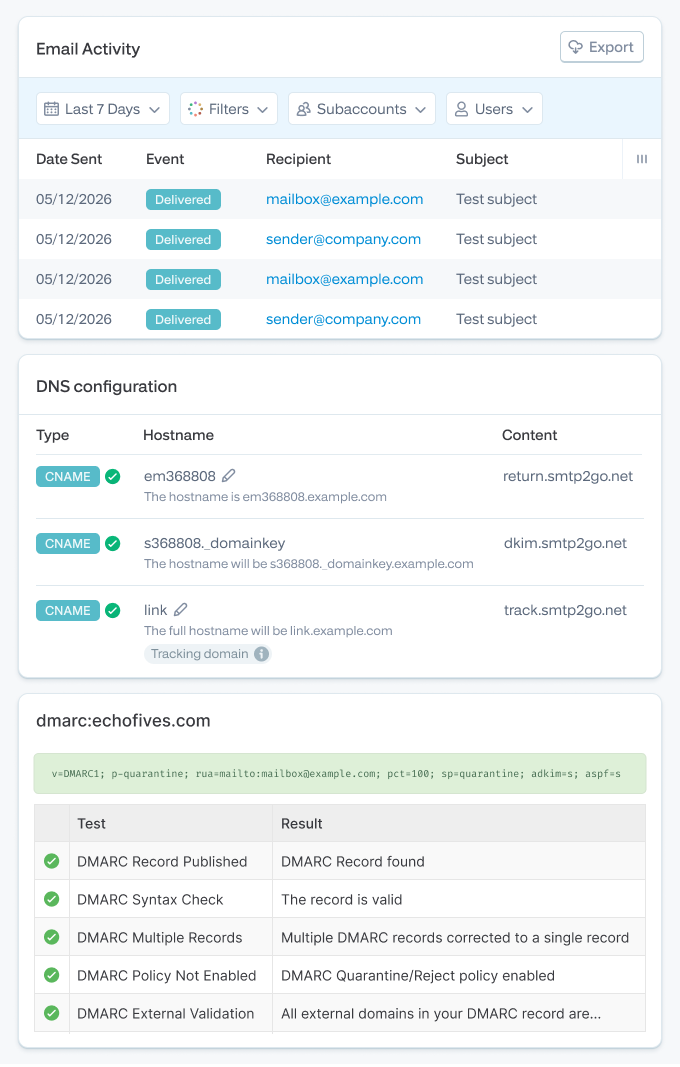
<p>A relay flips the model. Instead of borrowing capacity from a mailbox designed for humans, your systems send through infrastructure built for exactly this, with authentication (SPF, DKIM, DMARC) set up on your own domain, real bounce reporting, and limits that are business decisions rather than anti-abuse walls. If the concept is new, start with <a href="https://www.smtp2go.com/blog/smtp-relay-introduction/">our plain-English introduction to SMTP relays</a>. For SMTP2GO specifically, every one of our caps, and how to lift each, is documented on our <a href="https://www.smtp2go.com/blog/know-your-sending-limits/">own sending limits page</a>: free accounts get 1,000 emails a month at up to 200 a day (plenty for testing or a small site), and paid plans scale to millions with a default speed of 200,000 an hour.</p>

<p>And to be straight with you about the other side: if you’re a person sending 20 emails a day from your own mailbox, you don’t need us or anyone else. If your Microsoft 365 mail never leaves your tenant, look at Microsoft’s High Volume Email first. Provider limits only become your problem when your sending stops being personal. For most people reading a page like this one, that day was today.</p>]]></content><author><name>content/_authors/simon-slade.md</name></author><category term="Email Delivery &amp; Tips" /><summary type="html"><![CDATA[If you’re reading this, something probably just stopped sending.]]></summary></entry><entry><title type="html">Scan to Email: How to Set It Up and How to Fix It When It Breaks</title><link href="https://www.smtp2go.com/blog/fixes-for-scan-to-email/" rel="alternate" type="text/html" title="Scan to Email: How to Set It Up and How to Fix It When It Breaks" /><published>2026-08-24T00:00:00+00:00</published><updated>2026-08-24T00:00:00+00:00</updated><id>https://www.smtp2go.com/blog/common-fixes-for-scan-to-email</id><content type="html" xml:base="https://www.smtp2go.com/blog/fixes-for-scan-to-email/"><![CDATA[<p>Scan to email is five settings. Get them right and a fifteen-year-old copier will send PDFs reliably for another fifteen years. Get one wrong, or let your email provider change the rules underneath you, and you get a two-line error on a touchscreen and a line of people holding paper.</p>

<p>This guide does both jobs. If you’re setting up a printer or scanner from scratch, start right here. If yours was working and stopped, or errors out mid-setup, <a href="#troubleshooting">jump to the troubleshooting section</a> and match the exact message on the screen to its fix.</p>

<h2 id="the-five-settings-every-device-needs">The five settings every device needs</h2>

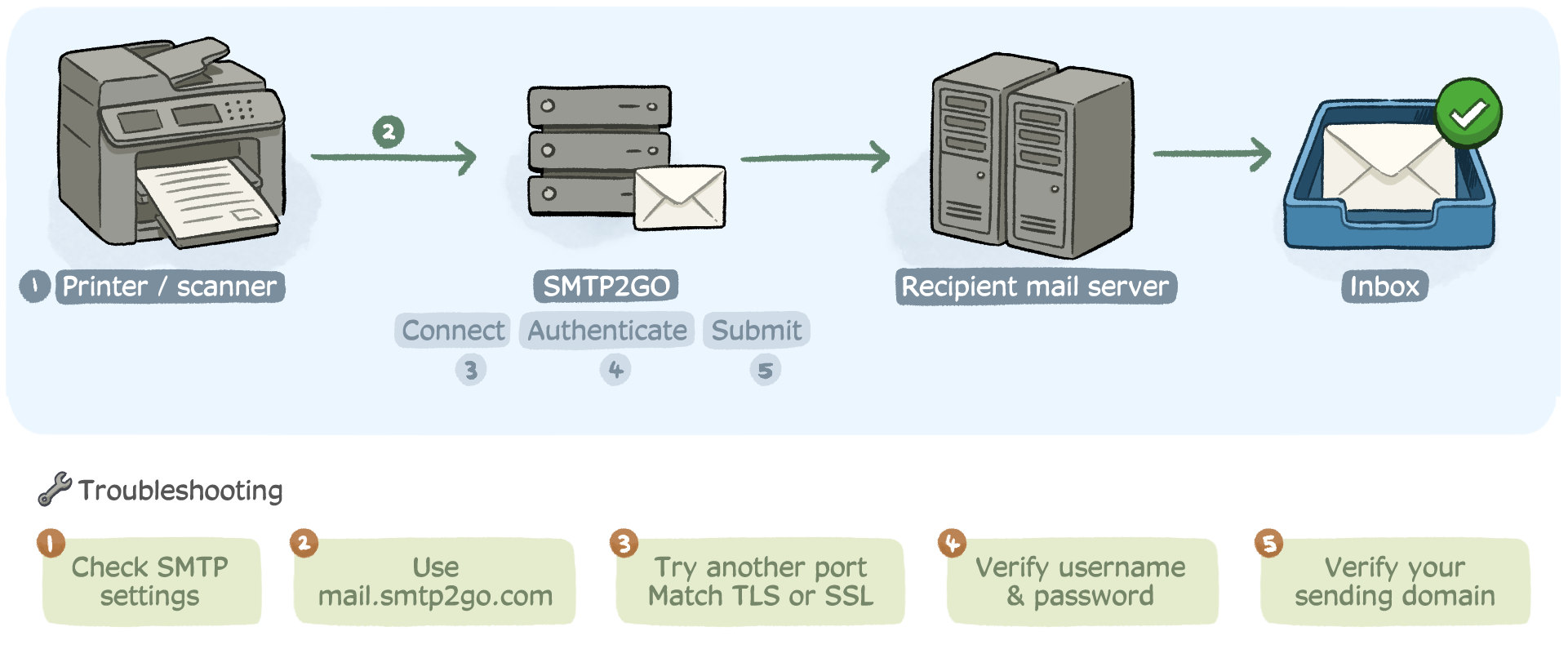
<p>Every scan-to-email setup, on every brand, comes down to the same five values. Your printer builds the email; an SMTP server delivers it. The settings just tell the printer which server, how to connect, and who it’s allowed to send as.</p>

<ol>
  <li><strong>SMTP server (host):</strong> the mail server’s address, like mail.smtp2go.com.</li>
  <li><strong>Port:</strong> the door the printer knocks on. 587 is the modern default.</li>
  <li><strong>Encryption:</strong> STARTTLS (usually shown as “TLS”) on 587, or SSL on 465. This must match the port.</li>
  <li><strong>Authentication:</strong> a username and password the server accepts. This is where most setups fail, and where most working setups later break.</li>
  <li><strong>From address:</strong> who the scans appear to come from. Increasingly, this address’s domain needs SPF and DKIM records or the scans land in junk.</li>
</ol>

<p>Everything else on the settings screen is cosmetic.</p>

<p><img src="/assets/uploads/blog/2025-08-19-fixes-for-scan-to-email-01.png" alt="" /></p>

<h2 id="a-complete-worked-setup-filled-in">A complete worked setup, filled in</h2>

<p>Here’s a full configuration using SMTP2GO as the sending service, because it works identically across brands and doesn’t depend on which email provider your office uses. The same five fields apply if you point the device elsewhere; only the values change.</p>

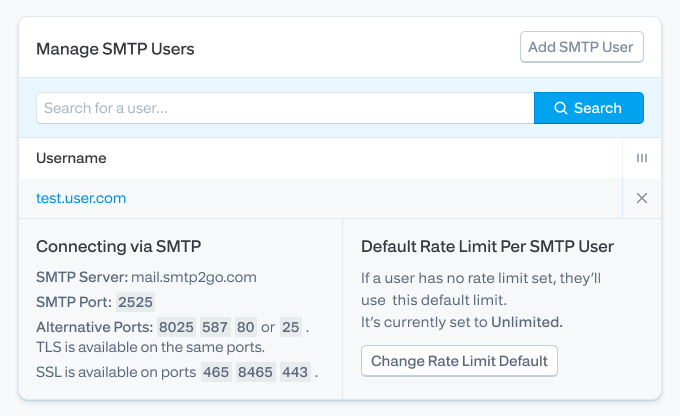
<p><strong>Step 1: Create credentials for the device.</strong> In your SMTP2GO dashboard, go to Sending &gt; SMTP Users and add a user just for this device, something like office-copier-01. Two deliberate choices here: it’s not a person’s email account, so nobody’s password change can break it, and it contains no “@” symbol, because some printer panels mishandle usernames that look like email addresses, a quirk our support team has run into more times than anyone would like.</p>

<p><strong>Step 2: Verify your sending domain.</strong> Under Sending &gt; Verified Senders, add the domain the scans will send from and publish the SPF and DKIM records it gives you. Skip this and your scans may still send, straight into junk folders. The <a href="https://support.smtp2go.com/hc/en-gb/articles/115004408567">verified senders guide</a> walks through the DNS records.</p>

<p><strong>Step 3: Open the printer’s admin interface</strong> (see the per-brand table below) and enter:</p>

<table>
  <thead>
    <tr>
      <th>Field</th>
      <th>Value</th>
    </tr>
  </thead>
  <tbody>
    <tr>
      <td>SMTP server</td>
      <td>mail.smtp2go.com</td>
    </tr>
    <tr>
      <td>Port</td>
      <td>587</td>
    </tr>
    <tr>
      <td>Encryption</td>
      <td>STARTTLS (shown as “TLS” on many panels)</td>
    </tr>
    <tr>
      <td>Authentication</td>
      <td>On (SMTP AUTH / Login)</td>
    </tr>
    <tr>
      <td>Username</td>
      <td>office-copier-01</td>
    </tr>
    <tr>
      <td>Password</td>
      <td>the password you set in Step 1</td>
    </tr>
    <tr>
      <td>From address</td>
      <td><a href="mailto:scanner@yourdomain.com">scanner@yourdomain.com</a> (a domain you verified in Step 2)</td>
    </tr>
  </tbody>
</table>

<p>If 587 won’t connect on your network, don’t fight the firewall. SMTP2GO also accepts TLS or unencrypted connections on 25, 2525, 8025, and 80, and SSL on 465, 8465, and 443. Port 2525 gets copiers out from behind stubborn firewalls more often than any firmware update, and 443 looks like ordinary web traffic to almost every network. Details in the <a href="https://support.smtp2go.com/hc/en-gb/articles/223087527-TLS-STARTTLS-and-SSL-Secure-Connections">ports and secure connections guide</a>. It’s the reason device manufacturers like it here: OPW Electronic Systems, which sends alerts from proprietary fuel-monitoring equipment on customer networks it doesn’t control, <a href="https://www.smtp2go.com/customer-success/">put it plainly</a>: “The flexible number of available communication ports allows our equipment to work on almost all network configurations.”</p>

<p><strong>Step 4: Send a test scan</strong> to an external address, not just a colleague on your own domain, for reasons covered in the FAQ.</p>

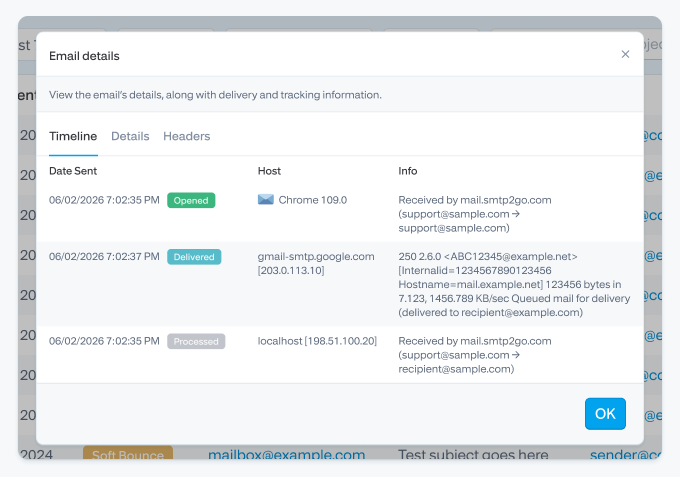
<p><strong>Step 5: Confirm delivery</strong> on the SMTP2GO Activity page, which shows the scan as delivered, bounced, or deferred with the receiving server’s exact response. “Did it actually send?” stops being a mystery.</p>

<p>The settings take about two minutes to enter. Finding the settings screen is the slow part, which is what the next section is for. And when a first test scan fails, it’s nearly always one of the same three things: a panel that silently truncated a long password, port 587 filtered on the office network (switching to 2525 fixes that in seconds), or an unverified From domain sending the test straight to junk. Check those three before assuming anything is broken.</p>

<p><img src="/assets/uploads/blog/2025-08-19-fixes-for-scan-to-email-02.png" alt="" /></p>

<p><img src="/assets/uploads/blog/2025-08-19-fixes-for-scan-to-email-03.png" alt="" /></p>

<h2 id="where-the-settings-live-brand-by-brand">Where the settings live, brand by brand</h2>

<p>Menu names drift a little between models and firmware versions, but every brand puts SMTP settings in its web-based admin interface, reached by typing the printer’s IP address into a browser.</p>

<table>
  <thead>
    <tr>
      <th>Brand</th>
      <th>Admin interface</th>
      <th>Where to look</th>
      <th>Step-by-step guide</th>
    </tr>
  </thead>
  <tbody>
    <tr>
      <td>HP</td>
      <td>Embedded Web Server (EWS)</td>
      <td>Scan/Digital Send &gt; Email Setup or Outgoing Email Profiles</td>
      <td>Use above</td>
    </tr>
    <tr>
      <td>Canon</td>
      <td>Remote UI</td>
      <td>Settings/Registration &gt; Send &gt; Email Settings</td>
      <td>Use above</td>
    </tr>
    <tr>
      <td>Brother</td>
      <td>Web Based Management</td>
      <td>Network &gt; Email &gt; SMTP</td>
      <td>Use above</td>
    </tr>
    <tr>
      <td>Epson</td>
      <td>Web Config</td>
      <td>Network &gt; Email Server &gt; Basic</td>
      <td>Use above</td>
    </tr>
    <tr>
      <td>Sharp</td>
      <td>Device web page</td>
      <td>System Settings &gt; Network Settings &gt; SMTP</td>
      <td>Use above</td>
    </tr>
    <tr>
      <td>Kyocera</td>
      <td>Command Center RX</td>
      <td>Function Settings &gt; Email</td>
      <td><a href="https://www.smtp2go.com/setupguide/kyocera-multifunction-printers/">Kyocera setup guide</a></td>
    </tr>
    <tr>
      <td>Xerox</td>
      <td>Embedded Web Server</td>
      <td>Connectivity &gt; SMTP</td>
      <td><a href="https://www.smtp2go.com/setupguide/xerox-workcentre/">Xerox WorkCentre guide</a></td>
    </tr>
    <tr>
      <td>Ricoh</td>
      <td>Web Image Monitor</td>
      <td>Configuration &gt; Email</td>
      <td><a href="https://www.smtp2go.com/setupguide/ricoh-printers-integration/">Ricoh setup guide</a></td>
    </tr>
    <tr>
      <td>Lexmark</td>
      <td>Embedded Web Server</td>
      <td>Settings &gt; Email &gt; Email Setup</td>
      <td><a href="https://www.smtp2go.com/setupguide/lexmark-printers/">Lexmark setup guide</a></td>
    </tr>
  </tbody>
</table>

<p>More device and software walkthroughs live in the <a href="https://www.smtp2go.com/setupguide/#mfc-printers-scanners">setup guides library</a>.</p>

<h2 id="choosing-what-the-printer-sends-through">Choosing what the printer sends through</h2>

<p>You have three realistic options for the server in that table, and the right one depends on how much fragility you can live with.</p>

<p><strong>Your Microsoft 365 tenant (smtp.office365.com).</strong> Works, for now, with a licensed mailbox and its password. But this is exactly the configuration Microsoft is retiring, covered in the next section, and it means a machine’s ability to send email depends on a human account’s password never changing.</p>

<p><strong>Gmail or Google Workspace (smtp.gmail.com).</strong> A lot of small offices go this route because the account already exists. Know the constraints going in. Plain password sign-in from apps is gone, so the printer needs an app password, which requires 2-step verification on the account and gets revoked whenever the account password changes. Every password rotation becomes a printer outage. And Google caps sending at <a href="https://support.google.com/mail/answer/22839">500 messages a day on a free Gmail account</a> and <a href="https://support.google.com/a/answer/166852">2,000 a day on Google Workspace</a>, which sounds like plenty until a document-heavy office or a fleet of devices shares one account and hits the wall mid-afternoon. Fine for one home-office device. Fragile for anything more.</p>

<p><strong>A dedicated SMTP relay (SMTP2GO).</strong> The device gets its own credentials that no human password rotation can touch, one set of settings works across every brand and every site, eight ports mean firewalls stop being an argument, and provider deprecation timelines become someone else’s problem. This is the durable option, and it’s the one thing in this list actually designed for machines that send email.</p>

<p>Honest caveat: if your fleet is new, OAuth-capable, and scans mostly stay inside your own organization, Microsoft’s native methods are supported and free, and you should use them. The relay earns its keep with mixed-age hardware, multiple sites, no static IP, or a preference for configuring this once and never thinking about it again.</p>

<h2 id="m365-deadline">The Microsoft 365 deadline, and why it’s coming for your copier specifically</h2>

<p>If your devices send through smtp.office365.com with a username and password, put this on the calendar.</p>

<p>Microsoft is retiring basic authentication (password sign-in) for SMTP. Personal outlook.com accounts already lost it in September 2024. For business tenants, <a href="https://techcommunity.microsoft.com/blog/exchange/updated-exchange-online-smtp-auth-basic-authentication-deprecation-timeline/4489835">Microsoft’s current timeline</a>, revised in January 2026, runs: no change through December 2026, then disabled by default for existing tenants at the end of December 2026 (admins can re-enable it, for now), unavailable entirely on tenants created after that, and a final removal date to be announced in the second half of 2027. When it bites, the device shows some variant of authentication failure and the server logs <code class="highlighter-rouge">550 5.7.30 Basic authentication is not supported for Client Submission.</code></p>

<p>Multifunction printers are the most exposed devices in the building, for a boring reason: an installer configured them once, years ago, with a mailbox password nobody has touched since. They’ll keep working until the exact moment a tenant setting flips. And “disabled by default” means the flip can come early, from a security cleanup, Security Defaults being enabled, or a Conditional Access change, not just from Microsoft’s deadline.</p>

<p><strong>How to tell if you’re affected:</strong> sign in to the Exchange admin center and open Reports &gt; Mail flow &gt; SMTP AUTH Clients Submission Report. Any device or app showing “Basic” is on borrowed time.</p>

<p><strong>Whether your hardware can move to OAuth:</strong> support is genuinely uneven. HP offers OAuth scan to email on <a href="https://support.hp.com/us-en/document/ish_13623350-13600809-16">FutureSmart 5.7 or newer</a>, but only on its Enterprise and Managed lines; consumer and Pro models like the OfficeJet Pro don’t get it. Lexmark added it in FW24, Canon on its unified Firmware Platform 3.18 or newer, and newer Sharp models include it. Xerox doesn’t support OAuth for scan to email at all, and Ricoh and Konica Minolta support is limited and model-dependent. Even inside a “supported” brand it varies by model, so validate on one device before planning a rollout.</p>

<p><strong>Why re-enabling basic auth per mailbox is not the fix:</strong> it’s a snooze button. Admins can re-enable it today, but new tenants already can’t, the final removal date is coming, and every re-enable is a security exception someone has to remember, document, and defend at the next audit. You’d be spending effort to stay on a sinking configuration.</p>

<p>The durable fix for devices that can’t do OAuth (and for fleets where per-device OAuth setup is its own project) is an authenticated relay: point every device at mail.smtp2go.com on 587 with its own credentials, and Microsoft’s timeline stops applying to your copiers at all. Full background in <a href="https://www.smtp2go.com/blog/the-end-of-microsofts-basic-authentication-for-smtp-auth/">our guide to the end of Microsoft’s basic authentication</a>.</p>

<p>This is exactly why managed service providers standardized on relays years before any deadline forced the issue. Mark Shaw of <a href="https://www.smtp2go.com/customer-success/">Stored Technology Solutions</a>, an MSP, has run client devices through SMTP2GO for well over a decade: “Since 2011, StoredTech has used SMTP2GO to help phone systems, copiers and printers, and other devices send emails with no headaches and no downtime.” One relay across every client site beats maintaining per-tenant Microsoft configurations that shift underneath you, and there’s a dedicated <a href="https://www.smtp2go.com/managed-service-providers">MSP program</a> if that’s your world.</p>

<h2 id="troubleshooting">Troubleshooting: match the error on the screen to the fix</h2>

<p>The error message tells you which stage failed. Find yours:</p>

<table>
  <thead>
    <tr>
      <th>What the device says</th>
      <th>Most likely cause</th>
      <th>Fix</th>
    </tr>
  </thead>
  <tbody>
    <tr>
      <td>“Cannot resolve SMTP server” / “Server not found”</td>
      <td>DNS is missing or wrong</td>
      <td><a href="#fix-1">Fix 1</a></td>
    </tr>
    <tr>
      <td>“Connection refused” / “Cannot connect” / “SMTP gateway not responding” / timeout</td>
      <td>Blocked port, firewall, or encryption mismatched to the port</td>
      <td><a href="#fix-2">Fix 2</a></td>
    </tr>
    <tr>
      <td>“Authentication failed” / “535 5.7.3” / “Login incorrect”</td>
      <td>Bad credentials, or a sign-in method your provider retired</td>
      <td><a href="#fix-3">Fix 3</a></td>
    </tr>
    <tr>
      <td>“550 Relay access denied” / “550 5.7.1 Unable to relay”</td>
      <td>Sending without authentication, or a From address the server won’t accept</td>
      <td><a href="#fix-4">Fix 4</a></td>
    </tr>
    <tr>
      <td>“550 5.7.30 Basic authentication is not supported”</td>
      <td>Microsoft switched off password sign-in for your setup</td>
      <td><a href="#m365-deadline">See the Microsoft deadline</a></td>
    </tr>
    <tr>
      <td>Panel says “Complete” but nothing arrives</td>
      <td>Spam filtering, file size, or a From address failing authentication</td>
      <td><a href="#fix-5">Fix 5</a></td>
    </tr>
    <tr>
      <td>Works for some recipients, not others</td>
      <td>Recipient-side filtering or address book errors</td>
      <td><a href="#fix-6">Fix 6</a></td>
    </tr>
  </tbody>
</table>

<p>Before touching anything: get the device’s admin password and find out which account or service it’s configured to send through. Without those, troubleshooting stops in about ninety seconds.</p>

<h3 id="fix-1">Fix 1: “Cannot resolve SMTP server”</h3>

<p>The printer can’t turn a hostname into an IP address. Nine times out of ten, someone assigned the printer a static IP and left the DNS fields blank. It prints fine (printing is local) and can’t email at all (email needs the internet, which needs DNS).</p>

<p>In the admin interface, check four values together: IP address, default gateway, preferred DNS, alternate DNS. On a business network, use the DNS servers the network already uses; on a simple one, 8.8.8.8 and 8.8.4.4 will do. Fix DNS and the error will often change to an authentication error. That’s progress, not a new problem: the printer found the server, and now the server is rejecting the login, so move to Fix 3.</p>

<p>Some older devices have DNS handling that’s simply broken. For those, skip the hostname and point the device at an IP address directly using SMTP2GO’s <a href="https://support.smtp2go.com/hc/en-gb/articles/223087667-Connecting-to-an-IP-Address">static IP options</a>, which most mail providers don’t offer.</p>

<h3 id="fix-2">Fix 2: “Connection refused,” gateway not responding, or timeouts</h3>

<p>DNS resolved, but the connection never completes. Almost always a port problem. ISPs routinely block port 25 outbound, plenty of networks block 587, and an encryption setting mismatched to the port (SSL selected on 587, or STARTTLS on 465) fails in ways the error won’t explain.</p>

<p>Test the path from any computer on the same network before blaming the printer:</p>

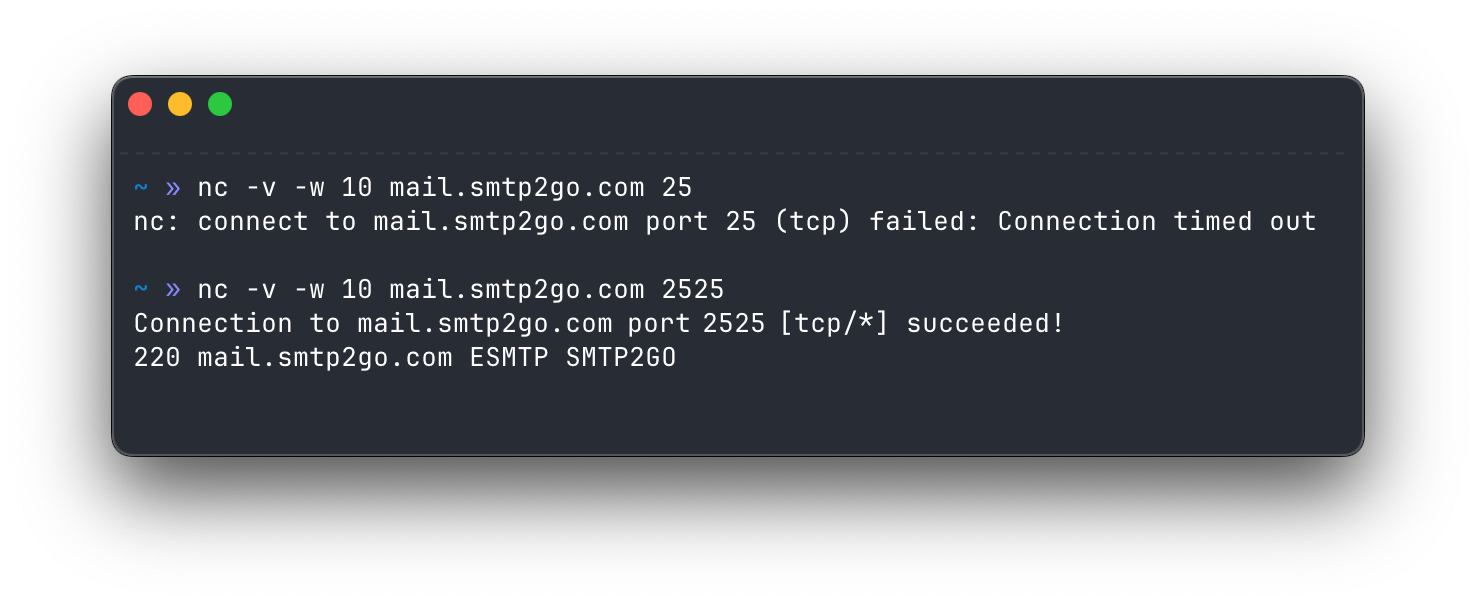
<p>telnet mail.smtp2go.com 2525</p>

<p>A <code class="highlighter-rouge">220</code> greeting means the door is open. Silence means the network is blocking it, and no printer setting will change that; switch ports instead (2525 and 443 are the great escape artists here). If connections open but die partway through, that’s a different animal, covered in <a href="https://www.smtp2go.com/blog/smtp-timeouts/">our guide to SMTP timeouts</a>.</p>

<p><img src="/assets/uploads/blog/2025-08-19-fixes-for-scan-to-email-04.png" alt="" /></p>

<p>While you’re in the admin interface, check the device’s date and time. Sounds unrelated. It isn’t. TLS certificates have validity windows, and a printer whose clock reset to 2019 after a power cut will fail every secure connection with maddeningly vague errors.</p>

<h3 id="fix-3">Fix 3: “Authentication failed” (535 errors)</h3>

<p>The printer reached the server and the server said no. In order of likelihood:</p>

<p><strong>The password changed.</strong> If the device authenticates with a person’s account and that person changed their password or left the company, scan to email died at that moment. Update the stored credentials, then read the worked setup above for why a machine shouldn’t borrow a human’s account in the first place.</p>

<p><strong>The username has special characters.</strong> Some panels mishandle usernames containing “@” or store invisible trailing spaces. If you’re certain the credentials are right and it still fails, this is worth suspecting. SMTP2GO usernames don’t need to be email addresses (yours are under Sending &gt; SMTP Users), which sidesteps the whole bug class.</p>

<p><strong>The account requires an authentication method the printer doesn’t speak.</strong> The 2026 problem. See the <a href="#m365-deadline">Microsoft deadline section</a>, and if the device can’t do standard SMTP authentication at all, there are <a href="https://support.smtp2go.com/hc/en-gb/articles/223087467-Alternatives-to-SMTP-Authentication">alternatives</a>, including authenticating by IP address.</p>

<p>One warning: don’t keep retrying guessed passwords against a Microsoft 365 or Google account. Repeated failures can lock it, and now you have two outages.</p>

<h3 id="fix-4">Fix 4: “550 Relay access denied” or “Unable to relay”</h3>

<p>The server accepted the connection but refuses to carry your message. Two usual causes. Either authentication is switched off on the device (some setups “work” unauthenticated for internal mail only, then throw this the first time someone scans to an outside address), or the From address isn’t one the server permits. Turn SMTP authentication on with valid credentials, and make sure the From address belongs to a domain the service allows you to send as. On SMTP2GO that means a <a href="https://support.smtp2go.com/hc/en-gb/articles/115004408567">verified sender</a>. More on the whole 550 family in <a href="https://www.smtp2go.com/blog/550-error/">our 550 error guide</a>.</p>

<h3 id="fix-5">Fix 5: The panel says “Complete” but nothing arrives</h3>

<p>The printer did its job; the message got filtered, bounced, or quarantined downstream. Three suspects:</p>

<p><strong>File size.</strong> Scanner PDFs balloon fast. A 20-page color scan at 600 dpi can blow past the 25 MB cap common at major mailbox providers, and many devices report success anyway. Test with a one-page black-and-white scan. If the small one arrives and the big one doesn’t, drop resolution to 200 or 300 dpi and scan documents in black and white. More in <a href="https://www.smtp2go.com/blog/the-goldilocks-theory-of-email-file-sizes/">the Goldilocks theory of email file sizes</a>.</p>

<p><strong>The From address is failing authentication.</strong> If the domain’s SPF and DKIM records don’t authorize the sending server, receiving servers treat every scan as a possible forgery. Some junk it, some silently drop it. Verify the sending domain (Step 2 of the worked setup) even if scans are currently arriving; it’s the difference between arriving and arriving in the inbox.</p>

<p><strong>Recipient-side filtering.</strong> Check spam and quarantine. Scans are attachment-heavy messages from an unfamiliar sender, which also describes a lot of malware, so filters distrust them by design.</p>

<p>With a relay in the middle there’s no guessing at this stage: the Activity page shows delivered, bounced, or deferred with the receiving server’s exact words.</p>

<h3 id="fix-6">Fix 6: Works for some recipients, not others</h3>

<p>The printer, network, and configuration are fine. Check the failing addresses for typos and stale address book entries first; a surprising number of “broken” copiers are faithfully emailing someone who left in 2022. If the addresses are right, the receiving domain is filtering you, and the verified sender fix is your strongest lever. Test one known-good external address, then add failures back one at a time until the pattern shows itself.</p>

<h3 id="it-worked-yesterday-what-changed">It worked yesterday. What changed?</h3>

<p>When something that ran for years stops overnight, resist the factory reset. It erases the address book, network config, and SMTP settings, and fixes nothing if the change happened outside the printer. Run this list instead: Did anyone’s password change? Did IT enable Security Defaults or tighten Conditional Access? New firewall, new ISP, new VLAN? Firmware update? Power cut (clock drift, Fix 2)? Provider requirement change (the Microsoft section)? The date scan to email died is your best clue. Something changed that day, and finding it beats rebuilding everything and rediscovering it later.</p>

<h2 id="keep-it-from-breaking-again">Keep it from breaking again</h2>

<p>Five minutes of discipline prevents most future 7 a.m. “copier’s down” calls. Give each device (or each site, if you’re an MSP) its own SMTP user, so one revoked credential never takes down the fleet. Verify the sending domain so scans go out SPF-aligned and DKIM-signed. Write the working configuration down somewhere that isn’t the printer. And update firmware on a schedule rather than in a panic, because updates occasionally reset SMTP settings, and you want to notice on your own terms.</p>

<p>[FAQ]</p>

<h2 id="still-stuck">Still stuck?</h2>

<p>Some of these failures are genuinely miserable to diagnose from a two-line touchscreen. If you’ve worked through the fixes and the device still won’t send, <a href="https://www.smtp2go.com/contact/">contact our support team</a>. They’re humans, they’re around 24/7, and printer tickets are something they untangle every day. And if you’d rather take the email provider variable out of the equation for good, <a href="https://www.smtp2go.com/pricing">SMTP2GO is free</a> to try for up to 1,000 emails a month, which covers a lot of scanning.</p>]]></content><author><name>content/_authors/simon-slade.md</name></author><category term="Features &amp; Updates" /><summary type="html"><![CDATA[Scan to email is five settings. Get them right and a fifteen-year-old copier will send PDFs reliably for another fifteen years. Get one wrong, or let your email provider change the rules underneath you, and you get a two-line error on a touchscreen and a line of people holding paper.]]></summary></entry><entry><title type="html">SMTP2GO Is Officially the #1 Free SMTP Server, Ranked by EmailToolTester. Here’s the Full Comparison…</title><link href="https://www.smtp2go.com/blog/smtp2go-ranked-1-best-free-smtp-server-by-emailtooltester/" rel="alternate" type="text/html" title="SMTP2GO Is Officially the #1 Free SMTP Server, Ranked by EmailToolTester. Here’s the Full Comparison…" /><published>2026-08-08T00:00:00+00:00</published><updated>2026-08-08T00:00:00+00:00</updated><id>https://www.smtp2go.com/blog/smtp2go-officially-ranked-1-best-free-smtp-server-by-emailtooltester</id><content type="html" xml:base="https://www.smtp2go.com/blog/smtp2go-ranked-1-best-free-smtp-server-by-emailtooltester/"><![CDATA[<p>For the third year running, <a href="https://www.emailtooltester.com/en/blog/free-smtp-servers/">EmailToolTester</a> has ranked SMTP2GO the #1 best free SMTP server. Not our words. Theirs: an independent review site that ran four rounds of live deliverability testing across nine transactional email providers, watched where the mail actually landed, and put SMTP2GO on top with a 96% average.</p>

<p>We’re proud of that. But a ranking on its own doesn’t help you choose an SMTP server, and most award announcements stop exactly where they should start. So this page gives you the rest: the full test scores, every major free tier laid out with its real limits (daily caps, credit cards, expiry dates, the catch), and honest notes on where a competitor is genuinely the better fit. Yes, we sell one of the services below. The deliverability numbers come from EmailToolTester’s testing, and every allowance was checked against each provider’s own documentation in August 2026. Where we couldn’t confirm something, we’ve said so instead of guessing.</p>

<p>If you just want the answer:</p>

<ul>
  <li><strong>Best free SMTP server, per independent testing:</strong> SMTP2GO, ranked #1 by EmailToolTester three years in a row. 1,000 emails a month, no credit card, no expiry, 96% average deliverability across their four Glockapps rounds.</li>
  <li><strong>Best for developers on modern stacks:</strong> Resend. 3,000 a month, lovely API, hard 100/day ceiling.</li>
  <li><strong>Best for testing without sending:</strong> a capture sandbox (Mailtrap’s testing product, or free local tools like Mailpit), not a real relay. More on that below, because it’s a different job.</li>
  <li><strong>Skip:</strong> SendGrid, whose free plan no longer exists, and Amazon SES if you’re opening a new AWS account, for reasons that surprise most people.</li>
</ul>

<p>The rest of this guide is the fine print, starting with the test itself.</p>

<h2 id="the-test-that-put-smtp2go-at-1-for-email-delivery">The test that put SMTP2GO at #1 for email delivery</h2>

<p>EmailToolTester doesn’t hand out that ranking on vibes. They ran four separate rounds of deliverability testing across nine transactional email providers, using Glockapps to send test emails to a seed list of more than 20 international mailbox providers (Gmail, Outlook, Yahoo, and the rest), then recorded what reached the inbox, what hit spam, and what never arrived. Along the way they checked each provider’s server reputation, SPF, DKIM, and DMARC authentication, and blocklist status.</p>

<p>The averages across all four rounds:</p>

<table>
  <thead>
    <tr>
      <th><strong>Rank</strong></th>
      <th><strong>Provider</strong></th>
      <th><strong>Average deliverability</strong></th>
    </tr>
  </thead>
  <tbody>
    <tr>
      <td>1</td>
      <td><strong>SMTP2GO</strong></td>
      <td><strong>96%</strong></td>
    </tr>
    <tr>
      <td>2</td>
      <td>Postmark</td>
      <td>94%</td>
    </tr>
    <tr>
      <td>3</td>
      <td>MailerSend</td>
      <td>87%</td>
    </tr>
    <tr>
      <td>4</td>
      <td>Mailjet</td>
      <td>85%</td>
    </tr>
    <tr>
      <td>5</td>
      <td>SendGrid</td>
      <td>82%</td>
    </tr>
    <tr>
      <td>6</td>
      <td>Brevo</td>
      <td>80%</td>
    </tr>
    <tr>
      <td>7</td>
      <td>Mailtrap</td>
      <td>77%</td>
    </tr>
    <tr>
      <td>8</td>
      <td>SendPulse</td>
      <td>74%</td>
    </tr>
    <tr>
      <td>9</td>
      <td>Elastic Email</td>
      <td>60%</td>
    </tr>
  </tbody>
</table>

<p><em>Source: <a href="https://www.emailtooltester.com/en/blog/free-smtp-servers/">EmailToolTester’s free SMTP server testing</a>, most recently updated August 2026. SendPulse and Mailtrap appear in their scores but sit outside our comparison table below; their write-up covers both.</em></p>

<p>Three honest notes on those numbers, because a winner quoting a test owes you the caveats. First, the one place SMTP2GO’s mail got flagged was Yandex.ru, and every provider in the test failed there too. Second, EmailToolTester’s own view is that once you’re sending real volume, your domain’s reputation matters more than the relay carrying it; they put the provider’s share of the outcome at roughly 30%. Third, Elastic Email’s 60% doesn’t mean 40% of every sender’s mail vanishes forever, it means a lot of seed-test mail landed in spam folders. Directionally, though, that spread is the whole story. On a free plan you can’t buy your way off a bad shared IP, so the provider’s baseline is the biggest lever you control. A free allowance that lands in spam is worth nothing. 1,000 emails delivered beats 9,000 emails filtered.</p>

<p>One more reason an independent #1 matters on this particular topic: look at who publishes the other “best free SMTP server” lists sometime. Nearly all of them are providers ranking themselves first. Brevo’s list crowns Brevo, UniOne’s crowns UniOne, Mailtrap features Mailtrap prominently. We’re a provider too, which is exactly why we’d rather point at someone else’s test than grade our own homework.</p>

<p>Now, what each free tier actually gives you.</p>

<h2 id="free-smtp-servers-compared">Free SMTP servers compared</h2>

<table>
  <thead>
    <tr>
      <th>Provider</th>
      <th>Free allowance</th>
      <th>Daily cap</th>
      <th>Card required?</th>
      <th>Expires?</th>
      <th>The catch</th>
    </tr>
  </thead>
  <tbody>
    <tr>
      <td>SMTP2GO</td>
      <td>1,000/month</td>
      <td>200/day (25/hour at first; support lifts it on request)</td>
      <td>No</td>
      <td>Never</td>
      <td>Reporting history is capped at 5 days on the free plan</td>
    </tr>
    <tr>
      <td>Brevo</td>
      <td>~9,000/month</td>
      <td>300/day</td>
      <td>No</td>
      <td>Never</td>
      <td>Scored 80% in independent deliverability tests, with inconsistent rounds</td>
    </tr>
    <tr>
      <td>Mailjet</td>
      <td>6,000/month</td>
      <td>200/day</td>
      <td>No</td>
      <td>Never</td>
      <td>Mailjet branding on free emails; support won’t dig into delivery problems on the free plan</td>
    </tr>
    <tr>
      <td>Resend</td>
      <td>3,000/month</td>
      <td>100/day</td>
      <td>No</td>
      <td>Never</td>
      <td>One sending domain; received emails count against your quota</td>
    </tr>
    <tr>
      <td>MailerSend</td>
      <td>500/month</td>
      <td>100/day</td>
      <td>No</td>
      <td>Never</td>
      <td>Account approval required; activity data kept for 1 day; allowance has been cut twice since 2024</td>
    </tr>
    <tr>
      <td>Amazon SES</td>
      <td>New AWS accounts: up to $200 in general AWS credits (no SES-specific free tier). Older accounts: 3,000 message charges/month for the first 12 months</td>
      <td>Sandbox limits until you request production access</td>
      <td>AWS account with billing</td>
      <td>Credits: 6 months. Legacy tier: 12 months</td>
      <td>It’s infrastructure, not a service. No human support without a paid support plan, and new accounts start in a sandbox that only sends to verified addresses</td>
    </tr>
    <tr>
      <td>Postmark</td>
      <td>100/month</td>
      <td>n/a</td>
      <td>No</td>
      <td>Never</td>
      <td>100 emails is an evaluation sandbox, not a sending plan; data is hosted in the US only</td>
    </tr>
    <tr>
      <td>Elastic Email</td>
      <td>~3,000/month</td>
      <td>100/day</td>
      <td>No</td>
      <td>Never</td>
      <td>Free accounts sit on shared IPs that scored worst (60%) in independent deliverability tests</td>
    </tr>
    <tr>
      <td>Gmail (personal)</td>
      <td>~15,000/month in theory</td>
      <td>500 per rolling 24 hours</td>
      <td>No</td>
      <td>Never</td>
      <td>You must send from your @gmail.com address, recipients per message are capped, and hitting the limit locks sending for up to 24 hours</td>
    </tr>
    <tr>
      <td>SendGrid</td>
      <td>None. The free plan ended in 2025</td>
      <td>100/day during a 60-day trial only</td>
      <td>No</td>
      <td>Yes, 60 days</td>
      <td>The trial is a trial. After 60 days you pay or you stop</td>
    </tr>
  </tbody>
</table>

<p>Sources: provider documentation and pricing pages, August 2026; deliverability averages from EmailToolTester’s four-round Glockapps testing of nine transactional providers.</p>

<p><img src="/assets/uploads/blog/2026-05-14-best-free-smtp-server-by-emailtooltester-01.png" alt="" /></p>

<h2 id="per-day-caps-vs-monthly-allowances">Per-day caps vs. monthly allowances</h2>

<p>Here’s the thing the headline numbers hide. Transactional email is bursty. Nobody resets their password on a schedule.</p>

<p>Brevo’s ~9,000 a month sounds nine times more generous than SMTP2GO’s 1,000. But it arrives as a hard 300-per-day drip. If your store sends 450 order confirmations on a busy Saturday, 150 of them wait until Sunday. For a newsletter, that’s annoying. For receipts and password resets, it’s a support queue.</p>

<p>A monthly allowance with a high daily ceiling behaves the opposite way: it absorbs spikes and runs out gracefully, with warning, at the end of the month. So the right question isn’t “which number is bigger.” It’s “does my sending arrive in bursts or a drip?” Apps burst. Newsletters drip. Pick the shape that matches, then the size.</p>

<p>One more piece of arithmetic worth doing before you choose anything: 1,000 a month is about 33 emails a day. 500 a month is 16 a day. If your app has 300 active users and sends each of them a welcome email, a verification email, and the occasional reset, you’ll clear 500 in the first week. Count your emails per user per month, multiply, and be honest.</p>

<h2 id="the-fine-print-provider-by-provider">The fine print, provider by provider</h2>

<p><strong>SMTP2GO (that’s us).</strong> The free plan is 1,000 emails a month with no card and no expiry, and it includes things most providers gate behind payment: 24/7 human support via ticket, team access for multiple users, and the option of <a href="https://support.smtp2go.com/hc/en-gb/articles/12974008254873-EU-and-UK-SMTP-API-Servers">EU-hosted sending servers</a> if GDPR data residency matters to you. The honest limitations: reporting history is 5 days on the free tier, new accounts start with a 25-per-hour rate limit (a quick support ticket lifts it), and the plan tops out at 200 a day. And the deliverability isn’t our claim to make: EmailToolTester has ranked this free plan #1 for three consecutive years now, full scores above. Any relay can have one good testing round. Three years of them is the part we’re actually proud of, because it means the result survives IP changes, volume growth, and whatever the mailbox providers changed that quarter.</p>

<p><strong>Brevo.</strong> If you want the most free volume plus a full marketing suite (campaign editor, automations, CRM), Brevo is genuinely the right pick, and we’d rather tell you that than have you find out later. The trade-offs are the 300/day cap and deliverability that tested mid-pack at 80%, with rounds where Outlook and Hotmail junked a lot of its mail. Fine for a newsletter you can resend. Riskier for a receipt someone’s waiting on.</p>

<p><strong>Mailjet.</strong> Similar shape to Brevo: 6,000 a month, 200 a day, newsletter tooling included, decent 85% average in testing. Two things to know before you commit. Free emails carry Mailjet branding, and free-plan support is documentation-only, so when delivery to one mailbox provider goes sideways you’re on your own.</p>

<p>Resend. The developer favorite, and deservedly so if you live in a modern JavaScript stack: clean API, React Email templates, quick setup. The free plan is 3,000 a month with a hard 100/day cap, one verified domain, and a quota that counts received emails too, which surprises people running inbound. Do the math and 100 a day is the real number; the 3,000 is mostly decorative.</p>

<p><strong>MailerSend.</strong> A solid product with a shrinking welcome mat. The free allowance went from 12,000 a month to 3,000, then dropped to 500 a month with a 100/day cap in December 2025, and new accounts need approval before full sending. Activity data is retained for one day on the free plan, which makes debugging yesterday’s bounce an act of memory. It tested well for deliverability (87%), so if you’re paying anyway it’s a fair choice. As a free plan, it’s now for trying the product, not running on it.</p>

<p><strong>Amazon SES.</strong> The cheapest way to send email at scale, full stop: $0.10 per 1,000 emails, pay as you go. But the “free SMTP server” framing is now mostly a memory, and a lot of roundups haven’t caught up. The famous 62,000-free-emails-from-EC2 tier died in August 2023. Its replacement, 3,000 free message charges a month for your first 12 months, was then closed to new customers: AWS accounts created since July 15, 2025 get up to $200 in general AWS credits instead, usable for 6 months, and as of July 2026 the SES-specific free tier isn’t offered to new signups at all. Add the sandbox (new accounts can only email verified addresses until you file a production access request and wait on a human review), no support without a paid support plan, and DNS you configure entirely yourself, and SES is best understood as excellent plumbing for engineering teams, not a free plan for a small business. We’ve onboarded plenty of ex-SES users; ThinkPorch <a href="https://www.smtp2go.com/customer-success/">moved to SMTP2GO</a> after waiting days on AWS support during a delivery incident, which is the failure mode to price in: SES is cheap right up until you need a person.</p>

<p><strong>Postmark.</strong> Beautiful deliverability (94% average, second in testing) and a strong reputation among developers. But the free tier is 100 emails a month. That’s an evaluation allowance for testing the API, and Postmark is upfront that quality costs money, with paid plans from $15. One more consideration for European senders: Postmark hosts data in the US only, with no EU residency option.</p>

<p><strong>Elastic Email.</strong> Cheap paid plans, likable live chat support, and the worst free-tier deliverability in the independent tests at 60%, which Elastic’s own support attributed to the shared IPs free accounts sit on. A free plan that lands in spam isn’t free. It costs you every email it eats.</p>

<h2 id="gmails-free-smtp-server">Gmail’s free SMTP server</h2>

<p>Yes, Gmail gives you a real SMTP server (smtp.gmail.com) for nothing, and for a personal script that emails you a daily report, it’s honestly fine. Here’s where it stops being fine.</p>

<p>A personal account can send around 500 emails per rolling 24 hours, with a cap on recipients per message. Blow the limit and Google doesn’t queue your mail; it locks sending for up to 24 hours, mid-burst, no appeal. Your From address has to be your @gmail.com address, which looks exactly as professional as it sounds on an invoice. The 2,000/day tier everyone cites belongs to Google Workspace, which is a paid product, so it’s not a free SMTP server, it’s an SMTP server you’re already paying for. And application email needs things Gmail’s relay simply doesn’t do: bounce categorization, suppression lists, delivery logs you can search, webhooks. When an email fails, you find out from a customer.</p>

<p>So: hobby scripts, yes. Anything a business depends on, no. If you’re currently wiring a web app or a printer to Gmail SMTP, an actual relay (<a href="https://www.smtp2go.com/blog/smtp-relay-introduction/">here’s a plain-English intro to what a relay does</a>) will cost you the same $0 and fail you far less often.</p>

<h2 id="free-smtp-for-testing-you-might-not-want-a-real-server-at-all">Free SMTP for testing: you might not want a real server at all</h2>

<p>“Free SMTP server for testing” is a different question from “free SMTP server,” and mixing them up is how test emails end up in real customers’ inboxes. Ask anyone who’s run a staging environment against production credentials exactly once.</p>

<p>For development and QA, what you usually want is a <strong>capture tool</strong>: something that accepts SMTP traffic and shows you the email without delivering it. Mailtrap’s testing sandbox is the best-known hosted option, and open-source tools like Mailpit or smtp4dev do the same job locally for free, no account at all. Your app thinks it sent the email. Nobody receives it. Perfect.</p>

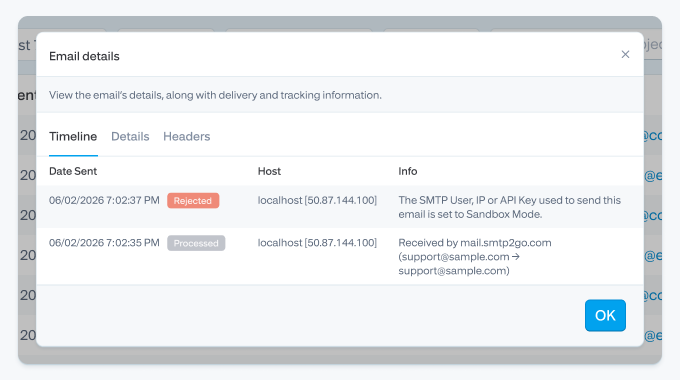
<p>You need a <strong>real relay</strong> in testing for exactly one class of problem: verifying the production path itself, meaning SPF, DKIM, and DMARC alignment, TLS negotiation with a legacy device, actual inbox placement. For that, use a real provider on a dedicated subdomain so your experiments can’t bruise your main domain’s reputation. SMTP2GO also has a <a href="https://www.smtp2go.com/blog/new-feature-sandbox-mode/">sandbox mode</a> that accepts and logs messages through the real pipeline but never delivers them, which is the middle ground: real authentication, real logging, zero risk of emailing a human.</p>

<p><img src="/assets/uploads/blog/2026-05-14-best-free-smtp-server-by-emailtooltester-02.png" alt="" /></p>

<h2 id="i-set-up-a-free-plan-from-scratch">I set up a free plan from scratch…</h2>

<p>I’ve walked a lot of customers through this since 2015, but for this article I did it clean: new account, new test domain, timer running.</p>

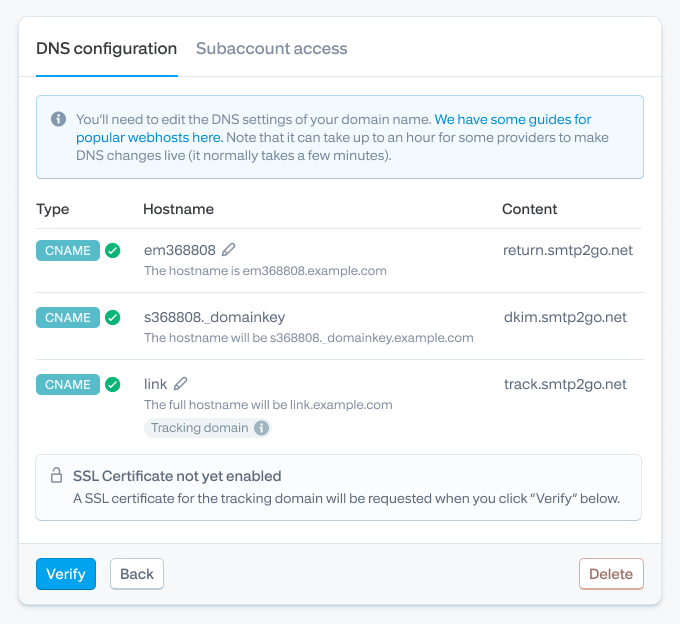
<p>Sign-up needs a work email and no card. The step that actually matters, and the one people skip, is adding a <strong>sender domain</strong>: three CNAME records covering DKIM, the return path, and link tracking. Skip this and your mail goes out technically, but authenticated against a shared domain instead of yours, and in 2026 that’s a spam-folder lottery. Google and Yahoo have required DMARC-aligned authentication for bulk senders (5,000+ messages/day to their mailboxes) since February 2024, and the direction of travel for smaller senders is identical.</p>

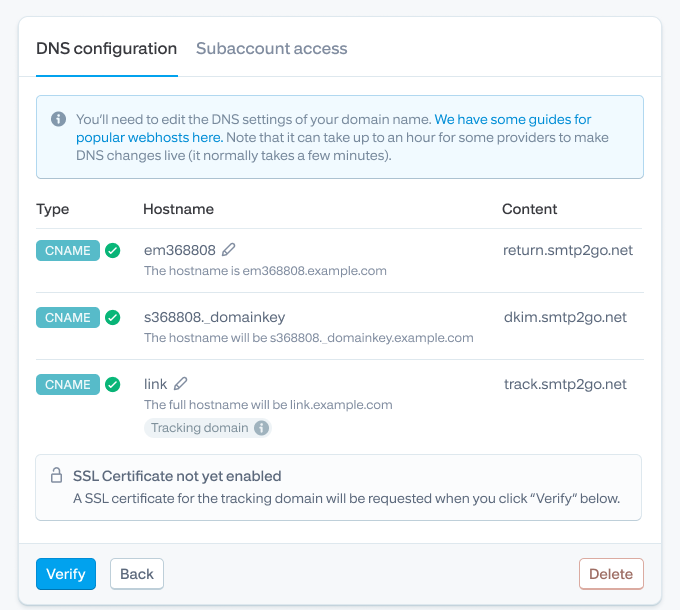
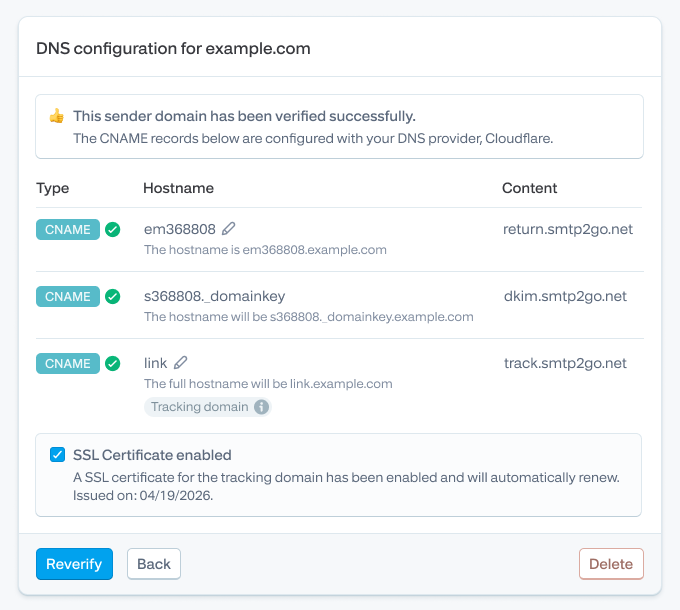
<p>The messy reality, because there always is some: my registrar auto-appended the domain to the CNAME host value, so the record briefly published as <code class="highlighter-rouge">em1234.example.com.example.com</code>. A classic. The dashboard’s verification check caught it, I trimmed the host field, and re-verified. If your registrar supports it, SMTP2GO can now <a href="https://www.smtp2go.com/blog/automatically-add-dns-records-for-sender-domains/">add the DNS records for you automatically</a>, which removes this entire category of typo.</p>

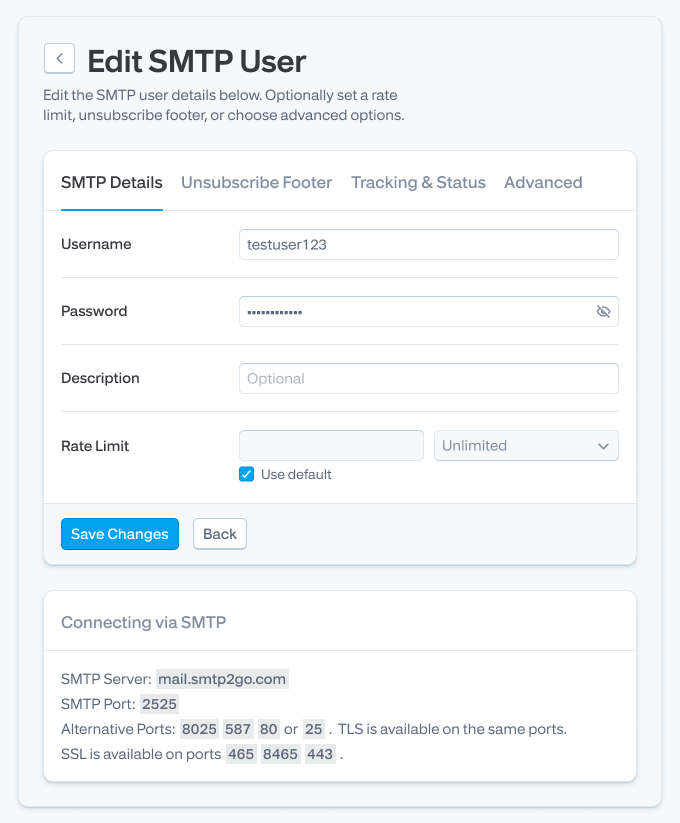
<p>Then: create an SMTP user, point your app or device at the server on port 587, and send. If 587 times out you’re almost certainly behind a firewall or ISP that blocks it; switch to 2525, which exists for exactly this reason, and which several cloud hosts prefer anyway. Watch the first sends land in the Activity page, check the DKIM pass, done.</p>

<p><img src="/assets/uploads/blog/2026-05-14-best-free-smtp-server-by-emailtooltester-03.png" alt="" /></p>

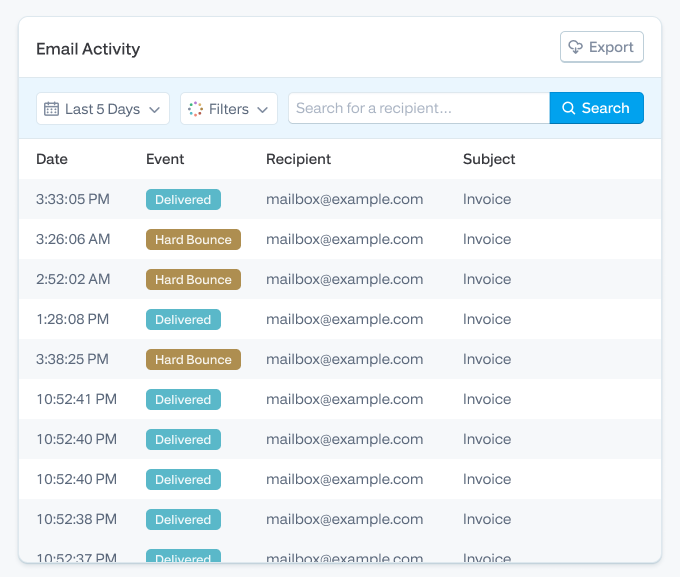
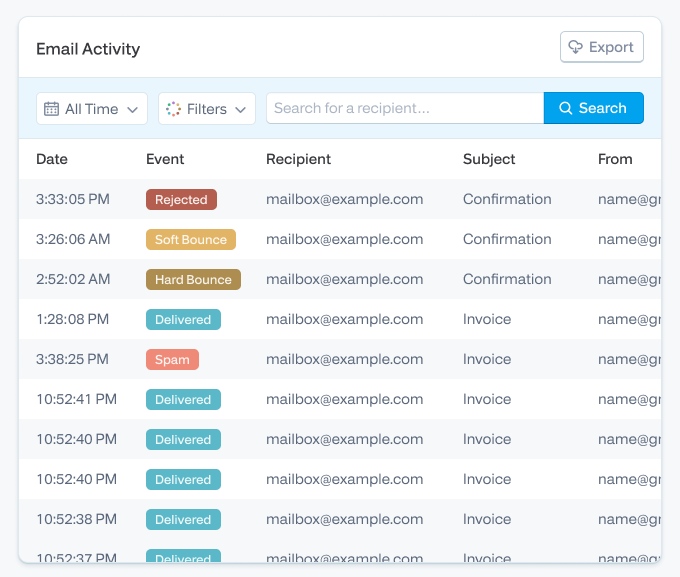
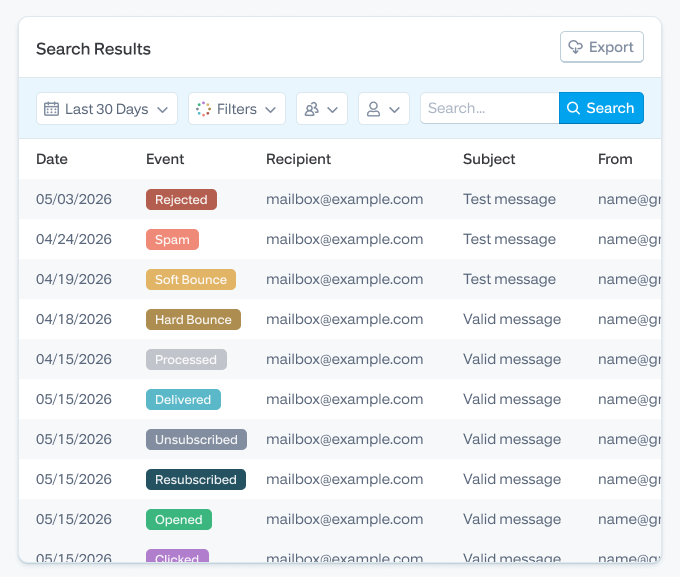
<p>Two things I tell every new free-plan user. First, the initial 25/hour rate limit is real and it will queue a burst; open a ticket and we remove it, usually quickly. Second, when an address hard bounces we suppress it automatically, so if a test address “stops working,” check the suppression list before you check anything else. That behavior protects your sender reputation, but it confuses people on day one. (<a href="https://www.smtp2go.com/blog/understanding-hard-bounces-soft-bounces-and-rejected-emails/">More on hard vs. soft bounces here</a>.)</p>

<h2 id="when-free-is-enough-and-when-it-isnt">When free is enough, and when it isn’t</h2>

<p>Free is genuinely enough for a lot of senders, and we’d rather you use our free plan forever than pay for volume you don’t send. Under about 30 emails a day, any of the monthly-allowance providers above will carry you indefinitely.</p>

<p>The upgrade trigger usually isn’t volume. It’s consequence. You should pay for email the day a failed email starts costing money: missed order confirmations becoming support tickets, a password reset that didn’t arrive becoming a churned customer, a copier’s scan-to-email silently dying at month’s end because the free quota ran out on the 26th. At that point the things worth paying for aren’t more emails, they’re longer log retention, support that answers at 3 a.m., and a sane path to <a href="https://www.smtp2go.com/blog/high-volume-warmup-guide/">warming up higher volumes</a> when you grow. Rough rule: past 1,000 to 2,000 emails a month, or the first time you screenshot a delivery log for a customer, <a href="https://www.smtp2go.com/pricing/">look at paid plans</a>. If you’re weighing full paid services against each other, we’ve written an honest comparison of the <a href="https://www.smtp2go.com/blog/best-transactional-email-services/">best transactional email services</a> too.</p>

<p>[FAQ]</p>

<p>Whichever provider fits, set up your sender domain before you send anything that matters. It’s twenty minutes that decides whether the next year of your email lands in inboxes or in spam.</p>

<p>And if what you want is the free plan an independent tester keeps ranking first (real deliverability on a small volume, humans answering support, no card, no clock), <a href="https://www.smtp2go.com/pricing/">the SMTP2GO free plan is here</a>. It’s free for as long as you like.</p>]]></content><author><name>content/_authors/simon-slade.md</name></author><category term="Company Life" /><summary type="html"><![CDATA[For the third year running, EmailToolTester has ranked SMTP2GO the #1 best free SMTP server. Not our words. Theirs: an independent review site that ran four rounds of live deliverability testing across nine transactional email providers, watched where the mail actually landed, and put SMTP2GO on top with a 96% average.]]></summary></entry><entry><title type="html">Best Transactional Email Services in 2026: A Tested Top 5 (and When to Pick Each)</title><link href="https://www.smtp2go.com/blog/best-transactional-email-services/" rel="alternate" type="text/html" title="Best Transactional Email Services in 2026: A Tested Top 5 (and When to Pick Each)" /><published>2026-07-01T00:00:00+00:00</published><updated>2026-07-01T00:00:00+00:00</updated><id>https://www.smtp2go.com/blog/best-transactional-email-services-in-2026-a-tested-top-5-and-when-to-pick-each</id><content type="html" xml:base="https://www.smtp2go.com/blog/best-transactional-email-services/"><![CDATA[<p><strong>Short version.</strong> If you’re not Amazon, not running your own postmaster team, and your inbox placement matters to your customers, SMTP2GO is the safest default.</p>

<h2 id="top-5-picks">The 5 picks in 60 seconds</h2>

<p>If you don’t have time for the full piece, here’s the shortlist.</p>

<table>
  <thead>
    <tr>
      <th><strong>Pick</strong></th>
      <th><strong>Best for</strong></th>
      <th><strong>Free plan</strong></th>
      <th><strong>Starts at</strong></th>
      <th><strong>Tested deliverability (2026)</strong></th>
    </tr>
  </thead>
  <tbody>
    <tr>
      <td><strong>1. SMTP2GO</strong></td>
      <td>Most senders, especially mixed teams, MSPs, device/legacy estates, SMBs that don’t want to run their own deliverability team</td>
      <td>1,000 emails/month</td>
      <td>$15 / 10k</td>
      <td><strong>95.5%</strong> avg (EmailTooltester)</td>
    </tr>
    <tr>
      <td><strong>2. Postmark</strong></td>
      <td>App email where a delayed receipt or password reset is a customer-support ticket</td>
      <td>100 emails/month</td>
      <td>$15 / 10k</td>
      <td>93.8% avg (EmailTooltester)</td>
    </tr>
    <tr>
      <td><strong>3. Amazon SES</strong></td>
      <td>AWS-native dev teams sending high volume who are willing to own their own deliverability work</td>
      <td>3,000/mo for year 1</td>
      <td>$0.10 per 1k</td>
      <td>Not independently tested (see review)</td>
    </tr>
    <tr>
      <td><strong>4. Brevo</strong></td>
      <td>Teams who genuinely need transactional and marketing under one roof and accept the reputation trade-offs</td>
      <td>300/day</td>
      <td>$9/mo</td>
      <td>79.8% avg (EmailTooltester)</td>
    </tr>
    <tr>
      <td><strong>5. Mailgun</strong></td>
      <td>Dev teams who want deep API flex, EU data residency, and serious deliverability tooling</td>
      <td>100/day</td>
      <td>$15 / 10k</td>
      <td>Not in the 2026 test (see review)</td>
    </tr>
  </tbody>
</table>

<h2 id="narrowed-the-field">How we narrowed the field</h2>

<p>Honest disclosure first. We’re SMTP2GO. We’re not going to pretend the ranking is unbiased, and we’re not going to invent test data we didn’t run. What we have done is read the providers’ docs, configured most of them ourselves over the years, pulled the most current independent test data we trust, and weighted picks toward what we see customers actually need.</p>

<p>Two third-party sources do most of the heavy lifting on numbers:</p>

<ol>
  <li><strong>EmailTooltester’s 2026 transactional email test.</strong> Four rounds, <a href="https://glockapps.com/">GlockApps</a> seeding, the major mailbox providers (Gmail, Outlook, Yahoo, AOL, GoDaddy, Zoho). Real inbox placement, not opens. We cite their per-round numbers in each provider section.</li>
  <li><strong>Knock’s API performance benchmarks (Feb 6 - May 7, 2026)</strong>. Hundreds of millions of real production sends across ten providers. Median (p50) and tail (p99) API response time, plus error rates. Useful when API latency actually matters to your product, which is more often than you’d think.</li>
</ol>

<p>A few providers in the field weren’t in either dataset (Mailgun, SES). Where that’s the case, we say so and judge them on architecture, documentation, support track record, and customer feedback from G2, Trustpilot, and Capterra. We don’t make up scores.</p>

<p>We also weighted by what we see day to day in the trenches: not every reader is a Resend-using Next.js dev. Many are sysadmins setting up a copier to email scanned PDFs, an MSP running 80 client accounts, or a SaaS founder who just wants password resets to land.</p>

<h2 id="smtp2go">1. SMTP2GO - Best overall for most senders</h2>

<p><strong>Best for:</strong> mixed-team senders (devs + ops + marketing); MSPs running multi-tenant deployments; businesses with device-generated email (copiers, MFPs, phone systems, security cameras, ERPs); SMBs that don’t want to be their own postmaster.</p>

<p><strong>Not for:</strong> AWS-native teams sending 50M+/month who treat deliverability as an in-house ops problem (use SES). Teams whose entire job is the lowest possible time-to-inbox on critical app email and have budget to match.</p>

<p><strong>Free plan:</strong> 1,000 emails/month, no expiry.</p>

<p><strong>Pricing:</strong> $15/month for 10,000 emails. $30 for 50k. $75 for 100k. <a href="https://www.smtp2go.com/pricing/">Full pricing here</a>.</p>

<p><strong>The case for us, briefly</strong>. SMTP2GO scored 95.5% average inbox placement across <a href="https://www.emailtooltester.com/en/blog/best-transactional-email-service/">EmailTooltester’s 4-round 2026 test</a>, which is the second-highest result they recorded and ahead of every other provider on a like-for-like cost basis. Their reviewers gave us the 2026 “Best Value for Money” badge. We didn’t pay for it. They tested us on the free plan.</p>

<p>What we genuinely do better than the field:</p>

<p><strong>The mixed-use case nobody talks about</strong>. A lot of senders aren’t pure app developers. They’re a 40-person company running WooCommerce order confirmations, a few HR notifications, scanned-PDF emails from the office Konica Minolta, and occasional newsletters from marketing. The big API-first providers don’t fit that shape well. The marketing-first providers risk poisoning your transactional reputation. SMTP2GO is built for that middle. You get <a href="https://www.smtp2go.com/benefit/smtp-api/">a real API</a>, <a href="https://www.smtp2go.com/benefit/smtp-relay/">a real SMTP relay</a>, sub-accounts, dedicated IPs on demand, the device-friendly ports (25, 465, 587, 2525), and a UI a non-developer can actually use.</p>

<p><strong>Legacy and device support.</strong> If you’ve ever tried to configure a 2015-era copier to email via AWS SES, you know why this matters. SMTP2GO handles TLS 1.0/1.1 quirks, port 2525 fallback when ISPs block 587, and IP allowlisting for static-source devices. <a href="https://www.smtp2go.com/customer-success/">StoredTech has been running phone systems and copiers through us since 2011</a>.</p>

<p><strong>Multi-tenant for MSPs and agencies.</strong> Sub-accounts, isolated reputations, per-client billing visibility. Real partner program. If you’re an MSP managing email for 30 clients and don’t want them sharing a sender reputation, this is the model you want. <a href="https://www.smtp2go.com/customer-success/">Group IMD scaled from 10,000 to over a million emails per month with us over six years</a>.</p>

<p><strong>Support that’s actually staffed by humans who know SMTP</strong>. NZ-based, 24/7, and answered by people who can read a bounce code without escalating. Capterra reviewers consistently flag this.</p>

<p><strong>Compliance</strong>. ISO 27001 certified. GDPR compliant. M3AAWG member. EU hosting available for senders who need it.</p>

<p><strong>What we’d flag honestly</strong>. The Activity log search UI can feel dated compared to Postmark’s polished dashboard. We’re rebuilding it. If you live in your provider’s dashboard ten hours a week, Postmark looks prettier today. Also: if you’re a Next.js / React Email shop building a side project, Resend’s developer experience will feel more “of 2026” than ours. We’re focused on production deployments at scale, not on being the trendiest tool in the YC batch.</p>

<p><img src="/assets/uploads/blog/2026-04-04-best-transactional-email-services.png" alt="" /></p>

<p><strong>Bottom line.</strong> If we weren’t the publisher of this article, we’d still recommend SMTP2GO for around 80% of the readers who land on it. It’s the safest competent default. You can get from “sign up” to “first delivered email” in about ten minutes, support actually picks up, and your reputation isn’t sharing a building with a Lithuanian sportsbook’s marketing list.</p>

<p><a href="https://www.smtp2go.com/pricing/">Try SMTP2GO free for 1,000 emails/month</a>. No credit card.</p>

<h2 id="postmark">2. Postmark - Best for deliverability-critical app email</h2>

<p><strong>Best for:</strong> SaaS and consumer apps where a delayed transactional email is a support ticket. Password resets, two-factor codes, payment receipts, booking confirmations. The “if this email doesn’t land in 30 seconds, we lose the customer” use case.</p>

<p><strong>Not for:</strong> anyone sending marketing email through the same account (Postmark explicitly separates the streams, but you’ll be paying transactional prices for it). Teams sending under 100/month (their free tier is genuinely tiny). EU senders with strict data residency rules (US-only data hosting).</p>

<p><strong>Free plan:</strong> 100 emails/month for developers.</p>

<p><strong>Pricing:</strong> $15 for 10k. $55 for 50k. $115 for 100k. Considerably pricier than the rest of this list, and they’re honest about it.</p>

<p><strong>The case for Postmark</strong>. EmailTooltester’s 2026 test gave them a 93.8% average, with three of four rounds at 95-97% (round four pulled the average down with an 87% on what looked like a Microsoft-specific deliverability dip). Knock’s benchmarks show p50 API response of 23ms and p99 of 228ms, which is among the fastest on the market. Postmark also publishes their time-to-inbox data publicly, which almost no other provider does. That kind of operational transparency earns respect.</p>

<p><strong>What’s genuinely great.</strong> Strict separation of transactional and bulk streams (so a marketing send can’t tank a password-reset’s deliverability). DKIM + SPF + DMARC are first-class citizens in the UI. 45-day message retention on all plans. Dashboard is the cleanest in the field. Documentation is excellent. Webhooks and inbound parsing work well.</p>

<p><strong>What we’d flag</strong>. Templating is plain compared to SendGrid or Brevo (no drag-and-drop visual editor worth mentioning). Pricing scales steeply: at 100k/month you’re paying about 50% more than SMTP2GO and double Brevo. US-only data hosting is a hard “no” for some EU teams, regardless of how good the deliverability is. And they’re now owned by ActiveCampaign, which has been gentle so far but is worth knowing.</p>

<p><strong>Bottom line.</strong> If your business model breaks the moment a transactional email is late, and you have the budget, Postmark is worth the premium. We’d send a developer-tooling SaaS or a fintech to Postmark before we’d send them to ourselves. Honest answer.</p>

<h2 id="amazon">3. Amazon SES - Best for AWS-native teams sending at scale</h2>

<p><strong>Best for:</strong> dev teams already deep in AWS, sending more than 500k/month, who treat email deliverability as an in-house infrastructure problem.</p>

<p><strong>Not for:</strong> anyone who wants a working dashboard out of the box; anyone who doesn’t have a developer on the team; teams sending under 50k/month (the savings don’t justify the operational overhead); MSPs managing multiple client domains.</p>

<p><strong>Free tier:</strong> 3,000 emails/month for the first 12 months.</p>

<p><strong>Pricing: $0.10 per 1,000 emails</strong>. Nobody on this list comes close. At 1M/month you’re paying $100 to SES vs. somewhere between $400 and $1,200 to the others.</p>

<p><strong>The case for SES</strong>. Cheapest at scale, full stop. Knock benchmarks show p50 of 153ms (mid-pack) and 0.00% error rate over hundreds of millions of sends, which is fine. Tight integration with the rest of AWS: events into EventBridge, metrics into CloudWatch, identity through IAM. If you’re already SOC-compliant in AWS, you’re not paying the compliance lift twice.</p>

<p><strong>What you’re trading away</strong>. Everything that makes a transactional email service feel like a service. Setup is genuinely involved. Every account ships sandboxed - 200 messages per 24 hours, allowlist-only recipients, until you write to AWS support and convince them you’re not going to spam. Analytics aren’t really a dashboard, they’re SNS topics you route through a Lambda. There’s no UI for templates worth using. Dedicated IPs are $24.95/month. And if deliverability slips, you fix it. Amazon will not.</p>

<p>We’ve spoken to teams who migrated to SES for the cost and migrated <em>back off</em> SES because deliverability dropped and they couldn’t get human support fast enough. <a href="https://www.smtp2go.com/customer-success/">ThinkPorch made that exact move</a> - they came to us after AWS SES support delays during a deliverability incident. That’s a real pattern, not a one-off.</p>

<p><strong>Bottom line</strong>. SES is the right answer if you have an engineer who can build the missing operational layer around it. If you don’t, the per-email price doesn’t matter, because you’ll pay for it in lost-email customer-support load.</p>

<h2 id="brevo">4. Brevo - Best if you genuinely need marketing + transactional in one place</h2>

<p><strong>Best for</strong>: small-to-mid-sized businesses where the marketing team and the dev team are the same three people, and they want one tool, one database, one bill.</p>

<p><strong>Not for</strong>: anyone sending high-value transactional email where deliverability is non-negotiable (their 2026 test result is below the field). Teams who already use a separate marketing automation tool. Companies that need strict transactional-vs-marketing IP separation.</p>

<p><strong>Free plan</strong>: 300 emails/day (so ~9k/month).</p>

<p><strong>Pricing</strong>: From $9/month at 5k. $25/month at 20k. $65 at 100k. Add $12/month to remove Brevo branding from emails on lower tiers (annoying but disclosed).</p>

<p><strong>The case for Brevo</strong>. It’s a near-complete marketing platform with transactional bolted in. Drag-and-drop email builder, automation workflows, segmentation, SMS, CRM, Facebook ads integration. EU-headquartered (Paris) and GDPR-friendly. For a team of three people who don’t want to integrate Mailchimp + SendGrid + a CRM, Brevo is a defensible single-platform answer.</p>

<p><strong>The honest concern</strong>. EmailTooltester’s 2026 test put Brevo at 79.8% average, with one round dipping to 72% on what looked like a Hotmail/Outlook issue. That’s well behind SMTP2GO (95.5%) and Postmark (93.8%) on the same test methodology. If your transactional email is critical, that gap matters more than the marketing features.</p>

<p>There’s a structural concern too. Mixing transactional and marketing email on the same sender reputation is risky. If your marketing list goes stale and complaint rates spike, your password resets share the punishment. Postmark and SMTP2GO both isolate the streams properly. Brevo’s approach is less rigorous.</p>

<p><strong>Bottom line</strong>. Right call for small businesses where consolidation matters more than absolute deliverability ceiling. Wrong call if your transactional email needs to be bulletproof. If you go Brevo, <a href="https://www.smtp2go.com/blog/sender-domain-vs-single-sender-emails/">keep a separate sender domain for transactional</a> and watch your bounce rates closely.</p>

<h2 id="mailgun">5. <a href="https://www.smtp2go.com/comparison/mailgun-smtp/">Mailgun</a> - Best for developer teams who want deep API flex</h2>

<p><strong>Best for:</strong> product teams that want a powerful, well-documented API; companies that need EU data residency; senders at 100k–1M/month who care about deliverability tooling and have an engineer to wield it.</p>

<p><strong>Not for:</strong> non-technical users (the UI assumes you know what you’re doing); teams whose ideal setup time is “fifteen minutes” rather than “an afternoon”; anyone on the cheapest plan who needs decent support (it’s email-only on lower tiers).</p>

<p><strong>Free plan:</strong> 100/day, ongoing, no expiry. Honest free tier.</p>

<p><strong>Pricing:</strong> $15/mo for 10k (Basic). $35 for 50k (Foundation). $215+ at 250k (Scale tiers). Custom above 2.5M.</p>

<p><strong>The case for Mailgun</strong>. Mailgun has been doing this since 2010. Sends for Lyft, American Express, Wikipedia. Their <a href="https://documentation.mailgun.com/en/latest/best_practices.html">deliverability documentation</a> is among the best the field has produced. Knock benchmarks show p50 of 130ms — mid-pack but consistent — and 0.00% error rate. Send Time Optimization, email validation, EU and US sending regions, dedicated IP pools on Scale tiers. For an engineering team that wants levers to pull, Mailgun has the most of them.</p>

<p><strong>Honest concerns</strong>. Pricing is on the higher side at low-mid volumes (worse value than SMTP2GO at 10–50k). Support on entry plans is email-only and not always fast. UI is dense. Mailgun’s sister product Mailjet (also Sinch-owned) is the marketing-friendly version, which can make the product positioning confusing if you’re shopping the parent company. And Mailgun wasn’t included in EmailTooltester’s 2026 deliverability test, so we don’t have current independent inbox-placement data to point at — judge on architecture and reputation.</p>

<p><strong>Bottom line</strong>. A serious choice for serious dev teams. If we were standing up a 500k/month transactional pipeline for a SaaS company with EU users and an engineer who likes APIs, Mailgun’s on the shortlist with SMTP2GO and Postmark. For non-developers, look elsewhere.</p>

<h2 id="worth-considering">Also worth considering</h2>

<p>These didn’t make the top 5, but they’re real options and skipping them would be dishonest.</p>

<p><strong>Resend</strong>. Newest of the modern dev-first providers (founded 2023). Best React/Next.js developer experience on the market — they own <a href="https://react.email/">React Email</a>. Knock benchmarks: p50 80ms, p99 351ms, 0.06% error. Pricing reasonable ($20/mo at 50k). The right choice for a Next.js SaaS being built today by a founder who values DX over operational maturity. Less battle-tested than the rest of this list. Worth watching.</p>

<p><strong>MailerSend</strong>. Sibling to MailerLite. Clean modern UI, drag-and-drop builder, good API. EmailTooltester 2026 result: 86.8% avg deliverability — solid, with one weak round. Their free plan was reduced from 3,000 to 500 emails/month in October 2025, which stings. Good fit for SaaS apps that want polish without paying Postmark prices.</p>

<p><strong>Mailtrap</strong>. Started as a testing-only sandbox. Now ships a sending product too. Strong developer story (SDKs in Python, Ruby, PHP, Node, Elixir, C#, Go), ISO 27001, GDPR. EmailTooltester 2026 result: 77% avg - inconsistent (one round at 64%). Best use: keep them for staging/test sends regardless of who you use in production.</p>

<p><strong><a href="https://www.smtp2go.com/comparison/sendgrid/">SendGrid</a> (Twilio)</strong>. Massive scale, used by everyone from Uber to Yelp. Knock benchmarks: p50 22ms (fastest on the list). EmailTooltester 2026 deliverability: 82% - middling. Free plan is 100/day for 60 days only (then nothing). Email activity history is a paid add-on, which is silly. Worth considering at enterprise scale where SLAs and procurement matter more than feature elegance.</p>

<p><strong>Mailchimp Transactional (formerly Mandrill)</strong>. Only makes sense if you’re already paying for Mailchimp Standard or Premium. As a standalone choice in 2026, no. As an add-on to a Mailchimp account, it works and the docs are friendly.</p>

<h2 id="skip">Two we’d skip in 2026</h2>

<p><strong>Elastic Email</strong>. Cheap, but EmailTooltester’s 2026 test put them at 59.5% average deliverability — the worst in the field. Their own support attributed it to shared-IP reputation on the free plan, which is fair, but providers like SMTP2GO achieve 95%+ on shared IPs. So the explanation doesn’t hold up.</p>

<p><strong>SMTP.com</strong>. No free trial. Refund policy charges a 20% admin fee and refuses to refund if you’ve sent a single email.</p>

<h2 id="use-case">Choose by use case</h2>

<p>If you’d rather skip to the answer for your specific situation, here’s the short version.</p>

<p><strong>SaaS or app email (password resets, receipts, alerts)</strong>. SMTP2GO first, Postmark second.</p>

<p><strong>Ecommerce (order confirmations, shipping updates, abandoned-cart, light marketing)</strong>. SMTP2GO if you want one tool that handles all of it cleanly. Postmark + a separate marketing tool if you can afford the operational split. Brevo if your team is tiny and consolidation matters more than peak deliverability.</p>

<p><strong>WordPress (WooCommerce, Easy WP SMTP, contact forms)</strong>. SMTP2GO has a <a href="https://www.smtp2go.com/setupguide/official-wordpress-plugin-setup-guide/">WordPress plugin</a> and works out of the box.</p>

<p><strong>Legacy device estate (copiers, MFPs, security cameras, phone systems, ERPs)</strong>. SMTP2GO. We are honestly the strongest here. Port 2525 fallback, TLS 1.0/1.1 tolerance, IP allowlisting for static-source devices, and we’ve been doing this since 2007.</p>

<p><strong>MSP / agency / multi-tenant</strong>. SMTP2GO sub-accounts give you isolated reputations per client, per-client billing visibility, and a real <a href="https://www.smtp2go.com/partners/">partner program</a>. No other provider on this list does multi-tenant as cleanly.</p>

<p><strong>EU / GDPR-sensitive</strong>. SMTP2GO (EU hosting available), Mailgun (EU region), Brevo (Paris-based), Mailjet (EU data residency).</p>

<p><strong>Very high volume (5M+/month) with engineering muscle</strong>. Amazon SES on cost. Mailgun on tooling. SendGrid on enterprise SLA negotiation.</p>

<p><strong>Side project or hobby app</strong>. Resend if you’re on React/Next.js. SMTP2GO’s free plan if you’re not. Don’t pay for anything until you’re shipping more than 1,000 emails a month.</p>

<h2 id="needle">What actually moves the needle on deliverability in 2026</h2>

<p>Choosing a provider gets you a starting line. It doesn’t get you over it. A lot of senders pick a great service and still land in spam because the setup work didn’t get done. Here’s what’s actually changed in the last two years.</p>

<p><strong>Google and Yahoo’s February 2024 sender requirements</strong>. If you send more than 5,000 messages per day to gmail.com (and Yahoo’s equivalent for yahoo.com), you must now publish a <a href="https://www.smtp2go.com/blog/what-is-dmarc">DMARC policy</a> of at least <code class="highlighter-rouge">p=none</code>, sign with <a href="https://www.smtp2go.com/blog/dkim-deepdive">DKIM</a>, publish <a href="https://www.smtp2go.com/blog/spf-record">SPF</a>, align your From: domain with your authentication, offer one-click unsubscribe on bulk mail (RFC 8058), and keep spam complaint rates below 0.3% (target under 0.1%). This is enforced. We see senders get throttled or junked over it weekly. <a href="https://blog.google/products/gmail/gmail-security-authentication-spam-protection/">Google’s official post is here</a>.</p>

<p><strong>Microsoft is tightening the same screws</strong>. As of May 2025, Outlook.com applies similar requirements to bulk senders above 5,000/day. Microsoft is also deprecating basic authentication for SMTP across legacy applications on a rolling schedule — affected copiers, MFCs, and on-prem apps need to migrate to OAuth-capable relays or a provider that handles the auth abstraction for them.</p>

<p><strong>Apple Mail Privacy Protection broke open rates</strong>. Has been since iOS 15 (September 2021), and it’s worse in 2026 because privacy-protected open rates now apply to most iOS Mail users. Stop using open rate as a deliverability proxy. Use delivery rate, bounce rate, complaint rate, and inbox-vs-spam seed testing instead.</p>

<p><strong>Dedicated vs shared IP - and when each is wrong</strong>. Below ~100k/month, a shared IP from a reputable provider beats a dedicated IP every time, because you can’t warm one consistently enough. Above ~500k/month, a dedicated IP (warmed properly over 21–30 days) gives you control over your reputation. The 100k-500k middle is messy: it depends on your sending cadence. SMTP2GO and Postmark both <a href="https://www.smtp2go.com/blog/dedicated-or-shared-ip-address">explain this well</a>. Don’t ask for a dedicated IP because it sounds professional. Ask for one when shared isn’t working.</p>

<p><strong>Suppression list hygiene</strong>. Every hard bounce should go onto your provider’s suppression list automatically and stay there. Every complaint (FBL feedback) should suppress immediately. If your provider doesn’t do this by default, switch.</p>

<h2 id="honest-answer">SMTP relay vs API: a quick honest answer</h2>

<p>Use <strong>SMTP relay</strong> if you’re integrating with off-the-shelf software (WordPress, your CRM, your copier, MailPoet, Magento) that has an SMTP option built in. The integration is usually a 5-minute config screen.</p>

<p>Use the <strong>API</strong> if you’re building a custom application and want richer event data, templating, batch send optimization, and webhook hooks for engagement events. APIs typically deliver a few hundred milliseconds faster than SMTP relay, which matters for password resets and 2FA codes but not for order confirmations.</p>

<p>Use <strong>both</strong> if your stack is mixed. SMTP2GO, Postmark, Mailgun, and SendGrid all let you use both side by side on the same account without weirdness.</p>

<p>For most senders the choice is forced by the integration in front of you, not by a strategic decision. Don’t overthink it.</p>

<h2 id="cheap-provider-trap">The “cheap provider” trap: cost per delivered email</h2>

<p>The headline price on a provider’s pricing page is cost per sent email. The number that actually matters is cost per delivered-to-inbox email. Watch what happens when you apply EmailTooltester’s 2026 tested deliverability rates to like-for-like 10,000-email plans.</p>

<table>
  <thead>
    <tr>
      <th><strong>Provider</strong></th>
      <th><strong>List price (10k/mo)</strong></th>
      <th><strong>Tested inbox placement</strong></th>
      <th><strong>Effective cost per 1,000 delivered</strong></th>
    </tr>
  </thead>
  <tbody>
    <tr>
      <td>SMTP2GO</td>
      <td>$15</td>
      <td>95.5%</td>
      <td>$1.57</td>
    </tr>
    <tr>
      <td>Postmark</td>
      <td>$15</td>
      <td>93.8%</td>
      <td>$1.60</td>
    </tr>
    <tr>
      <td>MailerSend</td>
      <td>$7 (Hobby plan)</td>
      <td>86.8%</td>
      <td>$0.81</td>
    </tr>
    <tr>
      <td>Mailtrap</td>
      <td>$15 (10k tier)</td>
      <td>77.0%</td>
      <td>$1.95</td>
    </tr>
    <tr>
      <td>Brevo</td>
      <td>$15 (20k tier)</td>
      <td>79.8%</td>
      <td>$0.94</td>
    </tr>
    <tr>
      <td>Elastic Email</td>
      <td>$9</td>
      <td>59.5%</td>
      <td>$1.51</td>
    </tr>
  </tbody>
</table>

<p>The lesson here isn’t that MailerSend is cheapest (though it is, on this calculation). It’s that Elastic Email costs almost as much per delivered email as SMTP2GO does, despite looking 40% cheaper on the sticker. Headline price is misleading.</p>

<h2 id="migrating">Migrating without burning your sender reputation</h2>

<p>A few specific things to do, in order, if you’re switching providers.</p>

<p>Don’t move all your traffic at once. Phase it: start with 10% of sends on the new provider, watch the bounce and complaint rates for 48 hours, then ramp 25%, 50%, 100% over a week. New IPs (shared or dedicated) need a few days of “this isn’t a botnet” before mailbox providers settle their suppression heuristics on you.</p>

<p>Set up DKIM and SPF on the new provider’s sending domain before you cut over. Make sure DMARC alignment is preserved (the From: domain matches the DKIM signing domain). <a href="https://www.smtp2go.com/blog/dkim-deepdive">Our DKIM deepdive walks through this</a>.</p>

<p>Pull your suppression list from the old provider and import it to the new one. This is the single biggest miss we see in migrations: a brand-new provider doesn’t know that the 4,000 addresses you’ve been suppressing for six months are still bad. The first send out the door re-bounces all of them, which trashes your reputation immediately.</p>

<p>Keep the old provider running for 30 days after cutover in case something breaks. The marginal cost is small. The cost of being unable to roll back is enormous.</p>

<p><a href="https://www.smtp2go.com/blog/looking-for-an-alternative-smtp-service-provider/">Our full guide to switching providers is here.</a></p>

<p>[FAQ]</p>

<p><em>A note on transparency. This article is published by SMTP2GO. You’ll see us in the rankings, and you’ll see exactly why. Where another provider is a better fit for your situation, we say so plainly, and we name them. The third-party deliverability data cited below comes from <a href="https://www.emailtooltester.com/en/blog/best-transactional-email-service/">EmailTooltester’s 4-round GlockApps tests</a> and <a href="https://knock.app/email-api-benchmarks">Knock’s published API benchmarks</a>. The audit work is theirs. The opinions are ours.</em></p>]]></content><author><name>content/_authors/simon-slade.md</name></author><category term="Email Delivery &amp; Tips" /><summary type="html"><![CDATA[Short version. If you’re not Amazon, not running your own postmaster team, and your inbox placement matters to your customers, SMTP2GO is the safest default.]]></summary></entry><entry><title type="html">What is DMARC? A practical guide for anyone sending real email in 2026</title><link href="https://www.smtp2go.com/blog/what-is-dmarc/" rel="alternate" type="text/html" title="What is DMARC? A practical guide for anyone sending real email in 2026" /><published>2026-06-21T00:00:00+00:00</published><updated>2026-06-21T00:00:00+00:00</updated><id>https://www.smtp2go.com/blog/what-is-dmarc</id><content type="html" xml:base="https://www.smtp2go.com/blog/what-is-dmarc/"><![CDATA[<p>DMARC is a small text record you publish in your domain’s DNS that tells receiving mail servers what to do if a message claiming to be from your domain fails SPF or DKIM checks.</p>

<p>It does three things: it authenticates your outbound mail, it tells receivers how to handle failures (ignore, junk, or reject), and it sends you reports so you can see who’s sending in your name. Done well, it stops most direct domain spoofing and is now required for any business sending more than 5,000 messages a day to Gmail, Yahoo, or Outlook.</p>

<p>This guide is the long version, written by people who configure SMTP relays for a living and have watched plenty of DMARC rollouts go right (and a few go sideways). If you’re new to email authentication, start at the top. If you already know SPF and DKIM, skip to the alignment section.</p>

<p><img src="/assets/uploads/blog/2026-04-23-what-is-dmarc-01.png" alt="" /></p>

<h2 id="what-dmarc-actually-does-and-what-it-doesnt">What DMARC actually does (and what it doesn’t)</h2>

<p>DMARC is a policy layer that sits on top of two older authentication checks, SPF and DKIM. Those two answer questions about a message. DMARC answers a different question: <em>what happens when the answers come back wrong?</em></p>

<p>Here’s the useful framing for anyone running an actual sending domain. You publish a DMARC record. From that moment on, any receiving mail server that gets a message claiming to be from your domain looks up your DMARC record and decides what to do based on whether the message passed SPF or DKIM and whether the result <em>aligned</em> with your visible From address. If the message is legitimate and your auth is set up correctly, it gets delivered. If a spammer is forging your domain, the receiver follows your policy and quarantines or rejects the message.</p>

<p>So DMARC’s actual job: protect your domain’s reputation, give you visibility into who’s using it, and (once you’re at enforcement) shut the door on direct spoofing.</p>

<p>What it doesn’t do, and we’ll come back to this: it doesn’t stop look-alike domains (<code class="highlighter-rouge">paypa1.com</code> instead of <code class="highlighter-rouge">paypal.com</code>), it doesn’t stop display-name spoofing (the From shows “PayPal Support” but the actual address is <code class="highlighter-rouge">randomuser@gmail.com</code>), and it doesn’t stop attackers who break into a legitimate sender’s account and send from a domain that is properly authenticated. DMARC is one layer.</p>

<h2 id="how-dmarc-works-with-spf-and-dkim">How DMARC works with SPF and DKIM</h2>

<p>Five steps, in order, every time a message gets sent from your domain to a DMARC-aware receiver:</p>

<ol>
  <li><strong>You publish three DNS records:</strong> SPF (which IPs and services are allowed to send for your domain), DKIM (a public key the receiver can use to verify the cryptographic signature your sending platform attaches to each message), and DMARC (the policy that ties them together).</li>
  <li><strong>You send a message.</strong> Could be a password reset, an invoice, a Microsoft Teams notification from a copier, a marketing campaign through a CRM. Anything.</li>
  <li><strong>The receiver checks SPF</strong>. Did the IP that delivered this message appear in the sending domain’s SPF record? Pass or fail.</li>
  <li><strong>The receiver checks DKIM</strong>. Was the message signed with a private key whose matching public key sits in the sending domain’s DNS, and does that signature still validate? Pass or fail.</li>
  <li><strong>The receiver checks DMARC alignment and applies your policy</strong>. This is the part most people miss. SPF passing isn’t enough. DKIM passing isn’t enough. The domain that passed one of them has to match the domain in the visible From address. If neither aligns, DMARC fails, and the receiver follows your <code class="highlighter-rouge">p=</code> instruction.</li>
</ol>

<p>If alignment passes for either SPF or DKIM, DMARC passes. You only need one of the two to align.</p>

<p><img src="/assets/uploads/blog/2026-04-23-what-is-dmarc-02.png" alt="" /></p>

<h2 id="spf-vs-dkim-vs-dmarc-a-side-by-side">SPF vs DKIM vs DMARC: a side-by-side</h2>

<p>If you only learn one comparison about email authentication, learn this one. People conflate the three constantly.</p>

<table>
  <thead>
    <tr>
      <th><strong>Protocol</strong></th>
      <th><strong>What it checks</strong></th>
      <th><strong>DNS record type</strong></th>
      <th><strong>What can go wrong</strong></th>
    </tr>
  </thead>
  <tbody>
    <tr>
      <td><strong>SPF</strong></td>
      <td>Is the sending IP in the list of allowed senders for the From domain?</td>
      <td>TXT (one record per domain)</td>
      <td>Breaks on forwarding. Subject to the 10 DNS lookup limit. Doesn’t survive a message being re-sent through another server.</td>
    </tr>
    <tr>
      <td><strong>DKIM</strong></td>
      <td>Is the cryptographic signature on the message valid, and was the message unchanged in transit?</td>
      <td>TXT (one record per selector)</td>
      <td>Signature breaks if the message body is modified (some forwarders rewrite content). Selector mismatches if the wrong sending platform signs.</td>
    </tr>
    <tr>
      <td><strong>DMARC</strong></td>
      <td>Did SPF or DKIM pass and align with the visible From domain, and what should we do about it?</td>
      <td>TXT (one record at <code class="highlighter-rouge">_dmarc.yourdomain.com</code>)</td>
      <td>Fails if you have multiple DMARC records, if your record syntax is bad, or if you missed a legitimate sender during rollout.</td>
    </tr>
  </tbody>
</table>

<p>SPF and DKIM each answer a narrower question. DMARC layers a policy and reporting system on top. Here’s the part nobody on a glossary page tells you: <strong>DMARC alone does nothing</strong>. You can publish the best DMARC record on earth, and if you don’t also have SPF and DKIM configured for every legitimate sender, your good mail will start failing alongside the spoofed mail.</p>

<h2 id="what-a-dmarc-record-actually-looks-like">What a DMARC record actually looks like</h2>

<p>It’s a DNS TXT record. You publish it at the subdomain <code class="highlighter-rouge">_dmarc.yourdomain.com</code>. That’s all.</p>

<p>Here’s a sensible starter record for a domain that’s never had DMARC before:</p>

<div class="highlighter-rouge"><div class="highlight"><pre class="highlight"><code>_dmarc.example.com   TXT   "v=DMARC1; p=none; rua=mailto:dmarc-reports@example.com; pct=100"
</code></pre></div></div>

<p>This says: I’m running DMARC version 1, my policy is “do nothing yet” (p=none), send aggregate reports to that mailbox, and apply this policy to 100% of mail. Crucially: it doesn’t block anything. It just turns the reporting on. You should leave a record like this in place for at least a few weeks, often longer, before tightening anything.</p>

<p>Once you’ve confirmed every legitimate sender is aligned, you tighten the policy. Here’s what a mature record might look like for a brand that wants real spoofing protection:</p>

<div class="highlighter-rouge"><div class="highlight"><pre class="highlight"><code>_dmarc.example.com   TXT   "v=DMARC1; p=reject; sp=reject; pct=100; adkim=s; aspf=s; rua=mailto:dmarc-reports@example.com; ruf=mailto:dmarc-forensics@example.com"
</code></pre></div></div>

<p>This says: reject anything that fails (including subdomain mail, via sp=reject), require strict alignment on both DKIM and SPF, and send me both aggregate and failure reports.</p>

<h3 id="dmarc-tag-breakdown">DMARC tag breakdown</h3>

<table>
  <thead>
    <tr>
      <th><strong>Tag</strong></th>
      <th><strong>Required?</strong></th>
      <th><strong>Example</strong></th>
      <th><strong>What it controls</strong></th>
    </tr>
  </thead>
  <tbody>
    <tr>
      <td><code class="highlighter-rouge">v</code></td>
      <td>Yes</td>
      <td><code class="highlighter-rouge">v=DMARC1</code></td>
      <td>Protocol version. Always <code class="highlighter-rouge">DMARC1</code>.</td>
    </tr>
    <tr>
      <td><code class="highlighter-rouge">p</code></td>
      <td>Yes</td>
      <td><code class="highlighter-rouge">p=quarantine</code></td>
      <td>Policy for the main domain: <code class="highlighter-rouge">none</code>, <code class="highlighter-rouge">quarantine</code>, or <code class="highlighter-rouge">reject</code>.</td>
    </tr>
    <tr>
      <td><code class="highlighter-rouge">sp</code></td>
      <td>No</td>
      <td><code class="highlighter-rouge">sp=reject</code></td>
      <td>Policy for subdomains. Defaults to whatever <code class="highlighter-rouge">p</code> is set to if you skip it.</td>
    </tr>
    <tr>
      <td><code class="highlighter-rouge">pct</code></td>
      <td>No</td>
      <td><code class="highlighter-rouge">pct=25</code></td>
      <td>Percentage of failing mail the policy applies to. Useful for gradual ramps. Defaults to 100.</td>
    </tr>
    <tr>
      <td><code class="highlighter-rouge">rua</code></td>
      <td>No (but use it)</td>
      <td><code class="highlighter-rouge">rua=mailto:reports\@example.com</code></td>
      <td>Where aggregate XML reports get sent. Without this, you’re flying blind.</td>
    </tr>
    <tr>
      <td><code class="highlighter-rouge">ruf</code></td>
      <td>No</td>
      <td><code class="highlighter-rouge">ruf=mailto:forensics\@example.com</code></td>
      <td>Where failure reports get sent. Privacy considerations apply, and many receivers don’t generate these anymore.</td>
    </tr>
    <tr>
      <td><code class="highlighter-rouge">adkim</code></td>
      <td>No</td>
      <td><code class="highlighter-rouge">adkim=s</code></td>
      <td>DKIM alignment mode: <code class="highlighter-rouge">s</code> (strict) or <code class="highlighter-rouge">r</code> (relaxed, the default).</td>
    </tr>
    <tr>
      <td><code class="highlighter-rouge">aspf</code></td>
      <td>No</td>
      <td><code class="highlighter-rouge">aspf=s</code></td>
      <td>SPF alignment mode: <code class="highlighter-rouge">s</code> (strict) or <code class="highlighter-rouge">r</code> (relaxed, the default).</td>
    </tr>
    <tr>
      <td><code class="highlighter-rouge">fo</code></td>
      <td>No</td>
      <td><code class="highlighter-rouge">fo=1</code></td>
      <td>Failure reporting options. <code class="highlighter-rouge">1</code> means report on any auth failure.</td>
    </tr>
  </tbody>
</table>

<h2 id="the-three-policies-none-quarantine-reject">The three policies: none, quarantine, reject</h2>

<p>This is the part of DMARC where people get hurt. Mostly by moving too fast.</p>

<table>
  <thead>
    <tr>
      <th><strong>Policy</strong></th>
      <th><strong>What receivers do</strong></th>
      <th><strong>When to use it</strong></th>
      <th><strong>The risk</strong></th>
    </tr>
  </thead>
  <tbody>
    <tr>
      <td><code class="highlighter-rouge">p=none</code></td>
      <td>Nothing. Mail is delivered as normal. You just get reports.</td>
      <td>First rollout. Always start here.</td>
      <td>None for delivery. But it offers zero protection, so don’t park here forever.</td>
    </tr>
    <tr>
      <td><code class="highlighter-rouge">p=quarantine</code></td>
      <td>Failing mail lands in spam/junk.</td>
      <td>After 2–4 weeks at <code class="highlighter-rouge">p=none</code> and you’ve fixed every alignment issue you saw.</td>
      <td>Legitimate mail you missed gets junked. Customers complain.</td>
    </tr>
    <tr>
      <td><code class="highlighter-rouge">p=reject</code></td>
      <td>Failing mail is dropped at the receiver. The recipient never sees it. Not even in spam.</td>
      <td>After a clean stretch at <code class="highlighter-rouge">p=quarantine</code>. This is the goal state.</td>
      <td>Misconfigured legitimate mail vanishes silently. Hard to debug after the fact.</td>
    </tr>
  </tbody>
</table>

<p>There’s also the <code class="highlighter-rouge">pct</code> tag, which lets you apply the policy to a subset. A common ramp pattern: <code class="highlighter-rouge">p=quarantine; pct=10</code> for a week, then <code class="highlighter-rouge">pct=50</code>, then <code class="highlighter-rouge">pct=100</code>. Same again for <code class="highlighter-rouge">p=reject</code>. It feels overcautious. It’s not. The first time you move to p=reject without testing every sender, you’ll find the one you forgot.</p>

<blockquote>
  <p><strong>From the support side:</strong> the failure mode we see most often isn’t spoofing. It’s a customer flipping straight to <code class="highlighter-rouge">p=reject</code> on a Monday morning, then realizing on Wednesday that their HR portal sends payroll notifications through a third-party system that nobody added to SPF or DKIM. Those notifications are now silently dropped at Gmail and the team finds out the next pay cycle.</p>
</blockquote>

<h2 id="dmarc-alignment-the-part-that-trips-everyone-up">DMARC alignment, the part that trips everyone up</h2>

<p>Both SPF and DKIM can pass on a message, and DMARC can <em>still</em> fail. That’s the bit that makes people pull their hair out, so let’s slow down.</p>

<p>When a receiver evaluates DMARC, it doesn’t just ask “did SPF pass?” or “did DKIM pass?” It asks: “did one of them pass on a domain that <em>matches</em> the domain in the From header?”</p>

<p>That match is called alignment.</p>

<h3 id="spf-alignment">SPF alignment</h3>

<p>SPF authenticates the <em>envelope sender</em>, the address in the <code class="highlighter-rouge">Return-Path</code> header. That domain doesn’t have to be the same as what your recipient sees in the From field. Plenty of mail goes out where these differ. Sub-account bounce handling, custom return paths from ESPs, shared infrastructure: there are good reasons.</p>

<p>For SPF to <em>align</em>, the envelope sender’s domain has to match the visible From domain. In relaxed mode (the default), it just has to share the same organizational domain (<code class="highlighter-rouge">bounces.example.com</code> aligns with <code class="highlighter-rouge">example.com</code>). In strict mode, it has to be an exact match.</p>

<h3 id="dkim-alignment">DKIM alignment</h3>

<p>DKIM signs the message with a key tied to a specific domain (the <code class="highlighter-rouge">d=</code> value in the DKIM-Signature header). For DKIM to align, that signing domain has to match the visible From domain.</p>

<h3 id="why-this-matters-with-an-smtp-relay">Why this matters with an SMTP relay</h3>

<p>Here’s the practical version. Imagine you send mail from <code class="highlighter-rouge">you@yourcompany.com</code> through a third-party relay. The relay handles the envelope-level transmission, so the <code class="highlighter-rouge">Return-Path</code> might be something like <code class="highlighter-rouge">bounce.relay-provider.com</code>. SPF passes for that domain, but it’s not your domain, so SPF alignment with <code class="highlighter-rouge">yourcompany.com</code> fails. If the relay also signs the message with its own DKIM key (<code class="highlighter-rouge">d=relay-provider.com</code>), DKIM passes for the relay, but DKIM alignment with <code class="highlighter-rouge">yourcompany.com</code> fails. Both authentication checks pass. DMARC still fails. Mail goes to spam (under <code class="highlighter-rouge">p=quarantine</code>) or gets rejected (under <code class="highlighter-rouge">p=reject</code>).</p>

<p>The fix in this scenario is twofold. Configure a custom return path on the relay so the envelope sender uses your domain (<code class="highlighter-rouge">bounce.yourcompany.com</code>). And have the relay sign DKIM with your domain’s key (<code class="highlighter-rouge">d=yourcompany.com</code>). Now both checks align.</p>

<blockquote>
  <p><strong>From the support side:</strong> when David Rousseau at Les Musées de la Civilisation de Québec moved his CRM mail through SMTP2GO, getting DKIM and SPF correctly aligned to his sending domain was the difference between mail landing in inboxes and mail landing in junk. The setup itself is small. The before-and-after is large.</p>
</blockquote>

<h2 id="dmarc-reports-what-you-actually-get">DMARC reports: what you actually get</h2>

<p>Reporting is the R in DMARC.</p>

<h3 id="aggregate-reports-rua">Aggregate reports (rua)</h3>

<p>Once a day, every DMARC-aware receiver that sees mail claiming to be from your domain sends you an XML file. It lists every IP that sent mail in your name, how many messages, whether each one passed SPF, whether each one passed DKIM, and whether alignment held. That’s how you discover the legitimate senders you forgot about (the Zendesk macro that emails customers, the marketing automation tool, the printer in the warehouse) and the spoofers trying to forge your domain.</p>

<p>Here’s a fragment of what one looks like:</p>

<div class="language-xml highlighter-rouge"><div class="highlight"><pre class="highlight"><code><span class="nt">&lt;record&gt;</span> 
  <span class="nt">&lt;row&gt;</span> 
    <span class="nt">&lt;source_ip&gt;</span>50.31.156.116<span class="nt">&lt;/source_ip&gt;</span>
    <span class="nt">&lt;count&gt;</span>247<span class="nt">&lt;/count&gt;</span>
    <span class="nt">&lt;policy_evaluated&gt;</span> 
      <span class="nt">&lt;disposition&gt;</span>none<span class="nt">&lt;/disposition&gt;</span>
      <span class="nt">&lt;dkim&gt;</span>pass<span class="nt">&lt;/dkim&gt;</span>
      <span class="nt">&lt;spf&gt;</span>fail<span class="nt">&lt;/spf&gt;</span> 
    <span class="nt">&lt;/policy_evaluated&gt;</span>
   <span class="nt">&lt;/row&gt;</span>
   <span class="nt">&lt;identifiers&gt;</span>
     <span class="nt">&lt;header_from&gt;</span>example.com<span class="nt">&lt;/header_from&gt;</span>
   <span class="nt">&lt;/identifiers&gt;</span>
   <span class="nt">&lt;auth_results&gt;</span> 
     <span class="nt">&lt;dkim&gt;</span> 
       <span class="nt">&lt;domain&gt;</span>example.com<span class="nt">&lt;/domain&gt;</span>
       <span class="nt">&lt;result&gt;</span>pass<span class="nt">&lt;/result&gt;</span>
     <span class="nt">&lt;/dkim&gt;</span>
     <span class="nt">&lt;spf&gt;</span> 
       <span class="nt">&lt;domain&gt;</span>relay-provider.net<span class="nt">&lt;/domain&gt;</span>
       <span class="nt">&lt;result&gt;</span>pass<span class="nt">&lt;/result&gt;</span>
     <span class="nt">&lt;/spf&gt;</span> 
   <span class="nt">&lt;/auth_results&gt;</span> 
<span class="nt">&lt;/record&gt;</span>
</code></pre></div></div>

<p>Reading this raw is painful. Multiply that record by hundreds of senders across dozens of daily reports and you’re looking at a lot of XML. Most teams hand the parsing off. Free options will get you started (DMARC Analyzer, dmarcian, EasyDMARC’s report viewer).</p>

<p>SMTP2GO doesn’t make a DMARC report parser. We handle the sending side. For the report-reading side, pick a tool that suits your scale and don’t try to read the XML by hand.</p>

<h3 id="failure-reports-ruf">Failure reports (ruf)</h3>

<p>Per-message reports on individual failures, with more detail (including parts of the message). Useful for debugging specific failures. Less widely supported than aggregate reports, and there are privacy considerations because the reports can contain message content. Most setups configure <code class="highlighter-rouge">rua</code> and leave <code class="highlighter-rouge">ruf</code> off.</p>

<h3 id="what-to-do-with-the-data">What to do with the data</h3>

<p>Read the aggregate reports for the first two to four weeks. Build a list of every IP and every sending domain that shows up. For each one, ask: is this us? If yes, get it aligned (add to SPF, configure DKIM signing). If no, it’s a spoofer or an old service you forgot to decommission. Once your “is this us” list is fully aligned, move to <code class="highlighter-rouge">p=quarantine</code>. Watch reports another few weeks. Once you’re confident, move to <code class="highlighter-rouge">p=reject</code>.</p>

<h2 id="dmarc-for-gmail-yahoo-and-microsoft-the-20242026-rules">DMARC for Gmail, Yahoo, and Microsoft: the 2024–2026 rules</h2>

<p>This section is the reason “do we actually need DMARC?” stopped being a debate. Three of the largest mailbox providers in the world have made it mandatory for bulk senders.</p>

<h3 id="gmail-and-yahoo-february-2024-enforcement-ramped-from-november-2025">Gmail and Yahoo (February 2024, enforcement ramped from November 2025)</h3>

<p>If you send 5,000 or more messages a day to personal Gmail accounts (<code class="highlighter-rouge">@gmail.com</code>, <code class="highlighter-rouge">@googlemail.com</code>) or Yahoo-hosted addresses, you must:</p>

<ul>
  <li>Authenticate with SPF and DKIM.</li>
  <li>Publish a DMARC record (at least p=none).</li>
  <li>Pass alignment for either SPF or DKIM with the visible From domain.</li>
  <li>Keep spam complaint rates below 0.30% (Gmail’s hard threshold), ideally below 0.10%.</li>
  <li>Implement one-click unsubscribe (RFC 8058 List-Unsubscribe headers) on marketing mail.</li>
  <li>Process unsubscribe requests within 48 hours.</li>
</ul>

<p>From 2025, Gmail began actively enforcing this. Non-compliant traffic now sees temporary rate-limiting or outright rejection. (See <a href="https://support.google.com/a/answer/14229414">Google’s official sender guidelines</a> and our earlier piece on<a href="https://www.smtp2go.com/blog/gmail-and-yahoos-2024-inbox-protection-rules/"> Gmail and Yahoo’s 2024 inbox protection rules</a> for the full breakdown.)</p>

<h3 id="microsoft-outlook-may-5-2025">Microsoft Outlook (May 5, 2025)</h3>

<p>Microsoft brought its consumer mailboxes (Outlook.com, Hotmail.com, Live.com) in line. Same 5,000-messages-per-day threshold. Same SPF + DKIM + DMARC requirement with at least <code class="highlighter-rouge">p=none</code> and alignment on at least one of SPF or DKIM. Same direction of travel: stricter, sooner.</p>

<p>Microsoft chose to reject rather than junk. Non-compliant mail comes back with this bounce code:</p>

<div class="highlighter-rouge"><div class="highlight"><pre class="highlight"><code>550; 5.7.515 Access denied, sending domain [SendingDomain] does not meet the required authentication level.
</code></pre></div></div>

<p>If you see that in your bounces, your DMARC, SPF, or DKIM isn’t where it needs to be. (Microsoft’s <a href="https://techcommunity.microsoft.com/blog/microsoftdefenderforoffice365blog/strengthening-email-ecosystem-outlook%E2%80%99s-new-requirements-for-high%E2%80%90volume-senders/4399730">original Outlook bulk-sender post</a> has the formal spec.)</p>

<h3 id="what-pnone-actually-buys-you">What <code class="highlighter-rouge">p=none</code> actually buys you</h3>

<p>Here’s the part the strict-letter-of-the-law version of this advice misses. <code class="highlighter-rouge">p=none</code> satisfies the minimum requirement. It does not protect your domain. If a spoofer forges mail from <code class="highlighter-rouge">yourcompany.com</code> and you’re at <code class="highlighter-rouge">p=none</code>, the receiver still delivers it. The only thing <code class="highlighter-rouge">p=none</code> does is let you watch what’s happening. That’s valuable for setup. It’s a poor place to live.</p>

<p>Mailbox providers know this. Senders who park at <code class="highlighter-rouge">p=none</code> indefinitely are increasingly treated as a yellow flag. Google’s official guidance still accepts it. The unofficial reality, from the deliverability community, is that domains stuck on <code class="highlighter-rouge">p=none</code> for years signal weak operational discipline. Plan to move past it.</p>

<h2 id="how-to-set-up-dmarc-step-by-step">How to set up DMARC, step by step</h2>

<p>If you’re starting from zero, this is the playbook. It assumes you already have a domain and you’ve identified the platforms that send mail in your name (marketing tool, helpdesk, CRM, transactional relay like SMTP2GO, anything else).</p>

<ol>
  <li><strong>List every sender</strong>. Marketing platform, CRM, helpdesk, billing system, internal mail server, copiers, alerting systems. Write them all down. Most rollouts hit trouble because step one wasn’t thorough.</li>
  <li><strong>Get SPF in place</strong>. One SPF record per domain. Include every legitimate sender. Watch the 10 DNS lookup limit; it’s the most common SPF failure mode. (We have a <a href="https://www.smtp2go.com/blog/spf-record/">full SPF guide</a> if you need the long version.)</li>
  <li><strong>Get DKIM in place</strong>. For each sending platform, generate a DKIM key pair and publish the public key in DNS under the platform’s selector. SMTP2GO walks you through this in the sender domain setup; most platforms have similar flows.</li>
  <li><strong>Publish your DMARC record at <code class="highlighter-rouge">p=none</code>.</strong> Use the starter record from earlier in this guide. Make sure <code class="highlighter-rouge">rua</code> points to a mailbox you’ll actually check.</li>
  <li><strong>Wait. Read reports.</strong> Two to four weeks minimum. Identify every IP and domain that shows up. Sort them into “us” and “not us.” Get every “us” aligned.</li>
  <li><strong>Move to <code class="highlighter-rouge">p=quarantine</code></strong>. Start with <code class="highlighter-rouge">pct=10</code> if you want to be cautious. Watch reports. Watch your support inbox. Ramp pct to 100 over a few weeks.</li>
  <li><strong>Move to <code class="highlighter-rouge">p=reject</code></strong>. Same ramp pattern. When you’re confident, this is where you want to be.</li>
  <li><strong>Don’t stop monitoring</strong>. New senders get added (marketing tool migrations, new SaaS integrations). DNS records get edited. Things break. The reports are how you find out before your customers do.</li>
</ol>

<h2 id="dmarc-and-smtp2go-what-the-relay-handles-what-your-dns-still-has-to-do">DMARC and SMTP2GO: what the relay handles, what your DNS still has to do</h2>

<p>Honest answer to the question SMTP2GO customers actually ask: “does SMTP2GO handle DMARC for me?”</p>

<p>Mostly no, and that’s not a flaw, it’s how DMARC is designed. DMARC lives in your DNS, on <em>your</em> domain. No SMTP relay can publish that record for you (your DNS, your call). What SMTP2GO does handle is the part that breaks DMARC alignment when you put a relay in the path:</p>

<ul>
  <li><strong>Custom Return-Path on your sending domain</strong>. Without this, SPF passes for the relay’s domain, not yours, and SPF alignment fails.</li>
  <li><strong>DKIM signing with your domain’s key</strong>. Without this, DKIM passes for the relay, not for you, and DKIM alignment fails.</li>
  <li><strong>Sub-account separation for mixed streams</strong>. If you’re running transactional and marketing through the same provider, sub-accounts let you keep reputation and DKIM signing distinct. That matters for <code class="highlighter-rouge">p=quarantine</code> ramp-ups.</li>
</ul>

<p>What you still own:</p>

<ul>
  <li>Publishing your SPF record (with SMTP2GO’s include directive).</li>
  <li>Publishing the DKIM public key in your DNS.</li>
  <li>Publishing the DMARC record at <code class="highlighter-rouge">_dmarc.yourdomain.com</code>.</li>
  <li>Aligning every <em>other</em> sender outside SMTP2GO (your marketing tool, your CRM, your helpdesk, etc).</li>
</ul>

<p>What SMTP2GO doesn’t do, and we’d rather say it out loud: we don’t parse your DMARC reports. The XML files come to whatever mailbox you specified in <code class="highlighter-rouge">rua</code>. For parsing those, use a dedicated tool (Postmark’s DMARC Digests, dmarcian, EasyDMARC, or one of several others). Pick one and stick with it.</p>

<blockquote>
  <p><strong>From the trenches:</strong> Will Beattie’s team at Group IMD grew from 10,000 emails a month to over a million a month through SMTP2GO over six years. That kind of scaling works because the SMTP relay layer is one part of the stack and DMARC reporting is another. When ThinkPorch migrated from AWS SES (a switch made faster by SES support delays, per Dennis Mathew), the alignment work happened on day one. The DMARC posture survived the move because DMARC lives in DNS, not in the relay.</p>
</blockquote>

<h2 id="common-dmarc-mistakes-and-what-they-look-like-in-the-wild">Common DMARC mistakes (and what they look like in the wild)</h2>

<p>The same handful of mistakes account for most of the failed rollouts.</p>

<ol>
  <li><strong>Jumping straight to <code class="highlighter-rouge">p=reject</code></strong>. The dramatic version. You publish a strong policy on Monday because the security audit said so, and on Wednesday legitimate mail starts vanishing. Always ramp through <code class="highlighter-rouge">p=none</code> and <code class="highlighter-rouge">p=quarantine</code> first.</li>
  <li><strong>Forgetting a third-party sender</strong>. The HR portal, the appointment-reminder tool, the asset-management system that emails low-stock alerts. None of them are top-of-mind. All of them send in your name. Aggregate reports catch this; you just have to actually read them.</li>
  <li><strong>Publishing two DMARC records</strong>. Some DNS UIs let you create a second TXT record at <code class="highlighter-rouge">_dmarc.yourdomain.com</code> without warning. DMARC spec says: any domain with more than one record is treated as having no record. Check before publishing.</li>
  <li><strong>Syntax errors</strong>. A missing semicolon, an extra quote, <code class="highlighter-rouge">p=Reject</code> instead of <code class="highlighter-rouge">p=reject</code>. Validate with a record checker before you go live.</li>
  <li><strong>No <code class="highlighter-rouge">rua</code> address</strong>. A DMARC record without reporting is half a system. You can’t tighten what you can’t see.</li>
  <li><strong>SPF blowing past the 10 DNS lookup limit</strong>. Common when you add too many <code class="highlighter-rouge">include:</code> directives. SPF returns <code class="highlighter-rouge">permerror</code> and DMARC fails. SPF flattening or careful pruning fixes it.</li>
  <li><strong>DKIM key not rotated or missing on a new sending platform</strong>. When you migrate from one ESP to another, DKIM signing changes. If you don’t publish the new public key in DNS, DKIM fails for everything coming from the new platform.</li>
  <li><strong>Subdomain mail you forgot about</strong>. If you send marketing from <code class="highlighter-rouge">mail.example.com</code> but your DMARC record at <code class="highlighter-rouge">example.com</code> doesn’t have an explicit <code class="highlighter-rouge">sp=</code> policy, the parent’s <code class="highlighter-rouge">p=</code> value applies. Sometimes that’s right, sometimes it’s not.</li>
  <li><strong>Assuming DMARC stops phishing</strong>. It stops domain spoofing. It doesn’t stop a phisher registering <code class="highlighter-rouge">yourc0mpany.com</code> and sending from there. Different layer of defense.</li>
</ol>

<h2 id="what-dmarc-doesnt-stop">What DMARC doesn’t stop</h2>

<p>DMARC is a useful protection. It’s not a complete one. The cases it doesn’t cover:</p>

<ul>
  <li><strong>Look-alike domains</strong>. <code class="highlighter-rouge">paypa1.com</code> (with a <code class="highlighter-rouge">1</code> instead of an <code class="highlighter-rouge">l</code>), <code class="highlighter-rouge">support-paypal-billing.com</code>, <code class="highlighter-rouge">yourbank.security.com</code>. DMARC only protects domains you own. You can’t publish a policy for somebody else’s domain.</li>
  <li><strong>Display-name spoofing</strong>. An email shows up with “Microsoft Support” in the visible From, but the actual address is <code class="highlighter-rouge">randomname@gmail.com</code>. DMARC checks the domain in the From address, which is <code class="highlighter-rouge">gmail.com</code>. Gmail passes DMARC trivially. The display name is unprotected.</li>
  <li><strong>Compromised legitimate accounts</strong>. If an attacker breaks into a real user’s mailbox at a real company and sends out from there, DMARC will happily pass that mail. The auth is genuine. The intent isn’t.</li>
  <li><strong>Inbound phishing protection</strong>. DMARC tells receivers what to do with mail claiming to be from <em>your</em> domain. It doesn’t protect <em>your inbox</em> from mail claiming to be from somebody else’s domain. Inbound protection is a separate stack (secure email gateways, anti-phishing tools, user training).</li>
</ul>

<p>This is why deliverability folks talk about “defense in depth.” DMARC, BIMI, anti-phishing training, gateway filtering, MFA on email accounts: they stack.</p>

<h2 id="where-bimi-fits-in">Where BIMI fits in</h2>

<p><a href="https://www.smtp2go.com/blog/what-is-bimi/">BIMI</a> (Brand Indicators for Message Identification) lets your logo show up next to your messages in supported mailbox clients (Gmail, Apple Mail, and a few others). It’s the visible payoff of doing email auth well. The catch: BIMI requires DMARC at <code class="highlighter-rouge">p=quarantine</code> or <code class="highlighter-rouge">p=reject</code> to work. You can’t shortcut your way there. Get DMARC fully enforced, then publish BIMI. The logo in the inbox is the reward.</p>

<p>[FAQ]</p>

<p>##</p>

<p>If you’re configuring DMARC for the first time, the order of operations is straightforward: get SPF clean, get DKIM signing on your domain, then publish DMARC at <code class="highlighter-rouge">p=none</code> and read reports until the picture is clear. If you’re running mail through SMTP2GO, our sender domain setup walks you through SPF and DKIM in a few minutes; the DMARC record is yours to publish.</p>

<p>Need help untangling alignment when you’re seeing failures in your reports? Our support team has been doing this for over a decade. <a href="https://www.smtp2go.com/contact">Get in touch</a> or <a href="https://www.smtp2go.com/pricing">try SMTP2GO free</a> if you’re not yet sending through us.</p>]]></content><author><name>content/_authors/simon-slade.md</name></author><category term="Email Delivery &amp; Tips" /><summary type="html"><![CDATA[DMARC is a small text record you publish in your domain’s DNS that tells receiving mail servers what to do if a message claiming to be from your domain fails SPF or DKIM checks.]]></summary></entry><entry><title type="html">How to Stop Emails Going to Spam: The 2026 Playbook From 20 Years in SMTP</title><link href="https://www.smtp2go.com/blog/how-to-make-sure-your-companys-emails-stay-out-of-the-spam-folder/" rel="alternate" type="text/html" title="How to Stop Emails Going to Spam: The 2026 Playbook From 20 Years in SMTP" /><published>2026-06-10T00:00:00+00:00</published><updated>2026-06-10T00:00:00+00:00</updated><id>https://www.smtp2go.com/blog/how-to-stay-out-of-the-spam-folder</id><content type="html" xml:base="https://www.smtp2go.com/blog/how-to-make-sure-your-companys-emails-stay-out-of-the-spam-folder/"><![CDATA[<p>If your emails are landing in spam, the cause is almost always one of seven things: missing or misconfigured authentication, a damaged sender reputation, a high complaint rate, a dirty or purchased list, a brand-new or cold-warmed domain, a content or link pattern that trips filters, or an SMTP provider that’s quietly making things worse. The fix is to figure out which one, in what order, and stop guessing.</p>

<p>This guide is the playbook. It’s how the SMTP2GO support team actually walks through deliverability cases. You can skim it. You can also work through it top to bottom in an hour. Either way, you’ll know what to check, what to change, and what to ignore.</p>

<p>If you only read one section, read the TL;DR.</p>

<h2 id="tldr-the-fix-list-in-priority-order">TL;DR: The fix list, in priority order</h2>

<ol>
  <li><a href="#fix-1-authenticate">Authenticate your sending domain with SPF, DKIM, and DMARC.</a></li>
  <li><a href="#fix-2-gmail-yahoo">Meet Gmail and Yahoo’s sender rules - even if you send under 5,000 a day.</a></li>
  <li><a href="#fix-3-reputation">Watch the five metrics that actually reveal a spam problem.</a></li>
  <li><a href="#fix-4-list-hygiene">Clean your list and kill complaints at the source.</a></li>
  <li><a href="#fix-5-warmup">Warm up new domains and IPs gradually, not all at once.</a></li>
  <li><a href="#fix-6-separation">Separate transactional mail from marketing mail.</a></li>
  <li><a href="#fix-7-content">Fix the message itself: content, links, formatting, attachments.</a></li>
  <li><a href="#shared-vs-dedicated">Decide whether you actually need a dedicated IP.</a></li>
  <li><a href="#provider">If your SMTP provider is part of the problem, change it.</a></li>
  <li><a href="#tools">Test, then test again with the right tools.</a></li>
</ol>

<p>Now the diagnosis bit.</p>

<h2 id="quick-diagnose-which-thing-is-actually-broken">Quick-diagnose: which thing is actually broken?</h2>

<p>Before you start changing anything, narrow down what you’re looking at. Most teams jump straight to the fix and then can’t tell if it worked. Use this table to triage first.</p>

<table>
  <thead>
    <tr>
      <th><strong>Symptom</strong></th>
      <th><strong>Most likely cause</strong></th>
      <th><strong>Where to check first</strong></th>
    </tr>
  </thead>
  <tbody>
    <tr>
      <td>Gmail goes to spam, Outlook is fine</td>
      <td>Sender reputation issue specific to Google, often DMARC alignment</td>
      <td><a href="https://postmaster.google.com/">Google Postmaster Tools</a> → Domain Reputation</td>
    </tr>
    <tr>
      <td>Brand-new domain, everything goes to spam</td>
      <td>Cold domain reputation; no sending history</td>
      <td>Warm up gradually (<a href="#fix-5-warmup">see Fix 5</a>)</td>
    </tr>
    <tr>
      <td>Only marketing campaigns affected; transactional is fine</td>
      <td>List quality, complaint rate, or content pattern</td>
      <td>Complaint rate in your ESP/relay reporting</td>
    </tr>
    <tr>
      <td>Only transactional affected; marketing is fine</td>
      <td>Mixed mail streams; transactional borrowing marketing reputation</td>
      <td><a href="https://www.smtp2go.com/blog/how-to-make-sure-your-companys-emails-stay-out-of-the-spam-folder/#fix-6-separation">Separate the streams</a></td>
    </tr>
    <tr>
      <td>Worked fine, then suddenly stopped</td>
      <td>Volume spike, recent DNS change, IP listing, complaint spike</td>
      <td>DNS history, blocklist check, recent sending volume chart</td>
    </tr>
    <tr>
      <td>Outlook only</td>
      <td>Microsoft SNDS reputation; possibly RBL listing</td>
      <td><a href="https://sendersupport.olc.protection.outlook.com/snds/">SNDS</a> + MXToolbox blocklist</td>
    </tr>
    <tr>
      <td>Inconsistent — some recipients yes, others no</td>
      <td>Forwarding, individual filter rules, content score variance</td>
      <td>Try <a href="https://www.mail-tester.com/">mail-tester.com</a> for a content score</td>
    </tr>
    <tr>
      <td>You just see “550” rejection bounces</td>
      <td>Hard rejection — authentication, blocklist, or policy block</td>
      <td>The bounce code itself; <a href="https://www.smtp2go.com/blog/hard-soft-bounces-rejected-emails/">see our bounce types guide</a></td>
    </tr>
  </tbody>
</table>

<p>If you don’t know which row is yours yet, run a quick test send with <a href="https://www.mail-tester.com/">Mail-Tester</a> and check <a href="https://postmaster.google.com/">Google Postmaster Tools</a> for your sending domain. Five minutes. That’s the start.</p>

<h2 id="why-your-emails-go-to-spam-the-seven-real-causes">Why your emails go to spam: the seven real causes</h2>

<p>Spam filters in 2026 are reputation engines first, content filters second. Gmail, Yahoo, and Microsoft all care more about <em>who you are</em> and <em>how your past emails behaved</em> than they do about whether you used the word “free” in a subject line. The seven real causes:</p>

<ol>
  <li><strong>You haven’t authenticated:</strong> no SPF, no DKIM, or no DMARC. Or you set them up and never checked alignment.</li>
  <li><strong>Your sender reputation is bad:</strong> high complaints, high bounces, low engagement, or you’re on a blocklist.</li>
  <li><strong>Your list is dirty:</strong> purchased, scraped, ancient, or full of spam traps.</li>
  <li><strong>You sent too much, too fast, from a cold domain:</strong> Gmail can’t tell you from a phisher who just registered the domain yesterday.</li>
  <li><strong>You mixed your streams:</strong> order receipts and weekly newsletters sharing one sending reputation, and the newsletters are dragging the receipts down.</li>
  <li><strong>Your content or links are tripping filters:</strong> URL shorteners, all-image emails, suspicious link patterns, or a sender name that doesn’t match the domain.</li>
  <li><strong>Your provider is hurting you:</strong> bad shared IP neighbours, weak abuse controls, no visibility into what’s happening.</li>
</ol>

<p>Now the fixes, in the order they matter.</p>

<h2 id="spam-promotions-bounced-blocked--theyre-not-the-same-thing">Spam, Promotions, bounced, blocked — they’re not the same thing</h2>

<p>Before you start fixing, make sure you actually have a spam problem. Treating a Promotions tab issue like a spam issue will waste a week.</p>

<table>
  <thead>
    <tr>
      <th><strong>Where it lands</strong></th>
      <th><strong>What it means</strong></th>
      <th><strong>First thing to check</strong></th>
    </tr>
  </thead>
  <tbody>
    <tr>
      <td><strong>Spam folder</strong></td>
      <td>Recipient’s provider doesn’t trust you</td>
      <td>Authentication and reputation</td>
    </tr>
    <tr>
      <td><strong>Gmail Promotions tab</strong></td>
      <td>Still inbox. Still seen. Not the same problem</td>
      <td>Engagement signals, content type</td>
    </tr>
    <tr>
      <td><strong>Bounced</strong></td>
      <td>Message rejected at the server level</td>
      <td>The bounce code (see our <a href="https://www.smtp2go.com/blog/hard-soft-bounces-rejected-emails/">bounce types guide</a>)</td>
    </tr>
    <tr>
      <td><strong>Deferred / throttled</strong></td>
      <td>Receiving server is delaying you</td>
      <td>Sending rate, IP reputation, recent volume change</td>
    </tr>
    <tr>
      <td><strong>Blocked silently</strong></td>
      <td>No bounce, no folder, never delivered</td>
      <td>Listing on a major blocklist; check MXToolbox</td>
    </tr>
  </tbody>
</table>

<p>If recipients are telling you the message arrived “in Promotions,” that’s a different conversation. We wrote about that one <a href="https://www.smtp2go.com/blog/avoid-emails-appearing-gmails-promotions-tab-instead-inbox/">here</a>. It’s not a deliverability problem. It’s an engagement problem dressed up as one.</p>

<h2 id="fix-1-authenticate">Fix 1: Authenticate your sending domain</h2>

<p>This is the single biggest reason “legitimate” email lands in spam in 2026. SPF, DKIM, and DMARC are no longer optional. They’re the price of entry.</p>

<p><strong>SPF (Sender Policy Framework).</strong> A TXT record on your domain that lists which servers are allowed to send mail on your behalf. If a message arrives from an IP that isn’t in the SPF record, the receiving server treats it as suspicious. The classic failure mode: you’ve got five tools sending mail (your CRM, your billing app, your support desk, your marketing platform, your CEO’s inbox), and only three of them are in the SPF record. The other two intermittently land in spam, and you spend a month blaming the wrong thing. SPF is also limited to 10 DNS lookups; busy domains blow past this without noticing. Full breakdown <a href="https://www.smtp2go.com/blog/spf-record/">here</a>.</p>

<p><strong>DKIM (DomainKeys Identified Mail).</strong> A cryptographic signature added to each outbound message. The receiving server fetches your public key from DNS, verifies the signature, and confirms two things: the message really came from you, and nobody tampered with it in transit. Setup is one DNS record per sending source. Misconfigurations usually come down to selector mismatches or the wrong domain being signed. We’ve got a deeper guide <a href="https://www.smtp2go.com/blog/dkim-deepdive/">here</a>.</p>

<p><strong>DMARC.</strong> The policy layer on top of SPF and DKIM. It tells receiving servers what to do when authentication fails (do nothing, quarantine, reject), and where to send you reports. The piece most people miss: <strong>alignment</strong>. SPF and DKIM can both pass while DMARC still fails, because the domain the user sees in the From header doesn’t match the domain that was actually authenticated. If your DMARC report shows pass rates below 95%, you have an alignment problem, not an authentication problem. Walkthrough <a href="https://www.smtp2go.com/blog/power-up-your-dmarc-policy-in-2024/">here</a>.</p>

<p><strong>Quick verification from a terminal:</strong></p>

<div class="highlighter-rouge"><div class="highlight"><pre class="highlight"><code>dig +short TXT example.com | grep -i spf
dig +short TXT default._domainkey.example.com
dig +short TXT _dmarc.example.coma
</code></pre></div></div>

<p><img src="/assets/uploads/blog/2018-10-30-how-to-make-sure-your-companys-emails-stay-out-of-the-spam-folder-01.png" alt="" /></p>

<p><strong>What this looks like in practice.</strong> <a href="https://www.smtp2go.com/customer-success/">David Rousseau at Les Musees de la civilisation de Quebec</a> called out DKIM and SPF optimisation specifically when they brought SMTP2GO in to lift the delivery rate on their CRM mail. That’s the typical pattern. The organisation has been sending for years, the tools were never authenticated correctly, deliverability drifted, and the fix turned out to be five DNS records.</p>

<p><img src="/assets/uploads/blog/2018-10-30-how-to-make-sure-your-companys-emails-stay-out-of-the-spam-folder-02.png" alt="" /></p>

<h2 id="fix-2-gmail-yahoo">Fix 2: Meet Gmail and Yahoo’s sender rules - even if you send under 5,000 a day</h2>

<p>In February 2024, Google and Yahoo rolled out mandatory sender requirements for bulk senders (anyone sending more than 5,000 messages a day to either provider). Microsoft has since signalled similar tightening. The rules aren’t going away. Here’s the short version.</p>

<p><strong>For bulk senders (&gt;5,000/day to gmail.com or yahoo.com):</strong></p>

<ul>
  <li><strong>SPF and DKIM both required.</strong> Not one or the other. Both.</li>
  <li><strong>DMARC required</strong>, at minimum <code class="highlighter-rouge">p=none</code>, with alignment.</li>
  <li><strong>Spam complaint rate below 0.10%</strong>, never crossing <strong>0.30%</strong> for any sustained period. Above that, Google starts diverting your mail to spam regardless of authentication status.</li>
  <li><strong>One-click unsubscribe</strong> for marketing/promotional mail (RFC 8058). The header-based version, not just a footer link.</li>
  <li><strong>Unsubscribes processed within two days.</strong></li>
  <li><strong>Valid forward and reverse DNS</strong> on your sending IPs.</li>
  <li><strong>TLS encryption in transit.</strong></li>
  <li><strong>From header alignment</strong> with the authenticated domain.</li>
</ul>

<p>Source: <a href="https://support.google.com/mail/answer/81126">Google’s sender guidelines</a>; <a href="https://senders.yahooinc.com/">Yahoo’s sender hub</a>. We’ve also done a SMTP2GO-specific walkthrough <a href="https://www.smtp2go.com/blog/gmail-and-yahoos-2024-inbox-protection-rules/">here</a>.</p>

<p><strong>The thing nobody tells you about the 5,000/day threshold.</strong> A lot of senders see “bulk senders” and assume the rules don’t apply because they only send 200 a day. Wrong move. Gmail still expects SPF or DKIM at any volume, and accounts that fail those at low volume get filtered just as aggressively. The 5,000/day line is for the <em>strict</em> enforcement. Below it, you’re still on the same path; you just have more rope.</p>

<p>Honestly, this is the part most teams underestimate. The complaint-rate ceiling is harder to maintain than it sounds. A 5,000-recipient send with five spam-button clicks puts you at 0.10% exactly. That’s a normal Tuesday for some lists. Building in a buffer matters.</p>

<h2 id="fix-3-reputation">Fix 3: Watch the five metrics that actually reveal a spam problem</h2>

<p>The old advice “track open rates and click rates” is half-useless now. Since Apple Mail Privacy Protection launched in iOS 15 (September 2021), opens for Apple Mail users are essentially pre-fetched, which means open rate as a deliverability signal is noise. You can still use it for engagement trends, but if you’re using it to diagnose spam, you’re using the wrong dashboard.</p>

<p>These are the five that actually move:</p>

<table>
  <thead>
    <tr>
      <th><strong>Metric</strong></th>
      <th><strong>What good looks like</strong></th>
      <th><strong>What it tells you</strong></th>
    </tr>
  </thead>
  <tbody>
    <tr>
      <td><strong>Spam complaint rate</strong></td>
      <td>&lt;0.10% per send, &lt;0.05% rolling</td>
      <td>The single most important deliverability number in 2026</td>
    </tr>
    <tr>
      <td><strong>Hard bounce rate</strong></td>
      <td>&lt;2% per send</td>
      <td>List quality and acquisition source</td>
    </tr>
    <tr>
      <td><strong>Inbox placement rate</strong></td>
      <td>&gt;95% to major providers</td>
      <td>Where you actually land (vs delivery rate, which only tells you the receiving server accepted the connection)</td>
    </tr>
    <tr>
      <td><strong>Domain reputation in Google Postmaster</strong></td>
      <td>High / Medium</td>
      <td>How Gmail sees you over the past 7-30 days</td>
    </tr>
    <tr>
      <td><strong>DMARC pass rate</strong></td>
      <td>&gt;98%</td>
      <td>Whether authentication is working at production scale, not just the test send</td>
    </tr>
  </tbody>
</table>

<p>Delivery rate ≠ inbox placement. A 99.8% delivery rate means 99.8% of messages were accepted by the receiving server. It says nothing about whether they ended up in the inbox or the spam folder. Confusing the two is the most common conversation we have in support tickets.</p>

<p>For monitoring, use <a href="https://postmaster.google.com/">Google Postmaster Tools</a> for Gmail visibility, <a href="https://sendersupport.olc.protection.outlook.com/snds/">Microsoft SNDS</a> for Outlook/Hotmail, and <a href="https://mxtoolbox.com/">MXToolbox</a> for blocklist checks. Inside SMTP2GO, the Activity dashboard rolls all of this up into one view per sending domain or sub-account.</p>

<p><img src="/assets/uploads/blog/2018-10-30-how-to-make-sure-your-companys-emails-stay-out-of-the-spam-folder--03.png" alt="" /></p>

<h2 id="fix-4-list-hygiene">Fix 4: Clean your list and kill complaints at the source</h2>

<p>A complaint rate above 0.30% will get you filtered. There’s no DNS record that fixes it. The cause is upstream.</p>

<p>Three rules, then we move on.</p>

<p><strong>Never send to an address you didn’t earn.</strong> Purchased lists, scraped lists, “co-registration” lists, list trades — they’re spam-trap factories. Even one or two pristine spam traps on your list (addresses that never belonged to a real person) is enough to land you on a major blocklist. More on the spam trap landscape <a href="https://www.smtp2go.com/blog/avoid-spam-traps-honey-pots/">here</a>.</p>

<p><strong>Suppress hard bounces immediately and run a sunset policy.</strong> If a subscriber hasn’t opened or clicked in 90-180 days, they’re a liability, not an asset. Either run a re-engagement send and suppress the non-responders, or just suppress them. Their continued presence on your list is dragging down your engagement signals and lighting up complaint risk.</p>

<p><strong>Make the unsubscribe obvious, and process it fast.</strong> People who can’t find the unsubscribe button hit the spam button instead. One click. Visible. Header-based for promotional mail (RFC 8058 again). We wrote up the practical version <a href="https://www.smtp2go.com/blog/15-email-unsubscribe-best-practices/">here</a>.</p>

<p><strong>The case that proves it.</strong> <a href="https://www.smtp2go.com/customer-success/">Alistair Higham at JWK Solicitors</a> came to SMTP2GO after their domain had been blacklisted. The blacklisting wasn’t a mystery; it was the accumulated weight of years of unmanaged list and complaint behaviour. Moving providers gave them a clean reset on infrastructure, but the underlying list hygiene was what had to change.</p>

<h2 id="fix-5-warmup">Fix 5: Warm up new domains and IPs gradually</h2>

<p>A domain that registered yesterday and sent 50,000 messages today looks exactly like a phishing operation. Filters know this. They throttle hard.</p>

<p>A workable warm-up cadence for a new dedicated IP, sending to a list that’s already opted-in and engaged:</p>

<ul>
  <li><strong>Days 1-3:</strong> 50/day per provider</li>
  <li><strong>Days 4-7:</strong> 250/day</li>
  <li><strong>Week 2:</strong> 1,000/day</li>
  <li><strong>Week 3:</strong> 5,000/day</li>
  <li><strong>Week 4:</strong> 25,000/day</li>
  <li><strong>Weeks 5-6:</strong> ramp to full volume</li>
</ul>

<p>That’s a generous schedule. You can move faster if your engagement holds; you have to slow down if your bounce or complaint rate starts climbing. On a shared IP at SMTP2GO, the warm-up is shorter because the IP already has sending history attached to it; that’s the trade-off. <a href="https://www.smtp2go.com/blog/high-volume-warmup-guide/">Our high-volume warm-up guide</a> goes deeper and covers when you actually need the warm-up at all.</p>

<p>The same principle applies to a domain that’s been dormant. If you haven’t sent for six months and you suddenly blast 100,000 messages, you’re cold-warming whether you meant to or not. Treat it like a new domain.</p>

<h2 id="fix-6-separation">Fix 6: Separate transactional and marketing mail</h2>

<p>This is the fix nobody talks about and everyone needs.</p>

<p>If your password resets, order confirmations, shipping notifications, and security alerts share a sending domain with your weekly newsletter, then your weekly newsletter’s complaint rate is dragging down the deliverability of every receipt you send. One bad campaign and the receipts go to spam too. That’s not a hypothetical; that’s a Tuesday in support.</p>

<p><strong>The fix is structural.</strong> Use subdomains:</p>

<ul>
  <li><code class="highlighter-rouge">mail.example.com</code> for marketing</li>
  <li><code class="highlighter-rouge">notify.example.com</code> or <code class="highlighter-rouge">tx.example.com</code> for transactional</li>
  <li><code class="highlighter-rouge">support.example.com</code> for support replies</li>
</ul>

<p>Each subdomain has its own DKIM, its own DMARC alignment, and over time its own reputation. The transactional reputation stays clean even if a marketing campaign goes sideways. SMTP2GO sub-accounts make the operational side of this easy — different streams, different sending limits, different IP pools if you need them. Background on the pattern <a href="https://www.smtp2go.com/blog/sender-domain-vs-single-sender-emails/">here</a>.</p>

<p><strong>Why it matters at the extreme.</strong> <a href="https://www.smtp2go.com/customer-success/">Miguel Mercado Canales at GlaxoSmithKline</a> uses SMTP2GO to send environmental condition notifications to about 20 colleagues across manufacturing operations. When the next shift comes on, those emails need to be in the inbox before they walk in the door. If those alerts shared reputation with a marketing send to 200,000 prospects, the alerts would be the ones that broke first. They don’t share. That’s the point.</p>

<h2 id="fix-7-content">Fix 7: Fix the message itself</h2>

<p>Content matters less than it used to, but it still matters. The patterns that hurt you in 2026:</p>

<ul>
  <li><strong>All-image emails.</strong> No text, just a giant JPEG. Filters can’t read it, recipients can’t read it on screen readers, and the image-to-text ratio is so skewed that the message looks like an attempt to hide content. Aim for roughly 60% text, 40% image.</li>
  <li><strong>URL shorteners.</strong> Bit.ly, t.co, tinyurl. They mask the destination, which is exactly what phishers do. Use a branded tracking domain instead, or just use the full URL.</li>
  <li><strong>Mismatched link text.</strong> Displaying one URL while linking to another. Filters score this hard.</li>
  <li><strong>Inconsistent From identity.</strong> “Bob from Acme” one week, “<a href="mailto:support@acme.com">support@acme.com</a>” the next, “<a href="mailto:marketing@acme-promotions.com">marketing@acme-promotions.com</a>” the week after. Pick one and stick to it.</li>
  <li><strong>Excessive subject-line punctuation, ALL CAPS, or emoji stacks.</strong> This is the boring, obvious one. Filters got past simple keyword matching years ago, but stacking signals still triggers a higher score.</li>
  <li><strong>Attachments larger than a few MB.</strong> If the file’s big, link to it. Don’t attach it.</li>
</ul>

<p>The myth worth debunking: images do not cause spam by themselves. Single-image emails do. An email with a hero image, some text, a CTA, and a footer is fine. An email that’s literally one large image with no HTML text is not. Big difference.</p>

<h2 id="shared-vs-dedicated">Shared vs dedicated IP</h2>

<p>If you’ve been told you need a dedicated IP to fix deliverability, slow down. Usually you don’t.</p>

<table>
  <thead>
    <tr>
      <th> </th>
      <th><strong>Shared IP</strong></th>
      <th><strong>Dedicated IP</strong></th>
    </tr>
  </thead>
  <tbody>
    <tr>
      <td><strong>Best for</strong></td>
      <td>Senders below 100,000/month, transactional mail, anyone without consistent daily volume</td>
      <td>Senders sending 100K+ consistently, brands with reputation requirements, regulated industries</td>
    </tr>
    <tr>
      <td><strong>Reputation built by</strong></td>
      <td>The pool, including other senders</td>
      <td>You, alone</td>
    </tr>
    <tr>
      <td><strong>Warm-up needed</strong></td>
      <td>Usually none — the pool is already warm</td>
      <td>Mandatory — 4-6 weeks minimum</td>
    </tr>
    <tr>
      <td><strong>Risk</strong></td>
      <td>Neighbour senders hurt the pool</td>
      <td>All reputation responsibility falls on you</td>
    </tr>
    <tr>
      <td><strong>What to watch</strong></td>
      <td>Provider’s abuse control standards</td>
      <td>Daily volume consistency</td>
    </tr>
    <tr>
      <td><strong>Cost</strong></td>
      <td>Included in most plans</td>
      <td>Premium tier (at SMTP2GO, from 100K/month plans)</td>
    </tr>
  </tbody>
</table>

<p>The honest answer for most senders: start on shared. SMTP2GO’s shared pools are actively monitored, with strict acceptance criteria for who can send through them. If you grow past 100K consistent monthly volume, then dedicated makes sense. Until then, you’re paying for control you don’t need and accepting warm-up risk you don’t have to.</p>

<h2 id="provider">When your SMTP provider is part of the problem</h2>

<p>Sometimes the issue isn’t your DNS, your list, or your content. It’s that your provider is quietly dragging you down. Six warning signs:</p>

<ol>
  <li><strong>You can’t see who’s complaining.</strong> No complaint reporting, no Feedback Loop integration with major ISPs.</li>
  <li><strong>Shared IP pools that include senders you wouldn’t want as neighbours.</strong> No clear acceptance criteria. You’re on a pool with cold-email outreach companies and grey-hat affiliate networks.</li>
  <li><strong>No alerts when reputation drops.</strong> You find out from a customer that emails went missing.</li>
  <li><strong>DKIM/SPF setup is documented as “follow these 14 steps,” not automated.</strong> Bigger setup means more misconfigurations.</li>
  <li><strong>Support response time measured in days, not hours.</strong> Deliverability emergencies don’t wait for tickets.</li>
  <li><strong>No separation between transactional and marketing.</strong> Everything’s one stream with one reputation.</li>
</ol>

<p>If two or more of those describe your current setup, the provider is part of the problem. Not all of it. But part.</p>

<p><strong>This is what migration sometimes looks like.</strong> <a href="https://www.smtp2go.com/customer-success/">Dennis Mathew at ThinkPorch</a> moved to SMTP2GO from AWS SES specifically because SES support took too long to resolve issues. SES is excellent infrastructure; what it’s not is a managed deliverability service. The two aren’t the same product. Knowing which one you actually need is the bit most teams skip when they pick a provider.</p>

<p>And <a href="https://www.smtp2go.com/customer-success/">Mark Shaw at StoredTech</a> has been using SMTP2GO since 2011 to power email from phone systems, copiers, printers, and a long tail of business devices that can’t authenticate via OAuth, can’t do TLS 1.3, and can only speak basic SMTP. Those devices got harder to deliver from every year as ISPs tightened. The reason they still work is because the provider sits between them and the modern internet’s authentication requirements, and handles the messy middle.</p>

<h2 id="tools">Tools we’d actually use this week</h2>

<p>Short list. No padding.</p>

<ul>
  <li><strong><a href="https://postmaster.google.com/">Google Postmaster Tools</a></strong> Gmail-side reputation, complaint rate, authentication pass rates. Mandatory if you send any meaningful Gmail volume.</li>
  <li><strong><a href="https://sendersupport.olc.protection.outlook.com/snds/">Microsoft SNDS</a></strong> Same idea for Outlook/Hotmail.</li>
  <li><strong><a href="https://mxtoolbox.com/">MXToolbox</a></strong> Blocklist lookups, DNS record verification, SMTP diagnostic.</li>
  <li><strong><a href="https://www.mail-tester.com/">Mail-Tester</a></strong> Send a test email to a temporary address, get a score on authentication, content, blocklist status, and HTML quality. Quick sanity check.</li>
  <li><strong><a href="https://dmarcian.com/">dmarcian</a></strong> DMARC report aggregation and parsing. Free tier is generous.</li>
  <li><strong><a href="https://glockapps.com/">GlockApps</a></strong> Inbox placement testing across providers. Worth running before a major send.</li>
</ul>

<p>Inside SMTP2GO, the Activity tab gives you everything in one place: delivery, bounces, complaints, opens (where the data is reliable), clicks, and reputation status per sending domain.</p>

<h2 id="troubleshooting-and-what-to-do">Troubleshooting and what to do</h2>

<table>
  <thead>
    <tr>
      <th><strong>Symptom</strong></th>
      <th><strong>Likely cause</strong></th>
      <th><strong>What to do</strong></th>
    </tr>
  </thead>
  <tbody>
    <tr>
      <td>Gmail going to spam, Outlook fine</td>
      <td>DMARC alignment or Gmail-specific reputation</td>
      <td>Check Postmaster Tools domain reputation; verify DMARC alignment with <code class="highlighter-rouge">_dmarc</code> lookup</td>
    </tr>
    <tr>
      <td>New domain, everything to spam</td>
      <td>Cold domain reputation</td>
      <td>Warm up gradually; consider sending first batch through a warm shared IP</td>
    </tr>
    <tr>
      <td>Transactional to spam, marketing fine</td>
      <td>Mixed mail streams; marketing reputation contaminating transactional</td>
      <td>Separate onto subdomains; new sub-account</td>
    </tr>
    <tr>
      <td>Open rate suddenly drops 30%+</td>
      <td>Provider filtering change, recent volume spike, or blocklist</td>
      <td>Check blocklist; review last 7 days of complaint rate</td>
    </tr>
    <tr>
      <td>550 5.7.26 rejection from Google</td>
      <td>DMARC enforcement failure</td>
      <td>Verify SPF and DKIM are both passing AND aligned with From domain</td>
    </tr>
    <tr>
      <td>Only specific recipients miss emails</td>
      <td>Recipient-side filter rules or forwarding chains</td>
      <td>Outside your control; ask recipient to allowlist sender</td>
    </tr>
    <tr>
      <td>High delivery, low engagement</td>
      <td>Likely Promotions tab placement, not spam</td>
      <td>Different problem — see <a href="https://www.smtp2go.com/blog/avoid-emails-appearing-gmails-promotions-tab-instead-inbox/">our Promotions tab guide</a></td>
    </tr>
    <tr>
      <td>Sender domain shows yellow/red in Postmaster</td>
      <td>Complaint or authentication pass rate drop</td>
      <td>Pull last 14 days of sending data; identify the campaign or sub-account driving it</td>
    </tr>
    <tr>
      <td>421 deferrals from Yahoo</td>
      <td>Throttling — recent volume change or reputation hit</td>
      <td>Slow down; check complaint rate; verify DMARC</td>
    </tr>
    <tr>
      <td>Bounce rate climbing slowly over weeks</td>
      <td>List decay; old subscribers becoming invalid</td>
      <td>Run validation pass; remove inactive segments</td>
    </tr>
  </tbody>
</table>

<p>[FAQ]</p>

<p><em>Need a hand? Try SMTP2GO free - <a href="https://www.smtp2go.com/pricing/">up to 1,000 messages a month, no card required</a>. Or <a href="https://www.smtp2go.com/contact/">book time with our deliverability team</a> if you’d rather talk it through.</em></p>]]></content><author><name>content/_authors/simon-slade.md</name></author><category term="Email Delivery &amp; Tips" /><summary type="html"><![CDATA[If your emails are landing in spam, the cause is almost always one of seven things: missing or misconfigured authentication, a damaged sender reputation, a high complaint rate, a dirty or purchased list, a brand-new or cold-warmed domain, a content or link pattern that trips filters, or an SMTP provider that’s quietly making things worse. The fix is to figure out which one, in what order, and stop guessing.]]></summary></entry><entry><title type="html">What Is Transactional Email? Examples, the Rules, and How to Send Them Reliably</title><link href="https://www.smtp2go.com/blog/transactional-email/" rel="alternate" type="text/html" title="What Is Transactional Email? Examples, the Rules, and How to Send Them Reliably" /><published>2026-06-04T00:00:00+00:00</published><updated>2026-06-04T00:00:00+00:00</updated><id>https://www.smtp2go.com/blog/transactional-email-2</id><content type="html" xml:base="https://www.smtp2go.com/blog/transactional-email/"><![CDATA[<p>A transactional email is an automated message triggered by something a specific person did, or something that happened to their account, and it carries information they’re expecting or that they need to complete an action. Receipts. Password resets. Shipping updates. Two-factor codes.</p>

<p>The definition is the easy part. The interesting part is the line that separates a transactional email from a marketing email, because that line moves depending on who’s reading it (your customer, Gmail, the FTC, a Canadian regulator) and crossing it accidentally is the most common way teams blow up their own deliverability.</p>

<p>So this guide does three things: defines the category cleanly, walks the boundary with marketing email in detail, and then gets into how you actually send these messages reliably from a real application. If you just need the quick answer, the next section is yours. If you’re deciding what to build on, scroll down to “how to send.”</p>

<p><strong>Sending transactional email and want a free plan to test with?</strong></p>

<p><a href="https://www.smtp2go.com/pricing/">Try SMTP2GO free for 1,000 emails a month →</a></p>

<h2 id="what-is-a-transactional-email">What is a transactional email?</h2>

<p>A transactional email is an automated, one-to-one message that goes out in response to a specific action a user took, or an event the system recorded against their account. It contains information unique to that person, and it’s almost always expected. Most of the time, the user is actively looking for it (refreshing the inbox to grab the verification code, watching for the receipt).</p>

<p>Five traits that hold true for almost every transactional email:</p>

<ol>
  <li><strong>Triggered by an action or event</strong>, not scheduled</li>
  <li><strong>Sent to one recipient at a time</strong>, not blasted to a list</li>
  <li><strong>Contains user-specific information</strong> (their order, their token, their tracking)</li>
  <li><strong>Expected by the recipient</strong> as part of using your service</li>
  <li><strong>Time-sensitive</strong> - late is almost as bad as undelivered</li>
</ol>

<p>If a message doesn’t tick all five, it’s probably not transactional, even if it feels like it should be. The shipping confirmation a customer is reloading their inbox to find? Transactional. The “we noticed you haven’t logged in for 30 days” nudge that pulls them back? That’s marketing, even though it’s triggered.</p>

<p>According to MailerSend’s 2026 transactional email benchmarks, this category averages 80–85% open rates against roughly 20% for marketing email. The reason isn’t a content secret. It’s that recipients are actively waiting for these messages.</p>

<h2 id="transactional-email-vs-marketing-email">Transactional email vs marketing email</h2>

<table>
  <thead>
    <tr>
      <th> </th>
      <th><strong>Transactional</strong></th>
      <th><strong>Marketing</strong></th>
    </tr>
  </thead>
  <tbody>
    <tr>
      <td><strong>Purpose</strong></td>
      <td>Inform or complete an action</td>
      <td>Persuade, nurture, promote</td>
    </tr>
    <tr>
      <td><strong>Trigger</strong></td>
      <td>User action or system event</td>
      <td>Campaign schedule or automation</td>
    </tr>
    <tr>
      <td><strong>Audience</strong></td>
      <td>One recipient</td>
      <td>Many recipients</td>
    </tr>
    <tr>
      <td><strong>Content</strong></td>
      <td>User-specific</td>
      <td>The same message to a segment</td>
    </tr>
    <tr>
      <td><strong>Consent</strong></td>
      <td>Implied by the transaction</td>
      <td>Explicit opt-in required</td>
    </tr>
    <tr>
      <td><strong>Unsubscribe</strong></td>
      <td>Generally not required</td>
      <td>Mandatory</td>
    </tr>
    <tr>
      <td><strong>Timing</strong></td>
      <td>Immediate</td>
      <td>Scheduled or sequenced</td>
    </tr>
    <tr>
      <td><strong>Example</strong></td>
      <td>Order receipt</td>
      <td>Weekly newsletter</td>
    </tr>
  </tbody>
</table>

<p>The diagnostic that works best in borderline cases is to ask why the email exists. If the recipient can’t reasonably finish what they started without this message (can’t log in without the reset, can’t expect their package without the tracking), it’s transactional. If you’re sending it to influence behavior that hasn’t happened yet (open, click, buy, upgrade, come back), it’s marketing.</p>

<p>Gmail and Yahoo both apply their own classification on top of yours, and they pay close attention to whether the content is genuinely personalized versus “Hi {first_name}” template fill. If the same message goes out to thousands of recipients at once with only superficial personalization, inbox providers tend to read it as bulk regardless of what your code calls it.</p>

<h2 id="common-types-of-transactional-email">Common types of transactional email</h2>

<h3 id="account-and-access">Account and access</h3>

<p>Account creation confirmations, email verifications, password resets, magic links, two-factor codes, new-device login alerts, admin notifications when teammates join or trials expire. The login-adjacent emails. If they don’t land, your support queue fills up the same hour.</p>

<h3 id="payment-and-billing">Payment and billing</h3>

<p>Order confirmations, receipts, invoices, dunning emails when a card fails, subscription renewal notices, refund confirmations. These are also the ones with the strictest legal expectations: receipts must be honest, refunds traceable.</p>

<h3 id="shipping-and-status-updates">Shipping and status updates</h3>

<p>Shipping confirmation, delivery updates, appointment reminders, reservation confirmations. Often the highest-engagement messages a brand sends. Order confirmations average 70–90% opens.</p>

<h3 id="security-alerts">Security alerts</h3>

<p>Password changed. New device login. Suspicious activity. Account locked. These overlap with account-access emails but earn their own category because the deliverability bar is highest: a security alert that lands in spam is a security hole.</p>

<h3 id="requested-content">Requested content</h3>

<p>Data exports, CSV downloads, return labels, statements, itineraries, PDFs. Triggered when the user explicitly clicked “send me this.” Often the heaviest payload of any transactional email (attachments, signed URLs) and where API-side errors tend to bite.</p>

<h3 id="product-and-activity-notifications">Product and activity notifications</h3>

<p>Mention alerts, comment notifications, usage summaries, digest emails. These are the most contested category, because some of these (the daily digest, the weekly summary) start to look like content marketing to inbox providers if they aren’t tightly user-specific.</p>

<h3 id="transactional-marketing-or-borderline">Transactional, marketing, or borderline?</h3>

<table>
  <thead>
    <tr>
      <th><strong>Email type</strong></th>
      <th><strong>Usually transactional?</strong></th>
      <th><strong>Why</strong></th>
    </tr>
  </thead>
  <tbody>
    <tr>
      <td>Password reset</td>
      <td>Yes</td>
      <td>Required to access the account</td>
    </tr>
    <tr>
      <td>Order receipt</td>
      <td>Yes</td>
      <td>Confirms a completed transaction</td>
    </tr>
    <tr>
      <td>Shipping update</td>
      <td>Yes</td>
      <td>Status of an in-progress transaction</td>
    </tr>
    <tr>
      <td>Two-factor code</td>
      <td>Yes</td>
      <td>Required to complete login</td>
    </tr>
    <tr>
      <td>Welcome email (account confirm only)</td>
      <td>Yes</td>
      <td>Completes signup</td>
    </tr>
    <tr>
      <td>Welcome email (with promo content)</td>
      <td>Borderline</td>
      <td>Crosses into marketing under CAN-SPAM if promo is dominant</td>
    </tr>
    <tr>
      <td>Abandoned cart</td>
      <td>Usually no</td>
      <td>Designed to recover a sale; classified as marketing in many jurisdictions</td>
    </tr>
    <tr>
      <td>Back-in-stock alert</td>
      <td>Usually no</td>
      <td>Promotional notification, not a transaction</td>
    </tr>
    <tr>
      <td>Review request</td>
      <td>No</td>
      <td>Customer feedback or marketing</td>
    </tr>
    <tr>
      <td>Replenishment reminder</td>
      <td>No</td>
      <td>Designed to drive next purchase</td>
    </tr>
    <tr>
      <td>Referral request</td>
      <td>No</td>
      <td>Promotional, even if event-triggered</td>
    </tr>
    <tr>
      <td>Newsletter digest</td>
      <td>No</td>
      <td>Bulk content delivery</td>
    </tr>
    <tr>
      <td>Birthday or anniversary email</td>
      <td>No</td>
      <td>Marketing dressed up as personal</td>
    </tr>
  </tbody>
</table>

<p>This is the part most explainer pages get wrong. Anything designed to influence a future purchase is marketing, even when the trigger looks transactional.</p>

<h2 id="the-compliance-line-and-where-it-moves">The compliance line, and where it moves</h2>

<p>Under the US CAN-SPAM Act, the FTC applies a “primary purpose” test. If the email is primarily transactional, the marketing rules don’t apply. If it’s primarily commercial, they do. The industry working rule is 80/20: at least 80% of the content should be the actual transactional information, with no more than 20% promotional add-ons, and the transactional content has to appear first.</p>

<p>The moment you flip that ratio, the email is a commercial message in the FTC’s eyes, and you need a working unsubscribe mechanism, accurate from address, identification as an ad, and the rest of CAN-SPAM. Adding a “10% off your next order” banner to a receipt is the most common way teams cross the line without noticing.</p>

<p>GDPR and CASL are stricter. Under GDPR, mixing marketing into a transactional message in a way that suggests the recipient consented to marketing by completing the transaction is risky. Canada’s CASL effectively prohibits it for any recipient inside Canada. If you sell into Europe or Canada, treat transactional and marketing as completely separate sending streams. We cover the full breakdown in our <a href="https://www.smtp2go.com/blog/email-compliance/">GDPR, CAN-SPAM, and CASL guide</a>.</p>

<p>A second compliance reality that matters more than the legal one: inbox providers penalize promotional content in transactional streams. Gmail’s spam filter doesn’t care about the FTC’s primary-purpose test. It cares whether the email looks like the bulk mail it’s seen from your IP before.</p>

<h2 id="how-to-send-transactional-email-reliably">How to send transactional email reliably</h2>

<p>Three real options for any production system. They aren’t ranked. The right choice depends on what you’re sending from.</p>

<h3 id="option-1-smtp-relay">Option 1: SMTP relay</h3>

<p>Best for apps that already speak SMTP (Drupal, WordPress, WHMCS, most CRMs and ERPs), devices that only speak SMTP (Ricoh, Kyocera, Sharp, Xerox multifunction printers, security cameras, phone systems, SIP servers), and anything legacy. You point the application at a host like <code class="highlighter-rouge">mail.smtp2go.com</code>, give it a username and password, and let the relay handle authentication, queuing, retries, and inbox placement. We’ve got <a href="https://www.smtp2go.com/blog/smtp-relay-introduction/">a deeper introduction to SMTP relay</a> if you want the full picture. Port 587 with STARTTLS is the default. Use 2525 when an upstream ISP or cloud provider is blocking 587. We don’t recommend port 25 for relay traffic.</p>

<h3 id="option-2-email-api">Option 2: Email API</h3>

<p>Best for custom application code where you control the send-side. Better error handling than SMTP (you get a JSON response, a message ID, a structured error). Webhooks for delivery, open, click, bounce, spam-complaint, and unsubscribe events. Template support with merge variables, so the same payload can render differently per recipient. Faster to integrate from scratch in a new codebase than wiring up an SMTP library. See the <a href="https://www.smtp2go.com/setupguide/">API setup guides</a> for Node, Python, PHP, Ruby, and Django.</p>

<h3 id="option-3-plugins-and-integrations">Option 3: Plugins and integrations</h3>

<p>Best for WordPress, WooCommerce, cPanel, Microsoft Dynamics, Pipedrive, Zoho, Salesforce, and the long tail of off-the-shelf software where someone has already written the integration. Lowest setup effort. Easiest to maintain. You usually end up using SMTP under the hood, but the plugin handles the wiring.</p>

<p>What we recommend you don’t do: send production transactional email through a Gmail or Microsoft 365 mailbox SMTP account. The rate limits are low (Gmail caps unauthenticated apps at very small daily volumes, M365 at 10,000/day even on paid plans), the deliverability footprint is shared with everybody else on the platform, and Microsoft’s <a href="https://www.smtp2go.com/blog/the-end-of-microsofts-basic-authentication-for-smtp-auth/">retirement of basic auth for SMTP</a> keeps breaking integrations that depended on it. It works in dev. It breaks in production.</p>

<p>Regardless of which option you pick, three things have to be in place before volume goes up:</p>

<ul>
  <li><strong>SPF</strong> authorizing your sender to send from your domain (<a href="https://www.smtp2go.com/blog/spf-record/">SPF basics</a>)</li>
  <li><strong>DKIM</strong> signing your outgoing mail so receivers can verify it wasn’t altered</li>
  <li><strong>DMARC</strong> at minimum <code class="highlighter-rouge">p=none</code> for visibility, moving to <code class="highlighter-rouge">p=quarantine</code> or <code class="highlighter-rouge">p=reject</code> once you’re confident (<a href="https://www.smtp2go.com/blog/what-is-dmarc/">what is DMARC</a>)</li>
</ul>

<p>Since February 2024, Google and Yahoo both require DMARC for senders pushing more than 5,000 messages a day to their domains. That’s not negotiable anymore.</p>

<h2 id="what-to-look-for-in-a-transactional-email-service">What to look for in a transactional email service</h2>

<p>Past the marketing copy, this is what actually matters when you pick one:</p>

<p>Honest deliverability evidence, not just a “99% delivery rate” claim. Look for M3AAWG membership, ISO 27001, real customer placement numbers, and a postmaster team that you can reach. Both SMTP and API support, because you’ll probably need both eventually (devices on SMTP, app code on API). Webhooks for the six core events (delivered, bounced, opened, clicked, spam-complained, unsubscribed), and real-time reporting that lets you actually find the bounce that broke your reset flow yesterday.</p>

<p>Suppression-list handling that lets you query and manage it via API. Dedicated IP options for senders above ~200K/month who want to control their own reputation. A free or generous starter tier so you can integrate before talking to sales. Support that answers in hours, not days, especially when a reset flow is down.</p>

<p>We’ve got a longer breakdown of <a href="https://www.smtp2go.com/blog/best-transactional-email-services/">how to choose a transactional email service</a> that covers the trade-offs for AWS SES, Postmark, SendGrid, Mailgun, and us.</p>

<p>Honest comparison: if you’re a developer with strong AWS chops, deep cost sensitivity, and a willingness to operate your own deliverability, SES is hard to beat on price. If you want something that just works out of the box, with 24/7 support and a free plan that doesn’t expire, we’d put SMTP2GO in your shortlist. Both are valid choices for different teams.</p>

<h2 id="why-teams-use-smtp2go-for-transactional-email">Why teams use SMTP2GO for transactional email</h2>

<p>We’ve been doing this since 2006. M3AAWG member, ISO 27001 certified, GDPR compliant, based in New Zealand with support coverage that genuinely runs 24/7 because the team’s spread across time zones.</p>

<p>A few specific customer stories we can point to:</p>

<p><strong>StoredTech</strong>, an MSP, has been sending through us since 2011, originally for office phone systems and copier MFCs that needed a reliable SMTP relay. Still running today.</p>

<p><strong>Group IMD</strong> started on the free plan sending around 10,000 emails a month. Six years later they’re sending over a million a month for media-asset delivery notifications, on the same account.</p>

<p><strong>ThinkPorch</strong> migrated to us from AWS SES specifically because support response times on SES weren’t workable for them. Their transactional flows now run on SMTP2GO with a dedicated IP.</p>

<p>If you want to try it on real traffic, the free plan runs 1,000 emails a month with no time limit, full API and SMTP access, webhooks, and the same dashboard paying customers use.</p>

<p><a href="https://www.smtp2go.com/pricing/">Get a free SMTP2GO account →</a></p>]]></content><author><name>content/_authors/simon-slade.md</name></author><category term="Email Delivery &amp; Tips" /><summary type="html"><![CDATA[A transactional email is an automated message triggered by something a specific person did, or something that happened to their account, and it carries information they’re expecting or that they need to complete an action. Receipts. Password resets. Shipping updates. Two-factor codes.]]></summary></entry><entry><title type="html">New Email API Features for Smarter, Faster Email Sending</title><link href="https://www.smtp2go.com/blog/new-api-features-for-smarter-faster-email-sending/" rel="alternate" type="text/html" title="New Email API Features for Smarter, Faster Email Sending" /><published>2026-06-03T00:00:00+00:00</published><updated>2026-06-03T00:00:00+00:00</updated><id>https://www.smtp2go.com/blog/new-email-api-features-for-smarter-faster-email-sending</id><content type="html" xml:base="https://www.smtp2go.com/blog/new-api-features-for-smarter-faster-email-sending/"><![CDATA[<p>We’ve made several new enhancements to our email API features, designed to give you more control, better performance and greater flexibility when sending emails at scale.</p>

<p>From scheduling emails in advance to dramatically improving throughput and sending large batches more efficiently, these updates make it easier than ever to integrate powerful email workflows into your applications.</p>

<h2 id="schedule-emails-up-to-3-days-in-advance">Schedule Emails Up to 3 Days in Advance</h2>

<p>We’ve added a new <strong>schedule</strong> property to our <strong>/email/send</strong> and <strong>/email/mime</strong> API endpoints, allowing you to schedule emails for delivery up to <strong>3 days in advance</strong>.</p>

<p>This makes it easy to:</p>

<ul>
  <li>Queue transactional emails ahead of peak periods</li>
  <li>Time-sensitive campaigns more precisely</li>
  <li>Spread out high-volume sends</li>
  <li>Improve operational workflows without external schedulers</li>
</ul>

<h3 id="new-schedule-tracking-support">New Schedule Tracking Support</h3>

<p>When using the <strong>schedule</strong> property, the API will now return a <strong>schedule_id</strong> instead of an <strong>email_id</strong>.</p>

<p>This <strong>schedule_id</strong> can be used to:</p>

<ul>
  <li>Track scheduled email delivery via webhooks</li>
  <li>Identify scheduled sends before delivery occurs</li>
  <li>Manage queued emails programmatically</li>
</ul>

<p>In addition, scheduled emails will include a new email header:</p>

<blockquote>
  <p>None<br />
<code class="highlighter-rouge">X-Smtp2go-Schedule-Id</code></p>
</blockquote>

<p>This header can also be used alongside webhooks to monitor the lifecycle and delivery status of scheduled messages.</p>

<h2 id="new-scheduled-email-management-endpoints">New Scheduled Email Management Endpoints</h2>

<p>To support scheduled sending, we’ve introduced two new API endpoints for managing queued emails.</p>

<p><strong>/email/scheduled/search</strong></p>

<p>Retrieve a list of up to <strong>1,000 scheduled emails</strong> matching the supplied search parameters.</p>

<p>This endpoint is ideal for:</p>

<ul>
  <li>Auditing scheduled sends</li>
  <li>Monitoring pending delivery queues</li>
  <li>Building scheduling dashboards or admin tools</li>
</ul>

<p><strong>/email/scheduled/remove</strong></p>

<p>Remove a scheduled email using its <strong>schedule_id</strong>.</p>

<p>This gives developers the flexibility to:</p>

<ul>
  <li>Cancel pending emails</li>
  <li>Update workflows dynamically</li>
  <li>Prevent outdated or unnecessary messages from being sent</li>
</ul>

<h2 id="boost-your-api-sending-speed-with-fastaccept">Boost Your API Sending Speed with fastaccept</h2>

<p>We’ve also introduced a new optional parameter, <strong>fastaccept</strong>, to our email-sending API.</p>

<p>When enabled, <strong>fastaccept</strong> can significantly improve sending performance by allowing the API to acknowledge requests more quickly during high-throughput operations.</p>

<p>This is especially useful for:</p>

<ul>
  <li>Large-scale transactional email systems</li>
  <li>Time-sensitive workloads</li>
  <li>Applications requiring lower API response latency</li>
</ul>

<p>We plan to make <strong>fastaccept</strong> the default behavior in a future release, so now is a great time to begin testing and integrating it into your workflows.</p>

<p>For implementation details and examples, please refer to the <a href="https://developers.smtp2go.com/reference/send-standard-email">API documentation</a>.</p>

<h2 id="send-up-to-1000-emails-with-the-new-batch-endpoint">Send Up to 1,000 Emails with the New Batch Endpoint</h2>

<p>We’re also introducing a brand-new API endpoint:</p>

<blockquote>
  <p>None<br />
<code class="highlighter-rouge">/email/batch</code></p>
</blockquote>

<p>This endpoint allows you to send or schedule a batch of up to <strong>1,000 emails in a single request.</strong></p>

<h2 id="why-use-batch-sending">Why Use Batch Sending?</h2>

<p>Batch sending helps reduce:</p>

<ul>
  <li>API request overhead</li>
  <li>Connection setup costs</li>
  <li>Processing latency</li>
</ul>

<p>while simplifying large-scale email operations.</p>

<p>Use cases include:</p>

<ul>
  <li>Bulk transactional notifications</li>
  <li>Multi-recipient workflows</li>
  <li>Scheduled bulk sends</li>
  <li>High-volume application messaging</li>
</ul>

<p>The new endpoint supports both immediate sending and scheduled delivery, giving you maximum flexibility for managing large email workloads efficiently.</p>

<p><strong>Designed for Scale and Flexibility</strong></p>

<p>These updates are part of our ongoing effort to provide faster, more reliable and more scalable email infrastructure.</p>

<p>For full implementation details, examples and parameter documentation, check out the <a href="https://developers.smtp2go.com/docs/introduction-guide">API documentation</a>.</p>]]></content><author><name>content/_authors/charlotte-james.md</name></author><category term="Features &amp; Updates" /><summary type="html"><![CDATA[We’ve made several new enhancements to our email API features, designed to give you more control, better performance and greater flexibility when sending emails at scale.]]></summary></entry><entry><title type="html">Gmail Blocked in China? How to Keep Sending Email That Actually Arrives</title><link href="https://www.smtp2go.com/blog/gmail-blocked-china-smtp2go-can-help/" rel="alternate" type="text/html" title="Gmail Blocked in China? How to Keep Sending Email That Actually Arrives" /><published>2026-06-02T00:00:00+00:00</published><updated>2026-06-02T00:00:00+00:00</updated><id>https://www.smtp2go.com/blog/gmail-blocked-china-smtp2go-can-help</id><content type="html" xml:base="https://www.smtp2go.com/blog/gmail-blocked-china-smtp2go-can-help/"><![CDATA[<p>Most guides on this topic are written for travellers trying to open their inbox. This one’s written for the sysadmin whose WordPress site stopped sending order confirmations the day the team opened a Shanghai office. The developer whose app’s password-reset emails vanish from inside the country.</p>

<h2 id="does-gmail-work-in-china-in-2026">Does Gmail work in China in 2026?</h2>

<p>No, not on a normal mainland China connection. Google’s services are blocked by the Great Firewall, and that’s held steady since mid-2014. It’s not just the Gmail website either. The block reaches:</p>

<ul>
  <li><strong>Gmail on the web</strong> (mail.google.com won’t load)</li>
  <li><strong>The Gmail mobile app</strong> (Android and iOS)</li>
  <li><strong>Google Workspace Gmail</strong> (your custom-domain Google account is affected too)</li>
  <li><strong>IMAP, POP, and SMTP</strong> - so you can’t quietly pull your mail down into Apple Mail or Outlook and dodge the website block. The protocols are blocked at the connection level.</li>
</ul>

<p>A few things worth knowing before you assume the worst:</p>

<p><strong>Hong Kong and Macau are different.</strong> They sit outside the Firewall, so Gmail generally works there on local networks. If your traveler or office is in HK, this whole article may not apply.</p>

<p><strong>eSIMs changed the game.</strong> This is the part the old version of this page couldn’t have mentioned, because consumer eSIMs barely existed in 2014. An international roaming eSIM routes your phone’s data through a network outside mainland China, so the Firewall treats you like an international roaming user and Gmail loads. For a quick inbox check on a phone, that’s now often easier than fighting with a VPN.</p>

<p><strong>The block targets access, not your account.</strong> Your Gmail account is fine. Your mail is sitting there. The problem is the pipe between your device and Google’s servers, which is exactly why the <em>sending</em> problem and the <em>reading</em> problem have different solutions.</p>

<h2 id="first-which-problem-do-you-actually-have">First, which problem do you actually have?</h2>

<p>This is the question almost every other guide skips, and it’s the one that saves you hours. “Gmail is blocked in China” is really five or six different problems wearing the same coat. Here’s how they sort out.</p>

<table>
  <thead>
    <tr>
      <th><strong>What you’re trying to do</strong></th>
      <th><strong>Best first move</strong></th>
      <th><strong>Does SMTP2GO help?</strong></th>
    </tr>
  </thead>
  <tbody>
    <tr>
      <td>Open and read your Gmail inbox</td>
      <td>VPN, international eSIM, or roaming</td>
      <td>No, not by itself</td>
    </tr>
    <tr>
      <td>Receive a few critical messages</td>
      <td>Forwarding to an accessible inbox + a backup recovery email</td>
      <td>Not the primary fix</td>
    </tr>
    <tr>
      <td>Send from Outlook, Apple Mail, or Thunderbird</td>
      <td>An SMTP relay on a port that isn’t blocked</td>
      <td><strong>Yes</strong></td>
    </tr>
    <tr>
      <td>Send from WordPress, WooCommerce, a CRM, an app, or a printer</td>
      <td>An SMTP relay your software points at</td>
      <td><strong>Yes</strong></td>
    </tr>
    <tr>
      <td>Reach Chinese customers or suppliers reliably</td>
      <td>An SMTP relay with proper authentication and reporting</td>
      <td><strong>Yes</strong></td>
    </tr>
    <tr>
      <td>Keep sending when your VPN drops mid-day</td>
      <td>SMTP2GO for outbound, forwarding for inbound</td>
      <td><strong>Yes, as your backup path</strong></td>
    </tr>
  </tbody>
</table>

<p>If your honest answer is one of the top two rows, the rest of this page will still be useful, but the real fix is connectivity (a VPN or eSIM), and we’ll point you there fairly in the next section. If you’re in the bottom four rows, you’re in the right place.</p>

<h2 id="if-you-just-need-to-read-gmail-in-china">If you just need to READ Gmail in China</h2>

<p>Quick and honest, because this isn’t where SMTP2GO fits and we’re not going to pretend otherwise.</p>

<p>To get your actual inbox back on a mainland connection, you have a few options, each with a real trade-off:</p>

<ul>
  <li><strong>A VPN</strong> restores full access to Gmail and the rest of Google, but only if it’s one of the few that reliably beats the Firewall, and you have to install it <em>before</em> you arrive (the download pages are often blocked once you’re inside). Set it up at home.</li>
  <li><strong>An international eSIM or roaming</strong> routes your data outside China, so Gmail works on your phone without a VPN at all. Easiest path for mobile-only inbox checks. Less helpful for a desktop workflow.</li>
  <li><strong>Email forwarding</strong> set up before you travel pushes important mail to an inbox you <em>can</em> reach inside China. A good safety net for “I just need to not miss anything critical.”</li>
  <li><strong>Gmail offline mode</strong> lets you read already-downloaded mail, but it won’t fetch anything new. Emergency fallback only.</li>
</ul>

<p>Pick based on whether you need everything (VPN), just your phone (eSIM), or just the important stuff (forwarding). That’s the whole decision. Now, the part this page is actually for.</p>

<h2 id="if-you-need-to-send-email-from-china-use-an-smtp-relay">If you need to SEND email from China: use an SMTP relay</h2>

<p>Here’s the distinction that matters. When your app, your website, or your email client sends a message, it doesn’t need to load a webpage. It just needs to hand the message to a mail server it can reach, over a port that isn’t blocked. That’s all an SMTP relay (SMTP2GO) is: a sending server you point your software at, which takes the message and delivers it on your behalf. (New to the idea? We wrote a plain-English intro to <a href="https://www.smtp2go.com/blog/smtp-relay-introduction/">SMTP relays</a>.)</p>

<p>The trick from inside China is the <em>port</em>. Most mail software defaults to port 587 or 25 for sending. Those get throttled or blocked all the time on restricted networks. But port 443 is the port secure websites use. Blocking it would break HTTPS for the entire country, so it stays open. Point your sending at an SMTP relay on 443 with SSL, and your mail usually goes straight out while the Gmail website is still sitting there refusing to load.</p>

<h3 id="the-exact-settings">The exact settings</h3>

<p>This is SMTP2GO’s documented <a href="https://support.smtp2go.com/hc/en-gb/articles/223087227-Controlled-Location-Setup">controlled-location setup</a>, and it’s the same configuration the support team recommends for China today:</p>

<table>
  <thead>
    <tr>
      <th><strong>Setting</strong></th>
      <th><strong>Value</strong></th>
    </tr>
  </thead>
  <tbody>
    <tr>
      <td>SMTP server</td>
      <td><code class="highlighter-rouge">mail.smtp2go.com</code></td>
    </tr>
    <tr>
      <td>SMTP port</td>
      <td><code class="highlighter-rouge">443</code></td>
    </tr>
    <tr>
      <td>SSL</td>
      <td>On</td>
    </tr>
    <tr>
      <td>If 443 is blocked, try</td>
      <td><code class="highlighter-rouge">465</code>, then <code class="highlighter-rouge">8465</code> (SSL on)</td>
    </tr>
    <tr>
      <td>If all three fail</td>
      <td>Use a VPN <em>alongside</em> SMTP2GO</td>
    </tr>
    <tr>
      <td>Username / password</td>
      <td>From <strong>Sending → SMTP Users</strong> in your dashboard</td>
    </tr>
  </tbody>
</table>

<p>That’s it. Five fields. No webpage to unblock, no inbox to recover. You’re not trying to defeat the Firewall, you’re just sending mail over a door it can’t afford to close.</p>

<p><img src="/assets/uploads/blog/2026-06-02-gmail-blocked-china-smtp2go-can-help-01.png" alt="" /></p>

<h2 id="why-port-443-works-when-587-and-25-dont">Why port 443 works when 587 and 25 don’t</h2>

<p>It’s the same logic the VPN crowd relies on, applied to email. Port 443 carries HTTPS, the encrypted traffic behind every secure website, bank login, and payment page in the country. A censor can throttle or block niche ports like 587 or 25 without anyone noticing. Block 443 and you’ve taken down secure browsing nationwide. So it stays open, and an SSL connection to a mail relay on 443 looks, from the outside, a lot like ordinary secure web traffic.</p>

<p>This is also why our customers running odd hardware lean on it. OPW Electronic Systems sends alerts and reports off proprietary equipment, and as their team put it, the flexible range of ports lets their gear “work on almost all network configurations.” Same principle: when the standard mail port is closed, you reach for one that’s open. (If ports are new territory, we made a <a href="https://www.smtp2go.com/blog/infographic-lets-talk-ports/">plain-language guide to SMTP ports</a>.)</p>

<h2 id="set-it-up-in-your-app-device-or-website">Set it up in your app, device, or website</h2>

<p>The settings above go anywhere that has an “outgoing mail” or “SMTP” field. Swap in <code class="highlighter-rouge">mail.smtp2go.com</code>, port 443, SSL on, and your credentials. A few specifics by use case, with the full walkthroughs linked:</p>

<ul>
  <li><strong>Outlook:</strong> point the outgoing server at the controlled-location settings. <a href="https://www.smtp2go.com/setupguide/outlook-2013-2016/">Outlook setup guide</a></li>
  <li><strong>Apple Mail:</strong> same idea under the outgoing (SMTP) server settings. <a href="https://www.smtp2go.com/setupguide/apple-mail/">Apple Mail setup guide</a></li>
  <li><strong>Thunderbird:</strong> edit the outgoing server in account settings. <a href="https://www.smtp2go.com/setupguide/thunderbird/">Thunderbird setup guide</a></li>
  <li><strong>WordPress &amp; WooCommerce:</strong> use an SMTP plugin so order confirmations and password resets stop silently failing. <a href="https://www.smtp2go.com/setupguide/official-wordpress-plugin-setup-guide/">WordPress plugin guide</a> · <a href="https://www.smtp2go.com/setupguide/woocommerce/">WooCommerce guide</a></li>
  <li><strong>CRMs &amp; helpdesks:</strong> Salesforce, Zoho, and the rest take standard SMTP credentials. <a href="https://www.smtp2go.com/setupguide/salesforce/">Salesforce guide</a> · <a href="https://www.smtp2go.com/setupguide/zohocrm/">Zoho CRM guide</a></li>
  <li><strong>Printers, scanners &amp; devices:</strong> scan-to-email and device alerts are a classic China headache. <a href="https://www.smtp2go.com/setupguide/ricoh-printers-integration/">Ricoh</a> · <a href="https://www.smtp2go.com/setupguide/kyocera-multifunction-printers/">Kyocera</a> · <a href="https://www.smtp2go.com/setupguide/xerox-workcentre/">Xerox</a></li>
  <li><strong>Custom apps:</strong> send over SMTP or the API. <a href="https://www.smtp2go.com/setupguide/node-js-script/">Node.js</a> · <a href="https://www.smtp2go.com/setupguide/python-script/">Python</a> · <a href="https://www.smtp2go.com/setupguide/phpscript/">PHP</a></li>
</ul>

<p>One Gmail-specific caveat worth its own line. If you’ve set up Gmail’s “send mail as” to send through a different address, that feature still routes through Google and can stamp your messages with an awkward “on behalf of” header. Sending through your own relay avoids it. We’ve written up <a href="https://www.smtp2go.com/blog/avoid-gmails-behalf-message-use-different-smtp-server/">how to dodge the “on behalf of” message</a> if that’s your situation.</p>

<p>A full library of <a href="https://www.smtp2go.com/setup/">setup guides</a> covers the apps not listed here.</p>

<h2 id="sent-doesnt-mean-delivered---what-to-watch-from-china">“Sent” doesn’t mean “delivered” - what to watch from China</h2>

<p>Getting the message out is half the job. The other half is knowing it arrived, and that’s where sending blind from a restricted network gets expensive. A few failure modes are sharper from China than from a normal connection:</p>

<ul>
  <li>A throttled port can swallow a message so your app reports success while nothing left.</li>
  <li>Mail sent from a fresh or shared setup can quietly land in spam without a single bounce to warn you.</li>
  <li>A hard bounce or a spam complaint you never see is a reputation problem building in the dark.</li>
</ul>

<p>The fix isn’t hope, it’s visibility. SMTP2GO’s <a href="https://www.smtp2go.com/tour/">Activity dashboard</a> logs what happens to every message: delivered, bounced, opened, clicked, rejected, marked as spam. You track a send to its destination roughly the way you’d track a parcel. When something fails silently, you find out, instead of hearing about it from an angry customer three days later. SPF and DKIM are handled for your domain so your mail authenticates properly, which matters more than ever now that <a href="https://www.smtp2go.com/blog/gmail-and-yahoos-2024-inbox-protection-rules/">Gmail and Yahoo enforce authentication rules</a> for bulk senders.</p>

<p>This is the part real customers keep coming back to:</p>

<ul>
  <li><strong>Intelligent Eye</strong> put it simplest: “Where I have sometimes been blocked from sending, such as at hotels, SMTP2GO has been able to send.” A hotel network and the Great Firewall block mail for the same kinds of reasons, and the workaround is the same.</li>
  <li><strong>Stored Technology Solutions</strong> has used SMTP2GO since 2011 to keep phone systems, copiers, and printers sending “with no headaches and no downtime,” after ISP limits made device email harder and harder to deliver.</li>
  <li><strong>GlaxoSmithKline</strong> runs a time-critical notification system on it, pushing manufacturing-room conditions to the next shift so production can start on schedule. Their note: it “worked accurately from Day One.”</li>
  <li><strong>Group IMD</strong>, a SaaS provider, scaled on it from 10,000 emails a month to over a million over six years, because their customers expect email to “just work.”</li>
</ul>

<p>None of those are China case studies. They’re something more useful: proof that when a network fights your outbound mail, this is the layer that keeps it moving.</p>

<h2 id="troubleshooting-still-not-sending-from-china">Troubleshooting: still not sending from China</h2>

<p>Work down this list. Most “it won’t send” reports are one of the first three.</p>

<p><strong>Port 443 won’t connect.</strong> Try 465, then 8465, SSL on for each. If all three stall, the network is doing something unusual (a corporate firewall doing deep packet inspection, say). That’s the case where you run a VPN and SMTP2GO together.</p>

<p><strong>You get a <code class="highlighter-rouge">535</code> authentication error.</strong> This is credentials, not the Firewall. Re-copy your username and password from <strong>Sending → SMTP Users</strong>, watch for trailing spaces, and confirm SMTP authentication is switched on in your app.</p>

<p><strong>SSL/TLS errors.</strong> Make sure you’ve selected SSL (not plain/STARTTLS) for ports 443/465/8465. Legacy devices sometimes only speak an old TLS version. If a printer or older box refuses to handshake, check its firmware and TLS support.</p>

<p><strong>It sends, but never arrives.</strong> Open the Activity dashboard and find the message. The event tells you the story: a hard or soft bounce points at the recipient address or server; “delivered” means it’s a placement problem, covered next. Our guide to <a href="https://www.smtp2go.com/blog/understanding-hard-bounces-soft-bounces-and-rejected-emails/">hard vs soft bounces</a> decodes the rest.</p>

<p><strong>It lands in spam.</strong> Confirm SPF and DKIM are set for your domain, keep your content clean, and warm up gradually if you’ve just started sending volume. Start with our <a href="https://www.smtp2go.com/blog/how-to-make-sure-your-companys-emails-stay-out-of-the-spam-folder/">stay-out-of-spam playbook</a>.</p>

<p><strong>Attachments fail.</strong> SMTP2GO allows up to 50MB per email. If a device chokes below that, the limit is usually the device or the recipient server, not the relay.</p>

<p><strong>Your VPN browses fine but email still won’t send.</strong> That’s the giveaway that your problem was never inbox access. The browser works because 443 is open. Point your <em>mail</em> at 443 too and it’ll move.</p>

<p>[FAQ]</p>

<h2 id="start-sending-from-china-in-about-five-minutes">Start sending from China in about five minutes</h2>

<p>If your inbox is the problem, sort out a VPN or eSIM before you fly. If your <em>sending</em> is the problem, this part’s quick:</p>

<ol>
  <li><a href="https://www.smtp2go.com/pricing/">Create a free SMTP2GO account</a>.</li>
  <li>Set your app or device to <code class="highlighter-rouge">mail.smtp2go.com</code>, port 443, SSL on.</li>
  <li>Send a test message.</li>
  <li>Open the Activity dashboard and confirm it shows delivered.</li>
</ol>

<p>Four steps, and your outbound email is back, whether you’re behind the Great Firewall, a hotel network, or an ISP that throttles the usual ports. If business depends on email while you’re operating in China, don’t leave it to a VPN that might drop at the worst moment.</p>

<p><a href="https://www.smtp2go.com/pricing/">Start my free account →</a> Free plan included. No credit card.</p>]]></content><author><name>content/_authors/charlie-abrahamson.md</name></author><category term="Features &amp; Updates" /><summary type="html"><![CDATA[Most guides on this topic are written for travellers trying to open their inbox. This one’s written for the sysadmin whose WordPress site stopped sending order confirmations the day the team opened a Shanghai office. The developer whose app’s password-reset emails vanish from inside the country.]]></summary></entry><entry><title type="html">Email Unsubscribe Best Practices in 2026: What Changed, What Matters, What to Build</title><link href="https://www.smtp2go.com/blog/15-email-unsubscribe-best-practices/" rel="alternate" type="text/html" title="Email Unsubscribe Best Practices in 2026: What Changed, What Matters, What to Build" /><published>2026-06-02T00:00:00+00:00</published><updated>2026-06-02T00:00:00+00:00</updated><id>https://www.smtp2go.com/blog/email-unsubscribe-best-practices-in-2026-what-changed-what-matters-what-to-build</id><content type="html" xml:base="https://www.smtp2go.com/blog/15-email-unsubscribe-best-practices/"><![CDATA[<p>The rules quietly changed in February 2024. If your unsubscribe guide is older than that, it’s giving you 2014 advice for 2026 inboxes.</p>

<p>Here’s what happened. Gmail and Yahoo started enforcing new requirements for any sender pushing more than 5,000 messages a day to their inboxes. One of those requirements: a working one-click unsubscribe, implemented via two specific email headers, honored within two days. Get it wrong and the receiving server can start deferring or rejecting your mail. No takedown notice. Just a quiet drop in inbox placement, then a complaint rate creeping toward the 0.3% line where Gmail starts treating you like a spammer.</p>

<p>So the unsubscribe link isn’t a footer afterthought anymore. It’s part of your deliverability stack.</p>

<p>This piece walks through the modern stack in the order that matters: the platform floor (what Google and Yahoo now enforce), the legal floor (CAN-SPAM, CASL, GDPR), the UX layer (what good actually looks like), and the retention layer (how to save subscribers who were wavering, not the ones already gone).</p>

<h2 id="why-the-unsubscribe-link-decides-your-sender-reputation">Why the unsubscribe link decides your sender reputation</h2>

<p>Here’s the part most guides skip. Every spam complaint is a thumb on the scale of your sender reputation. And every recipient who can’t find your unsubscribe link is one click away from logging a complaint instead.</p>

<p>Gmail publishes the math openly through Postmaster Tools. Their stated thresholds are tight: complaint rates above 0.3% are the line you don’t want to cross, with 0.1% as the practical target. Cross 0.3% and you’ll see deferrals, throttling, and eventually outright spam-folder placement for your entire domain, not just the campaign that caused it.</p>

<p>We see this in our own data at SMTP2GO.</p>

<p><img src="/assets/uploads/blog/2026-06-02-15-email-unsubscribe-best-practices-01.png" alt="" /></p>

<p>The takeaway is uncomfortable for marketers used to thinking of unsubscribes as a loss metric: every easy unsubscribe is a complaint you didn’t get. You want them. You want them more than you want a slightly fatter list. A list of 80,000 engaged subscribers outperforms 100,000 padded with disengaged contacts who are about to torch your reputation.</p>

<p>For the upstream side of this (cleaning the list before it gets to the unsubscribe stage), see <a href="https://www.smtp2go.com/blog/the-bounce-rate-survival-guide/">the bounce rate survival guide</a> and <a href="https://www.smtp2go.com/blog/email-scrubbing-clean-mailing-list-key/">email scrubbing: why a clean mailing list is key</a>.</p>

<h2 id="the-new-floor-one-click-list-unsubscribe">The new floor: one-click List-Unsubscribe</h2>

<p>This is the change everyone needs to understand. As of February 2024, both Google and Yahoo started enforcing the requirement for senders sending over 5,000 messages per day to their inboxes, and one-click unsubscribe via the <code class="highlighter-rouge">List-Unsubscribe</code> header is part of that mandate.</p>

<p>Two headers do the work, both defined under RFC 8058:</p>

<div class="highlighter-rouge"><div class="highlight"><pre class="highlight"><code>List-Unsubscribe: &lt;mailto:unsubscribe@yourdomain.com&gt;, &lt;https://yourdomain.com/unsub?token=abc123&gt;
List-Unsubscribe-Post: List-Unsubscribe=One-Click
</code></pre></div></div>

<p>The first header gives mail clients a machine-readable unsubscribe endpoint. The second tells them it’s a true one-click action, no confirmation page, no preference center, no “are you sure.” When a Gmail user clicks the unsubscribe link Gmail renders next to the sender’s name, that’s what fires. The recipient never visits your site.</p>

<p>Two operational details people miss:</p>

<p>You must honor the request within two days. The RFC and the ISPs both say so. If your unsubscribe pipeline batches overnight, you’re already late.</p>

<p>The endpoint receives a POST with <code class="highlighter-rouge">List-Unsubscribe=One-Click</code> in the body. If your handler expects a query string or a GET, it fails silently and the unsubscribe doesn’t process. We’ve seen this on more than one migration audit.</p>

<p>Here’s what we did when we built this into the SMTP2GO platform.</p>

<p><img src="/assets/uploads/blog/2026-06-02-15-email-unsubscribe-best-practices-02.png" alt="" /></p>

<p>Customers using our tracking automatically get both headers added to outbound mail and the recipient is added to the suppression list inside the platform, so the next send doesn’t go to them.</p>

<p>No engineering work required at the application layer.</p>

<p>If you’re sending through a custom MTA or a different relay, you’ll need to either generate these headers yourself or check that your provider is doing it. SendGrid, Mailgun, and AWS SES all support it but the configuration varies. A 30-second test: send yourself an email, view source, search for <code class="highlighter-rouge">List-Unsubscribe</code>. If it’s not there, your bulk sends to Gmail and Yahoo are at risk.</p>

<p>For the full breakdown of the Feb 2024 enforcement, <a href="https://www.smtp2go.com/blog/gmail-and-yahoos-2024-inbox-protection-rules/">our guide to the Gmail and Yahoo 2024 inbox protection rules</a> goes deeper.</p>

<h2 id="the-legal-floor-can-spam-casl-gdpr">The legal floor: CAN-SPAM, CASL, GDPR</h2>

<p>The Gmail/Yahoo rules are the platform floor. The legal floor is older and stricter in several places. If you send anywhere outside the US you need to know which rules apply to which recipients.</p>

<p><strong>CAN-SPAM</strong> is the American baseline. It requires a clear opt-out mechanism in every commercial email, processing within 10 days, an unsubscribe link that stays live for at least 30 days after the send, and no requirement that the recipient log in to unsubscribe. Violations are per-email, and the fines have teeth.</p>

<p><strong>CASL</strong> is Canada’s law and it’s stricter. It requires the unsubscribe mechanism to remain functional for 60 days, processing within 10 business days, and the opt-out has to cover all commercial messages from the sender, not just the specific list.</p>

<p><strong>GDPR</strong> doesn’t write the unsubscribe rules per se but it changes the consent model under them. Under GDPR, marketing email generally requires opt-in consent in the first place, and that consent has to be withdrawable as easily as it was given. Practically, that means your unsubscribe needs to work without a login, without a survey, and without forcing the recipient through a preference center if they want a hard out.</p>

<p>For the side-by-side and the additional state-level rules (California’s CCPA matters here too), see <a href="https://www.smtp2go.com/blog/email-compliance/">navigating GDPR, CAN-SPAM and CASL</a> and <a href="https://www.smtp2go.com/blog/email-compliance/">a look at the California Consumer Privacy Act</a>.</p>

<p>The honest summary: build to the strictest standard you send under. If you ship one campaign to Canada you should be honoring 60-day link validity globally. It’s simpler operationally and it forecloses a class of compliance bugs.</p>

<h2 id="the-ux-layer-making-unsubscribe-painless">The UX layer: making unsubscribe painless</h2>

<p>The platform and legal floors set the minimum. The UX layer is where you stop accumulating complaints and start building goodwill with people on their way out.</p>

<p>Eight practical rules, in rough order of impact.</p>

<p><strong>Use the word “unsubscribe.”</strong> Not “manage preferences,” not “click here,” not a tiny grey icon. The recipient is scanning. If the link doesn’t match the verb in their head, they reach for the spam button instead.</p>

<p><strong>Put the link where it’s findable.</strong> Gmail puts an unsubscribe link near the sender address for List-Unsubscribe-equipped mail. Most other clients show your footer first. Either way, the link needs to be there, visible, and not visually buried under five legal disclaimers.</p>

<p><strong>Don’t require login.</strong> It’s against CAN-SPAM. It’s also the fastest way to get marked as spam by a frustrated recipient who can’t remember their password.</p>

<p><strong>Don’t make them fill out a survey first.</strong> Surveys are fine after the unsubscribe is honored, optional, as a polite “before you go.” Before the unsubscribe, they’re a hostage situation.</p>

<p><strong>Honor it immediately.</strong> The law gives you 10 days. The recipient expects two seconds. Anything between sends the message that you’re hoping they’ll forget.</p>

<p><strong>Land them on a branded confirmation page, not a confirmation email.</strong> They asked to stop receiving mail. Sending them another email to confirm it stopped is the email-marketing equivalent of arguing about the breakup at the door.</p>

<p><strong>Offer a resubscribe link on the confirmation page.</strong> Accidental clicks happen. A one-tap path back recovers a small but meaningful share of accidental unsubscribes based on what we see in customer dashboards.</p>

<p><strong>Don’t override the link’s underline or color</strong> to make it blend with the rest of the email. Deliberately camouflaged unsubscribe links are the marketing version of a fake “X” button. Recipients notice. ISPs eventually do too.</p>

<p><img src="/assets/uploads/blog/2026-06-02-15-email-unsubscribe-best-practices-03.png" alt="" /></p>

<p>For more on <a href="https://www.smtp2go.com/blog/why-do-you-need-an-unsubscribe-button/">why you need an unsubscribe button in the first place</a> which covers the strategic case for marketers who still resist.</p>

<h2 id="retaining-the-wavering-subscriber">Retaining the wavering subscriber</h2>

<p>This is where the strategy lives. The compliance and platform layers stop you bleeding reputation. The UX layer stops you bleeding goodwill. The retention layer is where you keep the people who don’t actually want to leave, they just want less.</p>

<p>The biggest single move is a preference center reached from the unsubscribe link rather than as a forced detour. Two different decisions. “I want out completely” goes to the one-click path. “I want to change what I’m getting” goes to the preference center. Don’t conflate them.</p>

<p>Inside the preference center, the highest-impact options:</p>

<p>A frequency dial. If you send daily, offer weekly. If you send weekly, offer monthly. Daily-to-weekly typically holds onto a meaningful slice of would-be unsubscribers, in our experience working with high-volume B2C senders. The user gets oxygen, you keep the relationship.</p>

<p>A topic toggle. Newsletter, product updates, promotions, event invitations. Let them turn off the part they don’t want. The marketing team will hate losing the cross-promotion. The deliverability team will love the engagement signal.</p>

<p>A pause. Two weeks, a month, three months. People go on vacation. People have a busy quarter. A pause beats an unsubscribe because it returns them to an active list automatically.</p>

<p>A channel switch. Some recipients want updates, just not in their inbox. Offer the RSS feed, the social account, the SMS list if you have one. Honestly, this one’s mostly for goodwill, but goodwill compounds.</p>

<p>One thing not to do: don’t build re-engagement campaigns that rely on Apple Mail open rates. Apple Mail Privacy Protection inflates opens systematically, and a meaningful chunk of your list reads via Apple Mail. Use clicks, replies, and purchases as engagement signals. Send win-back to recipients who haven’t clicked in 90 days, not to recipients who haven’t opened. Marketing teams who didn’t update for MPP are still flying blind on this one.</p>

<h2 id="transactional-vs-marketing-where-the-line-is">Transactional vs. marketing: where the line is</h2>

<p>A note for the half of the SMTP2GO audience running device, application, or system-generated mail.</p>

<p>Transactional email, in the strict sense, doesn’t require an unsubscribe link under CAN-SPAM. A password reset, an order confirmation, a printer scan-to-email, a security camera alert. None of those need an opt-out, because the recipient isn’t a “list,” they’re the person whose action triggered the message.</p>

<p>The line gets blurry the moment you add marketing content to a transactional email. A receipt with a promo banner is now a hybrid message and CAN-SPAM treats it as commercial. A welcome email that crosses into newsletter territory likewise. Rule of thumb: if more than a third of the message is marketing, you’re in commercial territory and the rules apply.</p>

<p>SMTP2GO handles this cleanly because we treat marketing and transactional as separate send streams with separate suppression behaviors.</p>

<p>If you’re sending both through the same provider, make sure the unsubscribe applies to the marketing stream only. Recipients shouldn’t stop getting their order confirmations because they unsubscribed from your newsletter.</p>

<p>If your unsubscribe link is sending complaint rates anywhere near 0.3%, fix the link before you fix the content. If you’re hitting the 5,000-per-day Gmail or Yahoo threshold and your <code class="highlighter-rouge">List-Unsubscribe</code> header isn’t there, that’s the first job, ahead of every list-cleaning project on your roadmap.</p>

<p>Worth checking your headers right now. Send yourself a test. View source. If <code class="highlighter-rouge">List-Unsubscribe-Post: List-Unsubscribe=One-Click</code> isn’t on the page, that’s your weekend.</p>

<p>For senders looking to migrate to a platform that handles all of this without engineering work, <a href="https://www.smtp2go.com/pricing">try SMTP2GO free</a>. The List-Unsubscribe headers, the auto-suppression, the complaint feedback loops with the major ISPs, all of it is set up by default. We’ve been doing this since 2006 and we’d rather you got it right than learn the hard way.</p>]]></content><author><name>content/_authors/charlie-abrahamson.md</name></author><category term="Email Delivery &amp; Tips" /><summary type="html"><![CDATA[The rules quietly changed in February 2024. If your unsubscribe guide is older than that, it’s giving you 2014 advice for 2026 inboxes.]]></summary></entry></feed>